
Python
Python is the third script language of Methodox Office, beside Lua and C#. It plays the same parts in the programming model: a .py script in the Scripts pane is a Command, a functions.py holds worksheet Functions, and a smart object's source can be a Python expression. Python runs on SteelPython, which is part of the suite, so nothing else needs to be installed.
A first script
Choose Python in the language list of the Scripts pane and New script, or open the Nu example Circle of triangles.pptx, whose CircleOfTriangles.py draws the ring the Lua script draws:
import colorsys
import math

COUNT = 24      # how many triangles
RADIUS = 170    # points from the centre of the ring to the centre of each triangle
SIZE = 34       # each triangle's width and height, in points

page = doc.active_page
cx, cy = page.center_x, page.center_y

old = page.shapes.find("Ring")
if old is not None:
    old.delete()

triangles = []
for i in range(COUNT):
    angle = 360 * i / COUNT
    t = math.radians(angle)
    triangle = page.shapes.add_shape("triangle", 0, 0, SIZE, SIZE)
    triangle.center_on(cx + RADIUS * math.cos(t), cy + RADIUS * math.sin(t))
    triangle.rotation = angle + 90
    r, g, b = colorsys.hsv_to_rgb(i / COUNT, 0.65, 0.95)
    triangle.fill = "#{:02X}{:02X}{:02X}".format(int(r * 255), int(g * 255), int(b * 255))
    triangles.append(triangle)

ring = page.shapes.group(triangles)
ring.name = "Ring"
print(f"Drew {COUNT} triangles on page {page.index}.")
The names are those of the object models in snake_case: doc.active_page, sheet.used_range.address, doc.sheets.add(...). doc, app, session, param and host are there as in Lua, and positions count from 1 (doc.sheets[1]). A run is one transaction and one step of Edit ▸ Undo, rolled back if it fails, as for any Command. From the command line: MethodoxNu --script CircleOfTriangles.py --save-as ring.pptx.
Worksheet functions
In a script named functions.py (or anything.functions.py), every top-level def whose name is in capitals is a worksheet function, called as =PY.NAME(...):
def TAX(amount: float, rate: float = 0.2) -> float:
    """Tax on an amount, at 20% unless a rate is given."""
    return amount * rate

def SUMSQ(values: list) -> float:
    """The sum of the squares of a range."""
    return sum(v * v for row in values for v in row if isinstance(v, (int, float)))
The docstring is the description Insert Function shows; a default value makes an argument optional, *values takes any number, an annotation of list takes a whole range as a list of rows, and float, str and bool convert the argument. A function reads the document's parameters as param.Name, and one that fetches through host is a data-source Function. See Worksheet Functions for how functions recalculate, spill and are enabled.
Smart objects
In Insert ▸ Smart Object, choose Python and write an expression over other smart objects, smart.Revenue * 0.2 or smart["Revenue"] * 0.2, or a body that returns a value. It can call the functions in the document's Python function scripts. See Smart objects.
What a document's Python may do
What a document's Python may use depends on the edition:
- Standard: the object models, the host's granted calls and a list of computing modules (
math,cmath,statistics,decimal,fractions,random,re,json,datetime,calendar,zoneinfo,time,collections,itertools,functools,textwrap,heapq,bisect,copy,enum,colorsys,difflib,unicodedata,base64,hashlib,struct,array,numbers). There is noopen,execoreval, no .NET bridge and no installed package, and an import outside the list is refused with a message naming it. - Compute: all of Python, with the packages of the document's environment and SteelPython's bridge to .NET.
Immediate mode (Tools ▸ Immediate) is your own typing, so its Python has full access in both editions.
Environments and packages
Packages are kept in Python environments, and each document says which one its Python imports from: its Python Environment setting. A workbook you send to someone carries its scripts and that setting, not a copy of the packages, so they make the environment on their computer.
Only fully trusted Python uses an environment: immediate mode, and a document's code in the Compute edition once you have enabled it. A document's scripts in the Standard edition run audited Python, which imports the computing modules listed above and nothing else, whatever the setting says.
Python environments and packages, the button on the Scripts pane's strip, opens the Python Environments dialog. At the top, the document's Python Environment is one of:
- Your environment: your own, per user, kept in
%LOCALAPPDATA%\DivookaOffice\Python\environmentsand shared by every document that does not choose another. Below it you choose which of yours is active, make and delete environments, and install pip into one. - .venv beside the document: a
.venvfolder next to the document's file, made for you (with pip) the first time you choose it. Save the document first, since the folder goes beside its file. - A folder…: any virtual environment, a folder with a
pyvenv.cfg, whether made by Python'svenv, SteelPython's or Methodox Office. - An interpreter…: a
python.exeorspy.exe. One inside a virtual environment stands for that environment; one outside any stands for its installation's packages, and pip runs with it.
A choice beside the document, or under its folder, is stored relative to it, so a folder holding a workbook and its .venv can be moved or shared as one. Choosing one marks the document changed; save it to keep the choice. The window uses the document's environment while that document is the one you are working on.
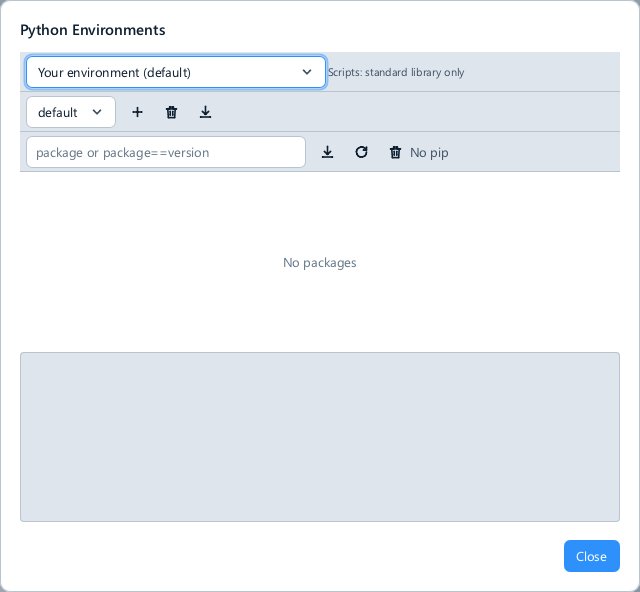
Under the choice, the dialog lists the environment's packages and installs (requests, or numpy==2.1 for a version), upgrades and uninstalls them, with pip's output shown as it runs. In the Standard edition the dialog says beside the choice that a document's own scripts import the standard library only.
Pure-Python packages only, for now. Whichever interpreter installs them, packages are imported by Methodox Office's own Python, SteelPython 3.12, inside the application, so scripts keep the object models. A package written in Python imports from any environment. A package with compiled extension modules, such as numpy, pandas or lxml, installs but does not import in Methodox Office yet. An environment made with another version of Python is marked, since its packages may not import.
For an environment Methodox Office made, pip runs in its own process, mos python, which is also Python on the command line; a virtual environment with its own interpreter runs pip with that:
mos python -V
mos python -c "print(2 ** 10)"
mos python script.py
mos python --env "%LOCALAPPDATA%\DivookaOffice\Python\environments\<name>" -m pip install requests
With --env, the environment is the installation: -m pip install installs into it and -m ensurepip puts pip there, as a virtual environment's own interpreter does.