
Working with Binary Data in Divooka
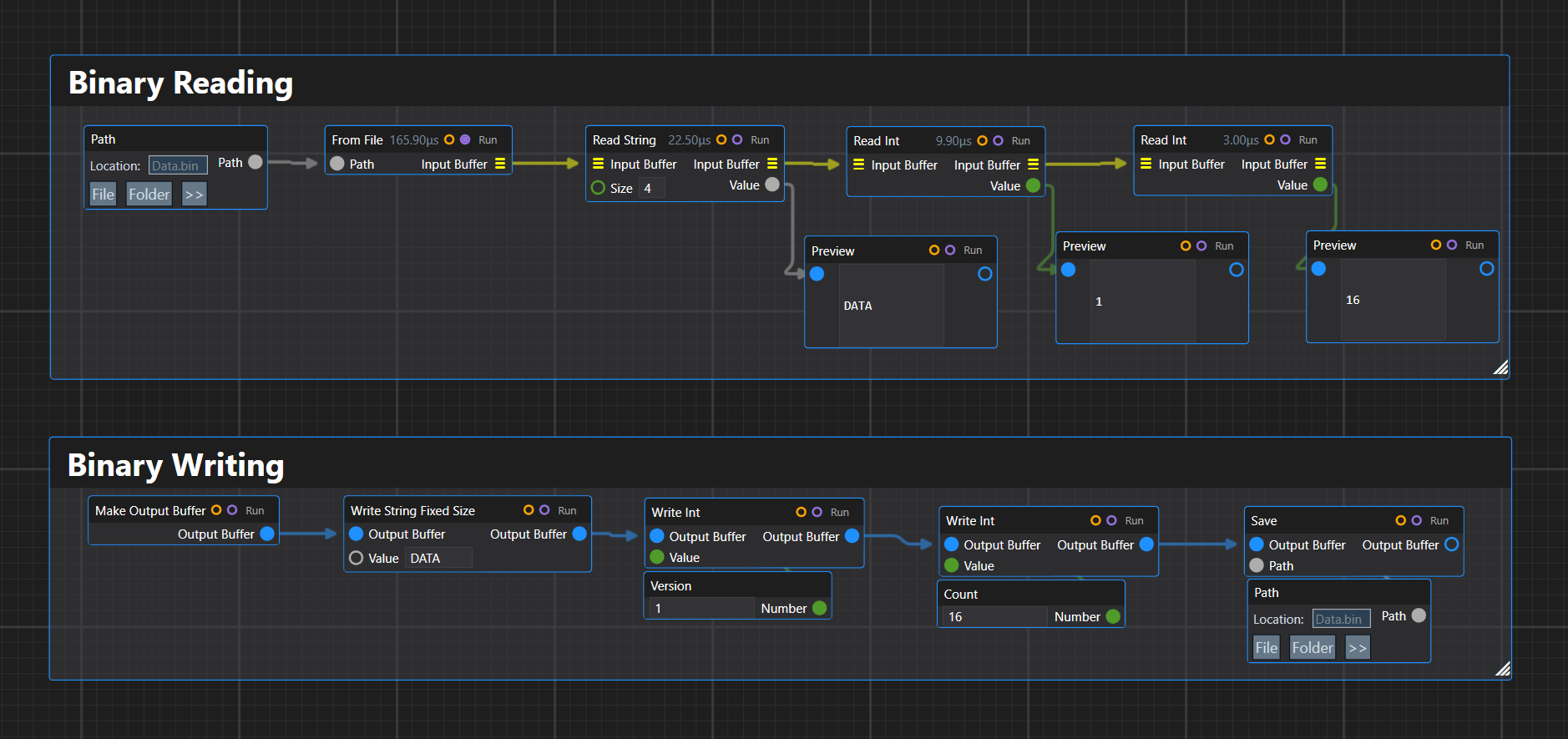
Binary formats are everywhere: images, meshes, save files, network packets, custom asset bundles, compressed streams, hardware protocols, game data, and old file formats that are still useful decades later.
Yet in application code, binary parsing often becomes messy very quickly. You start with a byte[], then an offset integer, then a few helper methods, then nested offset calculations, and soon the parser has two responsibilities at once: understanding the file format and manually managing where the cursor is.
The goal of ImmutableByteArray, ConstructiveByteArray, and ImmutableConstructiveByteArray is to move that cursor-management logic into a small fluent abstraction.
Instead of writing code like this:
int offset = 0;

string magic = Encoding.ASCII.GetString(bytes, offset, 4);
offset += 4;

int version = BinaryPrimitives.ReadInt32LittleEndian(bytes.AsSpan(offset, 4));
offset += 4;

int count = BinaryPrimitives.ReadInt32LittleEndian(bytes.AsSpan(offset, 4));
offset += 4;
we want this:
var remaining = ImmutableByteArray.FromFile("Data.bin")
    .ReadString(4, out string magic)
    .ReadInt(out int version)
    .ReadInt(out int count);
The parser reads like the binary format itself.
The writer mirrors that:
var data = new ConstructiveByteArray()
    .WriteStringFixedSize("DATA")
    .WriteInt(version)
    .WriteInt(count);
The idea is simple: binary data should be represented as a sequence of explicit read and write operations, not as scattered offset arithmetic.
Reading Binary Data
Reader: ImmutableByteArray
ImmutableByteArray is a reader-oriented abstraction over binary data.
It is immutable. Reading from it does not mutate the current object. Instead, read operations return the remaining unread portion of the buffer.
The main API shape is:
public ImmutableByteArray ReadInt(out int value);
public int ReadInt();
public int ReadIntWithOffset(int byteIndex);
These three forms cover three common use cases.
The out form is for fluent parsing:
var remaining = data
    .ReadString(4, out string magic)
    .ReadInt(out int width)
    .ReadInt(out int height);
The direct-return form is for reading a value from the start of a buffer when the remaining data is not needed:
int width = data.ReadInt();
The offset form is for random access without consuming anything:
int width = data.ReadIntWithOffset(4);
This gives the type a clear rule:
Sequential reads consume by returning a new remaining buffer. Offset reads do not consume.
Internally, ImmutableByteArray can safely use a private byte[] with an offset and length. External input should be copied at construction time, but internal slicing does not need to copy because the backing array is private and never exposed mutably.
That means this kind of operation is cheap:
var remaining = data.ReadBytes(32, out ImmutableByteArray header);
Both remaining and header can be views over the same internal byte array. Since neither object can mutate the backing storage, this remains safe.
Reading blocks
Binary formats often have fixed-size blocks. For example, a file might contain a 32-byte header, followed by 32 bytes of padding, followed by records.
The API shape for bytes is:
public ImmutableByteArray ReadBytes(int count, out ImmutableByteArray value);
public ImmutableByteArray ReadBytes(int count);
public ImmutableByteArray ReadBytesWithOffset(int byteIndex, int count);
public ImmutableByteArray ReadBytes(int count, out ImmutableByteArray value, Action<ImmutableByteArray> continuation);
The continuation form is useful when a sub-block should be parsed separately:
int versionNumber = 0;

var remaining = ImmutableByteArray.FromFile("MyData.bin")
    .ReadString(4, out string magic)
    .ReadBytes(32, out ImmutableByteArray _, header => header.ReadUInt(out versionNumber))
    .ReadBytes(32, out _)
    .ReadInt(out int count);
The main stream advances by 32 bytes, while the continuation reads from the isolated header block.
This is especially useful for formats where blocks have fixed sizes but only some fields inside the block are currently relevant.
Strings
Strings usually appear in binary formats in two common forms.
The first is fixed-size:
public ImmutableByteArray ReadString(int size, out string value);
public string ReadString(int size);
public string ReadStringWithOffset(int byteIndex, int size);
For example, a file magic value:
data.ReadString(4, out string magic);
The second is zero-terminated:
public ImmutableByteArray ReadString(out string value);
public string ReadString();
public string ReadStringWithOffset(int byteIndex);
This reads until the first 0x00 byte.
data.ReadString(out string name);
Fixed-size strings are common in headers. Zero-terminated strings are common in older binary formats, mesh files, embedded metadata, and C-style structures.
Writing Binary Data
Writer: ConstructiveByteArray
ConstructiveByteArray is the mutable writer.
It is a fluent append-only byte builder:
var current = new ConstructiveByteArray()
    .WriteStringFixedSize("CBA1")
    .WriteInt(1)
    .WriteDouble(3.14159);
It is mutable in-place. Each call appends bytes to the same underlying buffer and returns this.
This makes it the practical default for producing binary files.
The API deliberately uses explicit method names:
WriteInt(...)
WriteUInt(...)
WriteDouble(...)
WriteStringFixedSize(...)
WriteStringZeroTerminated(...)
WriteBytes(...)
This avoids the ambiguity of a single overloaded Write(...) method. In binary code, explicitness is usually worth the extra characters.
Immutable writer: ImmutableConstructiveByteArray
ImmutableConstructiveByteArray mirrors the writer API, but every write returns a new object.
var baseFile = new ImmutableConstructiveByteArray()
    .WriteStringFixedSize("TEST")
    .WriteInt(1);

var pathA = baseFile.WriteStringZeroTerminated("Variant A");
var pathB = baseFile.WriteStringZeroTerminated("Variant B");
This is useful when experimenting with different downstream write paths.
For example, you may have a common header, then several possible payload layouts:
var common = new ImmutableConstructiveByteArray()
    .WriteStringFixedSize("MESH")
    .WriteInt(version);

var triangleMesh = common
    .WriteStringZeroTerminated("triangles")
    .WriteInt(triangleCount);

var pointCloud = common
    .WriteStringZeroTerminated("points")
    .WriteInt(pointCount);
The mutable writer is faster and more memory efficient. The immutable writer is better for branching, testing, and functional construction patterns.
Writing fixed-size blocks
Writers also support fixed-size subblocks:
public ConstructiveByteArray WriteBytes(int count);
public ConstructiveByteArray WriteBytes(int count, Action<ConstructiveByteArray> subblock);
public ConstructiveByteArray WriteBytes(ConstructiveByteArray source);
For the mutable version:
int versionNumber = 1;
int count = 15;

ConstructiveByteArray current = new ConstructiveByteArray()
    .WriteStringFixedSize("CBA1")
    .WriteBytes(32, con => con.WriteUInt((uint)versionNumber))
    .WriteBytes(32)
    .WriteInt(count);

for (int i = 0; i < count; i++)
    current = current.WriteBytes(128);

current.Save("Copy1.bin");
current.Save("Copy2.bin");
current.Dispose();
The block continuation writes into a temporary sub-buffer. If it writes fewer than 32 bytes, the result is automatically padded with zeroes. If it writes more than 32 bytes, the writer should throw.
This makes fixed-size binary structures much easier to express.
The immutable version uses a functional continuation instead:
ImmutableConstructiveByteArray current = new ImmutableConstructiveByteArray()
    .WriteStringFixedSize("CBA1")
    .WriteBytes(32, con => con.WriteUInt((uint)versionNumber))
    .WriteBytes(32)
    .WriteInt(count);
Internally, that continuation should be shaped as:
Func<ImmutableConstructiveByteArray, ImmutableConstructiveByteArray>
because immutable writes return new objects.
Examples
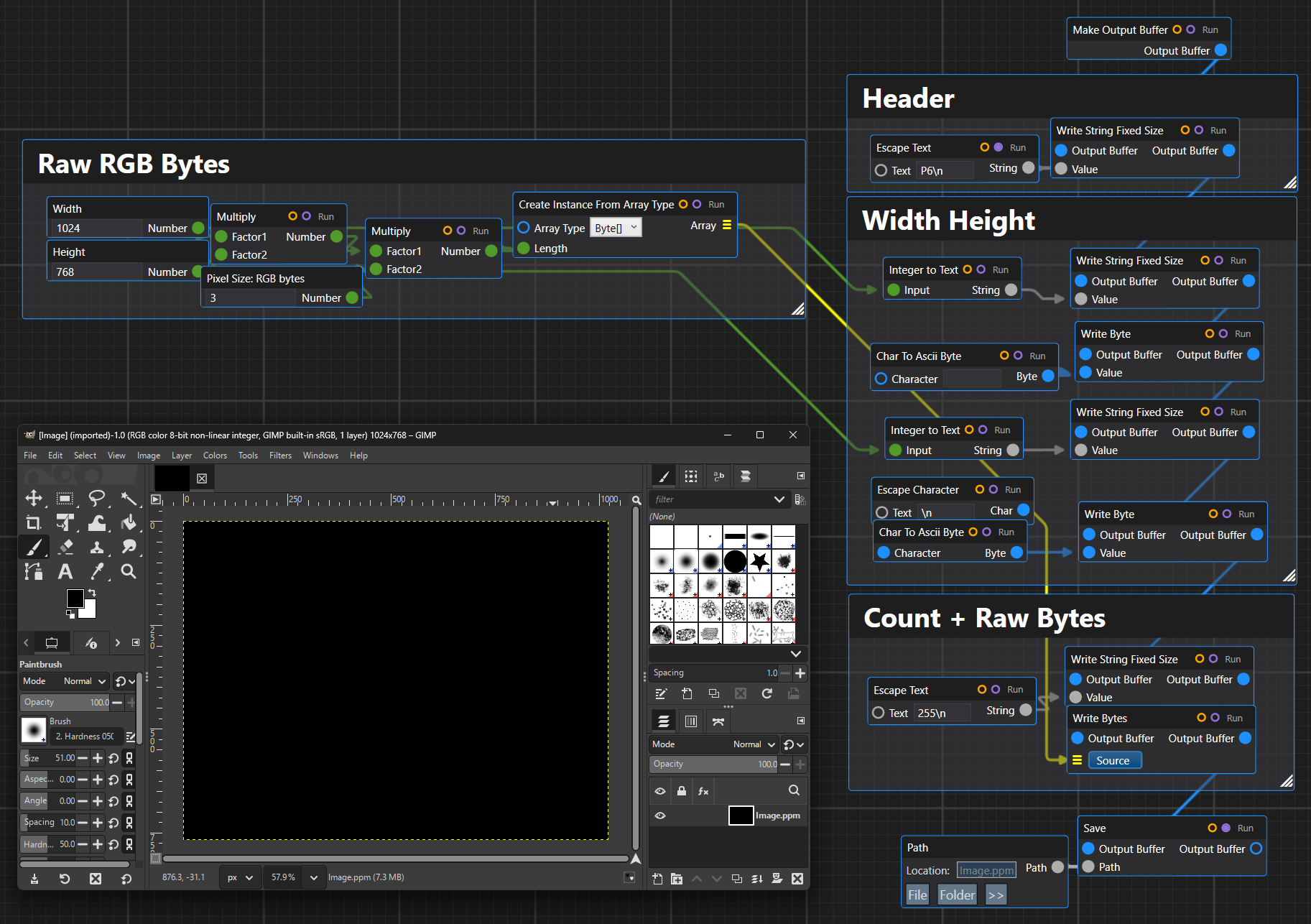
Example: reading a PPM image
PPM is a simple image format from the Netpbm family. It is useful as a teaching format because the structure is small and direct.
A binary PPM file normally starts with an ASCII header:
P6
width height
maxValue
followed by raw RGB pixel data.
For example:
P6
256 256
255
<binary RGB bytes>
The header is text, but the pixel payload is binary. This makes PPM a good example of mixed text and binary parsing.
A simple PPM reader might look like this:
public sealed class PpmImage
{
    public int Width { get; }
    public int Height { get; }
    public byte[] Pixels { get; }

    public PpmImage(int width, int height, byte[] pixels)
    {
        Width = width;
        Height = height;
        Pixels = pixels;
    }
}
Using ImmutableByteArray, a basic parser could be written as:
public static PpmImage ReadPpm(string path)
{
    ImmutableByteArray data = ImmutableByteArray.FromFile(path);

    data = ReadAsciiToken(data, out string magic);

    if (magic != "P6")
        throw new InvalidDataException("Only binary P6 PPM files are supported.");

    data = ReadAsciiToken(data, out string widthText);
    data = ReadAsciiToken(data, out string heightText);
    data = ReadAsciiToken(data, out string maxValueText);

    int width = int.Parse(widthText);
    int height = int.Parse(heightText);
    int maxValue = int.Parse(maxValueText);

    if (maxValue != 255)
        throw new InvalidDataException("Only 8-bit PPM files with max value 255 are supported.");

    int pixelByteCount = width * height * 3;

    data.ReadBytes(pixelByteCount, out ImmutableByteArray pixelData);

    return new PpmImage(width, height, pixelData.ToArray());
}
The helper token reader can be implemented as a small routine over the immutable buffer:
private static ImmutableByteArray ReadAsciiToken(ImmutableByteArray data, out string token)
{
    data = SkipAsciiWhitespace(data);

    int count = 0;

    while (count < data.Length && !IsAsciiWhitespace(data[count]))
        count++;

    token = Encoding.ASCII.GetString(data.AsSpan(0, count));
    return data.Skip(count);
}

private static ImmutableByteArray SkipAsciiWhitespace(ImmutableByteArray data)
{
    int count = 0;

    while (count < data.Length && IsAsciiWhitespace(data[count]))
        count++;

    return data.Skip(count);
}

private static bool IsAsciiWhitespace(byte value)
{
    return value == (byte)' ' || value == (byte)'\t' || value == (byte)'\r' || value == (byte)'\n';
}
The parser is not fighting offsets. Each helper receives a buffer and returns the remaining buffer.
That is the central pattern.
Example: writing a PPM image
Writing a binary PPM file is straightforward with ConstructiveByteArray.
public static void WritePpm(string path, int width, int height, ReadOnlySpan<byte> rgbPixels)
{
    int expectedLength = width * height * 3;

    if (rgbPixels.Length != expectedLength)
        throw new ArgumentException($"Expected {expectedLength} RGB byte(s).", nameof(rgbPixels));

    new ConstructiveByteArray()
        .WriteStringFixedSize("P6\n")
        .WriteStringFixedSize(width.ToString())
        .WriteByte((byte)' ')
        .WriteStringFixedSize(height.ToString())
        .WriteByte((byte)'\n')
        .WriteStringFixedSize("255\n")
        .WriteBytes(rgbPixels)
        .Save(path)
        .Dispose();
}
This writes:
P6
width height
255
then appends raw RGB bytes.
The string methods are still explicit. We are not pretending the whole file is text. We are building a binary byte sequence with some ASCII sections.
Example: reading a PLY polygon file
PLY is a common polygon mesh format. It can be ASCII or binary. A binary little-endian PLY file usually starts with an ASCII header, followed by binary vertex and face data.
A simplified binary PLY header might look like this:
ply
format binary_little_endian 1.0
element vertex 3
property float x
property float y
property float z
element face 1
property list uchar int vertex_indices
end_header
Then the binary body follows.
For that header, the body contains:
Three vertices, each with three 32-bit floats:
x y z
x y z
x y z
Then one face:
uchar count
int index0
int index1
int index2
A small model type:
public readonly record struct Vertex(float X, float Y, float Z);

public sealed class PlyMesh
{
    public List<Vertex> Vertices { get; } = new List<Vertex>();
    public List<int[]> Faces { get; } = new List<int[]>();
}
A simplified binary PLY reader:
public static PlyMesh ReadBinaryLittleEndianPly(string path)
{
    ImmutableByteArray data = ImmutableByteArray.FromFile(path, ByteArrayEndianness.LittleEndian, Encoding.ASCII);

    data = ReadPlyHeader(data, out int vertexCount, out int faceCount);

    var mesh = new PlyMesh();

    for (int i = 0; i < vertexCount; i++)
    {
        data = data
            .ReadFloat(out float x)
            .ReadFloat(out float y)
            .ReadFloat(out float z);

        mesh.Vertices.Add(new Vertex(x, y, z));
    }

    for (int i = 0; i < faceCount; i++)
    {
        data = data.ReadByte(out byte indexCount);

        int[] indices = new int[indexCount];

        for (int j = 0; j < indexCount; j++)
            data = data.ReadInt(out indices[j]);

        mesh.Faces.Add(indices);
    }

    return mesh;
}
The header reader can remain text-oriented:
private static ImmutableByteArray ReadPlyHeader(ImmutableByteArray data, out int vertexCount, out int faceCount)
{
    vertexCount = 0;
    faceCount = 0;

    var lines = new List<string>();

    while (true)
    {
        data = ReadAsciiLine(data, out string line);
        lines.Add(line);

        if (line == "end_header")
            break;
    }

    foreach (string line in lines)
    {
        string[] parts = line.Split(' ', StringSplitOptions.RemoveEmptyEntries);

        if (parts.Length == 3 && parts[0] == "element" && parts[1] == "vertex")
            vertexCount = int.Parse(parts[2]);

        if (parts.Length == 3 && parts[0] == "element" && parts[1] == "face")
            faceCount = int.Parse(parts[2]);
    }

    return data;
}

private static ImmutableByteArray ReadAsciiLine(ImmutableByteArray data, out string line)
{
    int count = 0;

    while (count < data.Length && data[count] != (byte)'\n')
        count++;

    line = Encoding.ASCII.GetString(data.AsSpan(0, count)).TrimEnd('\r');

    if (count < data.Length)
        count++;

    return data.Skip(count);
}
Again, the binary body parser is clean because the cursor is implicit in the returned ImmutableByteArray.
Example: writing a binary PLY file
Writing a simple triangle mesh to binary little-endian PLY:
public static void WriteBinaryLittleEndianPly(string path, IReadOnlyList<Vertex> vertices, IReadOnlyList<int[]> faces)
{
    var current = new ConstructiveByteArray(ByteArrayEndianness.LittleEndian, Encoding.ASCII)
        .WriteStringFixedSize("ply\n")
        .WriteStringFixedSize("format binary_little_endian 1.0\n")
        .WriteStringFixedSize($"element vertex {vertices.Count}\n")
        .WriteStringFixedSize("property float x\n")
        .WriteStringFixedSize("property float y\n")
        .WriteStringFixedSize("property float z\n")
        .WriteStringFixedSize($"element face {faces.Count}\n")
        .WriteStringFixedSize("property list uchar int vertex_indices\n")
        .WriteStringFixedSize("end_header\n");

    foreach (Vertex vertex in vertices)
    {
        current = current
            .WriteFloat(vertex.X)
            .WriteFloat(vertex.Y)
            .WriteFloat(vertex.Z);
    }

    foreach (int[] face in faces)
    {
        if (face.Length > byte.MaxValue)
            throw new InvalidDataException("PLY face has too many indices for uchar list count.");

        current = current.WriteByte((byte)face.Length);

        for (int i = 0; i < face.Length; i++)
            current = current.WriteInt(face[i]);
    }

    current.Save(path);
    current.Dispose();
}
A triangle can then be written like this:
var vertices = new[]
{
    new Vertex(0, 0, 0),
    new Vertex(1, 0, 0),
    new Vertex(0, 1, 0),
};

var faces = new[]
{
    new[] { 0, 1, 2 },
};

WriteBinaryLittleEndianPly("Triangle.ply", vertices, faces);
The code reads as a sequence of format fields, not as a set of array mutations.
Procedural vs Dataflow Construction
There are two writer types because they solve different problems.
ConstructiveByteArray is for ordinary construction. It is mutable, append-only, efficient, and can be saved multiple times.
var data = new ConstructiveByteArray()
    .WriteStringFixedSize("FILE")
    .WriteInt(1);

data.Save("A.bin");
data.Save("B.bin");
data.Dispose();
ImmutableConstructiveByteArray is for branching construction.
var common = new ImmutableConstructiveByteArray()
    .WriteStringFixedSize("FILE")
    .WriteInt(1);

var a = common.WriteStringZeroTerminated("A");
var b = common.WriteStringZeroTerminated("B");
The immutable writer is not meant to replace the mutable one for high-throughput output. It exists for safety, experimentation, and forkable construction.