
Examples
Divooka Explore ships a library of example documents - games, charts, terrains, sound, 3D models, data reports and more - sorted into categories. You never edit a shipped example: you open a copy of it wherever you like, and change the copy as much as you want.
Finding one
- On the start screen, Start from an example shows four. Shuffle draws another four; click a card to open a copy of that one.
- New from examples shows them all. Open it with Browse all on the start screen, Examples on the start screen's rail, or
Ctrl+Shift+E(Ctrl+Shift+Hdoes the same).
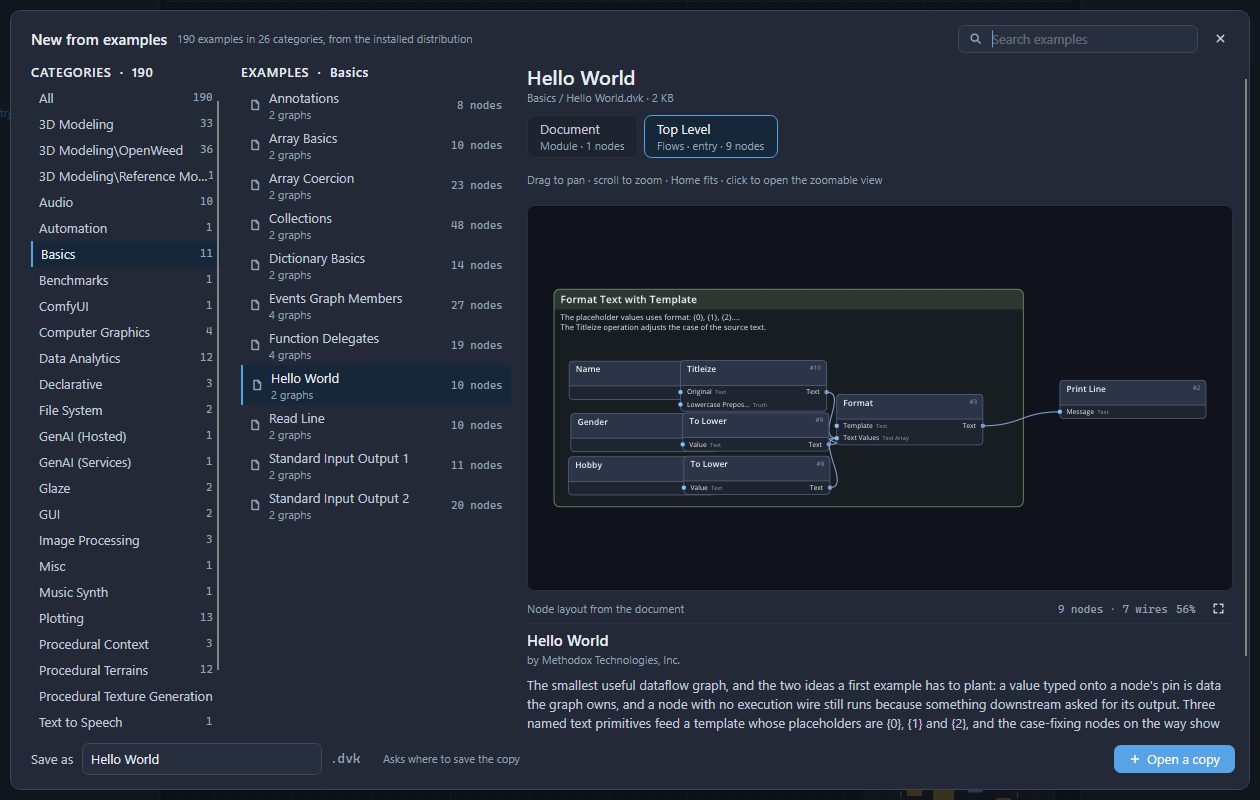
The categories are on the left - hover over one for what it holds - and the examples of the chosen category in the middle, with how many graphs and nodes each has. The keyboard starts in Search examples: type to find one by name. The examples and their categories are named in the language chosen in Appearance and settings. The right half describes the selected example: its title, author and description, and a picture of its graph drawn from the document itself. Drag the picture to pan it and scroll to zoom; when an example has several graphs, the list above the picture switches between them.
Basics is the place to start: values and nodes, arrays and collections, functions passed around as values, notes and drawings, and programs that read what you type.
Opening a copy
The Save as box at the bottom holds the name the copy will have - the example's own, unless you type another. Press Open a copy. A save dialog asks where the copy should live, suggesting a Divooka folder in your Documents. Save, and the copy opens; the status bar reads Opened a copy of Hello World. The copy is an ordinary document: run it with F5, change it, and save it with Ctrl+S.
Before running some of them
Most examples run as they are. A few reach outside Divooka Explore, and each says so in its description:
| Category | What it needs |
|---|---|
| Automation | It moves the real mouse pointer and presses keys in other programs until you press Esc. Read its notes first. |
| ComfyUI | ComfyUI already running on your machine. |
| GenAI (Hosted) | A language model available locally. |
| GenAI (Services) | An API key for a paid online service, which it calls. |
Examples with windows - games in Glaze, applications in GUI, the Visual Novel games - open a window of their own when they run; close it to end the run.