
Automation and the Programming Model
Impulse, Formula and Expo share one way of putting code in a document and running it, whichever application and whichever language. This page is the overview; the pages under it are the detail.
- Scripts - the Scripts pane, the object models of the three applications, and running a script from the command line.
- Divooka graphs - visual programs as Functions, Commands and event handlers, and the graph editor.
- Worksheet Functions - Formula functions of your own:
=LUA.NAME(),=CS.NAME()and=DVK.NAME(). - Smart objects - text, tables and pictures in an Impulse document whose content comes from a workbook, an expression or a graph.
- Command line and conversion -
mos, the LibreOffice-compatible switches, and converting documents without a window.
Commands, Functions and event handlers
Every piece of code in a document plays one of three parts.
- A Command changes the document when somebody runs it: a script run from the Scripts pane or the command line, or one of the applications' own menu commands called by name from a script. A Command runs as one transaction: everything it changes is one step in Edit ▸ Undo, and if it fails, everything it changed is rolled back.
- A Function computes a value from its inputs and changes nothing. The application decides when to run it: a worksheet function when the cells it reads change, a smart object when the document is refreshed. Because a Function cannot change the document, recalculating or refreshing it is always safe and gives the same answer for the same inputs.
- An event handler is a Command the document runs when something happens to it: opened, saved, a range changed, the workbook calculated, a parameter changed, smart objects refreshed, a slide show started, advanced or ended. Each handler runs as one transaction; an event its own changes cause is not delivered back to it, undo and redo raise none, and a flood of more than 64 events in a second pauses the handlers. Event handlers are written as Divooka graphs.
Smart objects are Functions, not macros: an Impulse smart object is to a document what a formula is to a cell. Formula's SQL.VIEW, which keeps the answer to an SQL query up to date in the grid, is a Function in the same sense.
Data-source Functions are Functions that fetch from the network or read a file. They fetch only when you ask - Data ▸ Refresh Data in Formula, References ▸ Refresh All in Impulse, or a Command - and keep what they fetched in the document, so between refreshes, and in a document opened offline, they answer from the last refresh. A function becomes one by using a fetching node in a graph, or by fetching from a script.
Languages
| Language | Files | Runs |
|---|---|---|
| Lua | .lua |
In a sandbox: no file or process access of its own (io and os.execute are not there); files and the network are reached only through the host. |
| C# | .csx |
Compiled when it runs, against the same object model, with its types checked. |
| Divooka graphs | .dvj, the text form of a Divooka .dvk |
Function graphs, Routines and Events graphs, run by Divooka's No-Reflection Interpreter; see Divooka graphs. |
The object models are the same in Lua and C#: app, doc and session in Lua, App, Doc and Session in C#, with lowerCamel names in Lua (doc.sheets) and PascalCase in C# (Doc.Sheets). Positions are counted from 1 in both. See Scripts.
Where code is kept
Documents carrying code keep their usual extensions, .docx, .xlsx and .pptx; there is no separate macro-enabled format. A workbook's worksheet functions and a document's smart objects are stored inside the file, in a custom XML part Office keeps (see file formats).
Every script and graph is stored inside the document too, with the document's parameters and the data its data-source Functions last fetched: Save in the Scripts pane keeps an edit in the document as an undoable change (written to disk with File ▸ Save), Export writes a plain copy beside it, and a scripts folder beside the document from an earlier release (Report.scripts\) is taken into the document when it opens.
Document Parameters
Functions cannot change the document, so values that several of them share - a principal, a city, a region, a rate - live in Document Parameters: a table of named values, each a number, text, a logical value or a date, stored in the document. Tools ▸ Parameters, in Impulse, Formula and Expo, edits them; a Command may also set them, as part of its undoable transaction.
Functions and smart objects read parameters and never write them:
| Where | Reads a parameter as |
|---|---|
| Formula | =PARAM("Region") |
| Lua | param.Region |
| C# | Param["Region"] |
| Divooka graph | a Parameter node |
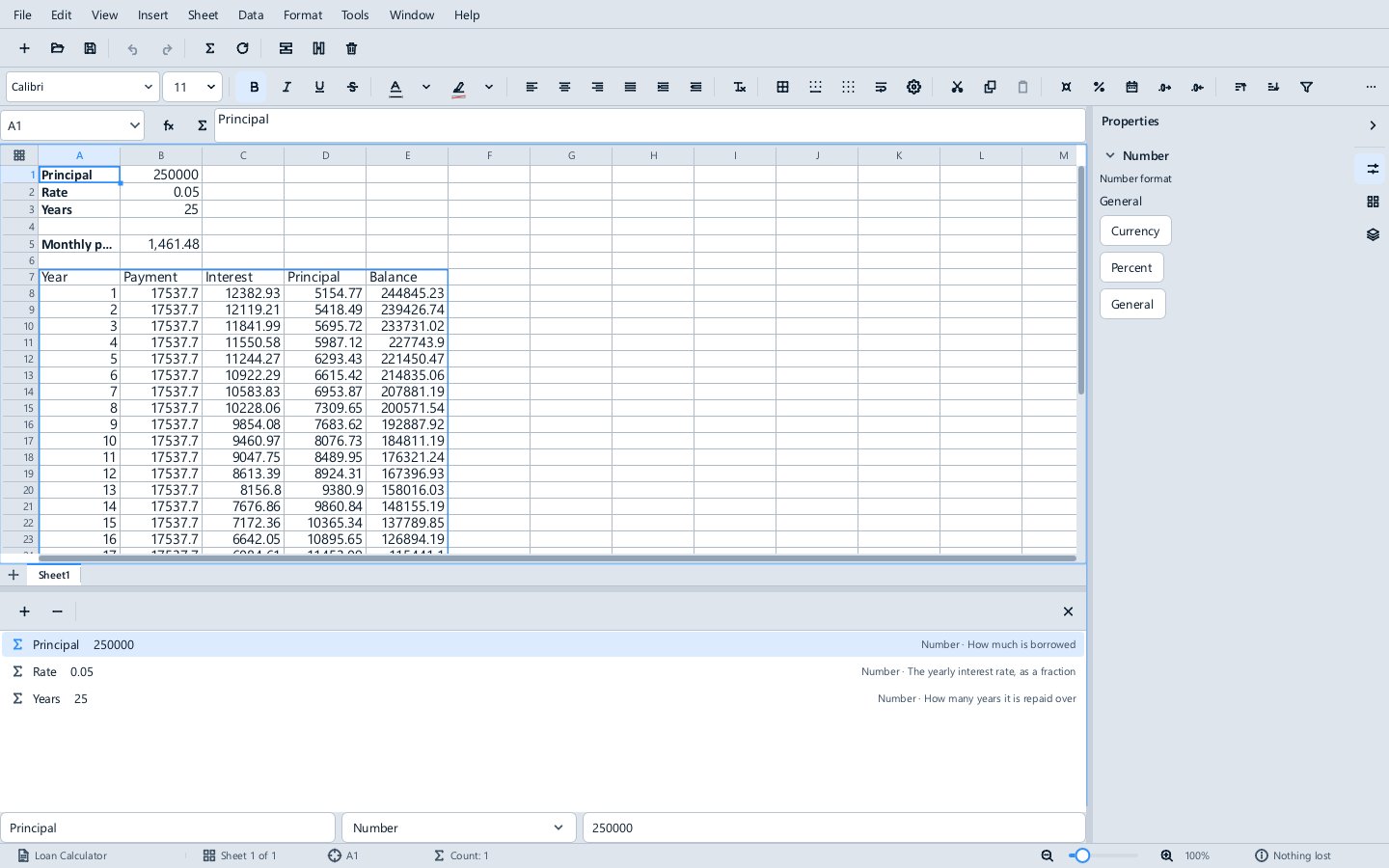
Every read is recorded, so changing a parameter recalculates exactly the cells and refreshes exactly the smart objects that read it, as one undo step with the change. =PARAM() answers as soon as the document opens, before anything is enabled, because a parameter is data, not code.
Trust
Opening a document never runs its code. A document carrying code opens with a bar over it reading Scripts disabled and an Enable button; hovering over the bar lists the code the document carries. Until it is enabled, its worksheet functions show #NAME? and its Lua, C# and graph smart objects do not refresh; smart objects that read a workbook are data, not code, and refresh either way.
Trust is remembered. Each person has a trust store, trust.json in Methodox Office's settings folder, which records each document they enabled against a hash of everything in it that runs. Opening the same document again needs no second yes; changing one character of its code, in Methodox Office or anywhere else, asks again. Parameters and fetched data are not code and do not count.
Granted access
In the Standard edition, a document's code reaches the network and files only through the host, and only where the person allowed it:
| Language | Calls |
|---|---|
| Lua | host.get(url), host.getJson(url), host.getImage(url), host.readText(path), host.url(...) |
| C# | Host.Get, Host.GetJson, Host.GetImage, Host.ReadText, Host.Url |
| Divooka graph | HTTP Get, HTTP Get Bytes and Read Text File nodes |
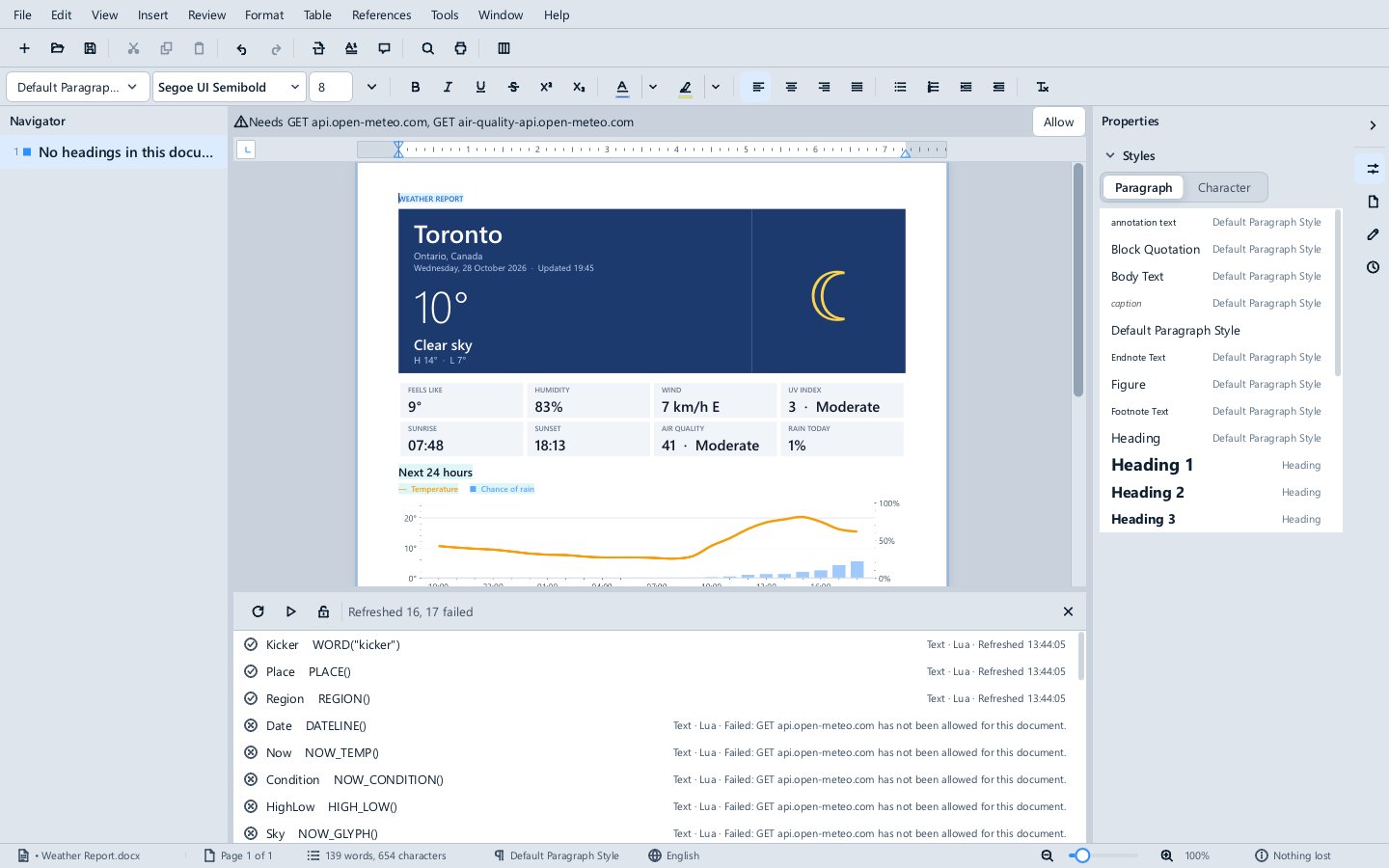
When code asks for something it has not been granted, the bar says what, such as Needs GET api.open-meteo.com, with an Allow button. Each website and each file is allowed per document and remembered in the trust store against the document's code hash, like enabling.
Two editions
What a document's graphs may run is set by the edition of Methodox Office, chosen when the suite is built; the standard installer is the Standard edition, and the Compute edition's installer and folder are named MethodoxOffice_Compute_...:
- Methodox Office (Standard) runs Lua, C#, and graphs made of the audited Office nodes and the Divooka standard library's pure routines (numbers, text, dates, lists, dictionaries and the like). Network and file access exist only as the host's granted calls above.
- Methodox Office + Divooka Compute also runs graphs using any Divooka package installed beside it, in full trust once the person trusts the document, for automation that needs the whole Divooka ecosystem.
A graph that uses a node its edition does not allow is refused before anything runs, and the message names the graph and the node.
SQL
Formula's SQL Workbench and SQL.VIEW query a workbook's tables, named ranges and sheets with SQLite's SQL, read-only. A .NET program hosting the engine reaches the same layer through WorkbookSql.Query(workbook, sql) in the Divooka.Office.Calc.Sql package. Lua and C# scripts do not have it in their object model yet.
Without a window
Every application runs scripts, converts documents and prints to PDF from the command line without opening a window, and mos does all of it for the whole suite. See Command line and conversion.
Examples
The suite's Examples\Automation folder has the scripts and documents used on these pages: the sample scripts, the smart report bound to a budget workbook, a loan calculator and loan letter driven by graphs and parameters, a workbook with event handlers, the graph editor's workbook, and the two showcase documents, the Weather Report and the Market Dashboard. See Examples.