
The Dhole Language
Every kind of Dhole diagram is written the same way: the same thing is said with the same words, whatever is being drawn. This page is everything the kinds share; each kind's page adds what is its own.
Four rules behind the rest
- It reads as a description of its picture. Shapes and colours are named in words -
[database],[green]- and a setting is a word, a colon and a value:direction: right. - It forgives. A line Dhole cannot read is left out and said - its line, its column, what is wrong and what to write instead - and everything else is drawn. A misspelt word is answered with the word it was probably meant to be.
- It is consistent. A thing is made where it is first named, a label follows a colon, attributes are in brackets after what they belong to, and a line indented under another belongs to it - in every kind.
- It is the same everywhere. The same text draws the same picture on every machine, in every language and on every day.
The first line
The first line that is not blank or a comment names what to draw, and whatever follows the kind's word is the title.
pie Where the day goes
A colon after the kind's word is allowed (gantt: Launch). The words are matched ignoring case, spaces, hyphens and underscores, so Mind Map, mind-map and mindmap are one kind. A kind can be written two words - state machine, pie chart, class diagram - and is read as one.
| Kind | Its word | Also |
|---|---|---|
| Flowchart | flowchart |
flow, graph, flowchart-v2 |
| Sequence diagram | sequence |
sequence diagram, seq |
| State diagram | state |
states, state diagram, state machine, stateDiagram-v2 |
| Class diagram | class |
classes, class diagram, uml |
| Entity diagram | entity |
entities, er, er diagram, entity relationship, database, schema |
| Mind map | mindmap |
mind map, mind, tree |
| Timeline | timeline |
history, milestones |
| Gantt chart | gantt |
schedule, plan, gantt chart |
| Pie chart | pie |
pie chart, and donut, doughnut or ring for a pie with a hole |
| Bar chart | bar |
bars, bar chart, column, columns, column chart |
| Line chart | line |
lines, line chart, line plot |
| Scatter chart | xy |
scatter, xy chart, scatter plot, points |
| Radar chart | radar |
radar chart, spider, web |
| Quadrant chart | quadrant |
quadrant chart, matrix, quadrants |
| Sankey diagram | sankey |
sankey-beta, flows |
| Table | table |
grid |
| Board | kanban |
board, kanban board |
A first word that is not a kind but is a slip for one - a letter or two away - is drawn as that kind, and said. One that is nothing like a kind is said, and that diagram is not drawn.
Lines, comments and indentation
- A line whose first character is
#is a comment. Comments and blank lines may stand anywhere. - A line indented under another belongs to it: a step to its group, a member to its class, a branch to the idea it grows from, a card to its column, a message to its block. Indentation is read as nesting, not measured: a line belongs to the nearest line above it that is indented less, however many spaces apart they are.
- A tab counts to the next multiple of four columns. A line indented with tabs and spaces together is read, and warned of.
- A line indented under a line that cannot hold anything - a setting, a single step - is read as if it were not indented, and warned of.
Settings
A line at the top of a diagram that is a setting's name, a colon and a value is a setting; every other line is the diagram's content. Settings are matched as kinds are - case, spaces and hyphens set aside - and each answers to a few names, so direction: LR and rankdir: LR are one setting. A setting written twice takes its later value, and is warned of.
Every kind takes these:
| Setting | Also | Value |
|---|---|---|
title |
the figure's title; the words after the kind on the first line are the same | |
subtitle |
a line under the title | |
caption |
source, note |
a line under the figure |
theme |
style, look |
one of the themes; light when none is given |
font |
typeface, face |
a font family's name, for every word in the figure |
size |
the figure's width and height in pixels: 800 x 600, 800x600, 800 by 600 |
Names and labels
A thing - a step, a state, a participant, a slice - is made where it is first named, and named again it is the same thing. Names are matched ignoring case and runs of spaces, so Order food and order food are one step, which keeps the spelling of its first mention.
A name can hold any character except the ones that mean something on its line - an arrow, a colon followed by a space, a bracket. A name that needs one goes in quotation marks, straight or curly: "A -> B" -> C. Inside them, \" is a quotation mark and \\ a backslash.
In the diagrams of boxes and lines, a short name can be given a longer label on a line of its own, so arrows stay short to write:
flowchart
pay: Pay at the till
cart -> pay
The colon
A line is cut at its first colon followed by a space, or at a colon that ends the line, or at a full-width colon :; a line with none of those is cut at its first colon of any kind. So a time of day keeps its colons - 09:00: Gates open is the time 09:00 - and Start->End:yes still has its label. What comes before the colon is what the line is about; what comes after is its label, its value or its data.
Attributes
Words in square brackets after a thing are its attributes, apart by commas: Enjoy [end, good]. What a word can be depends on what it belongs to - shapes are a flowchart's, a key is an entity's - and is listed on each kind's page. Colours and roles belong to every kind.
A word that is none of them is warned of, with the word it was probably meant to be when one is near - 'rond' is not something a step can be. Write 'round' if that is what you mean. - or else with every word it can be. A bracket that is not closed is said, and its words are still read.
Colours and roles
| Word | Also | Means |
|---|---|---|
blue |
blue | |
orange |
orange | |
green |
green | |
yellow |
amber, gold |
yellow |
pink |
magenta |
pink |
purple |
violet |
purple |
red |
red | |
teal |
cyan |
teal |
grey |
gray |
the theme's quiet ink |
accent |
highlight, primary |
the theme's own first colour |
good |
ok, success, done, yes |
green |
bad |
error, fail, failure, danger, no |
red |
warn |
warning, caution |
yellow |
muted |
quiet, faded, disabled, inactive |
a box or a line drawn in the theme's quiet ink |
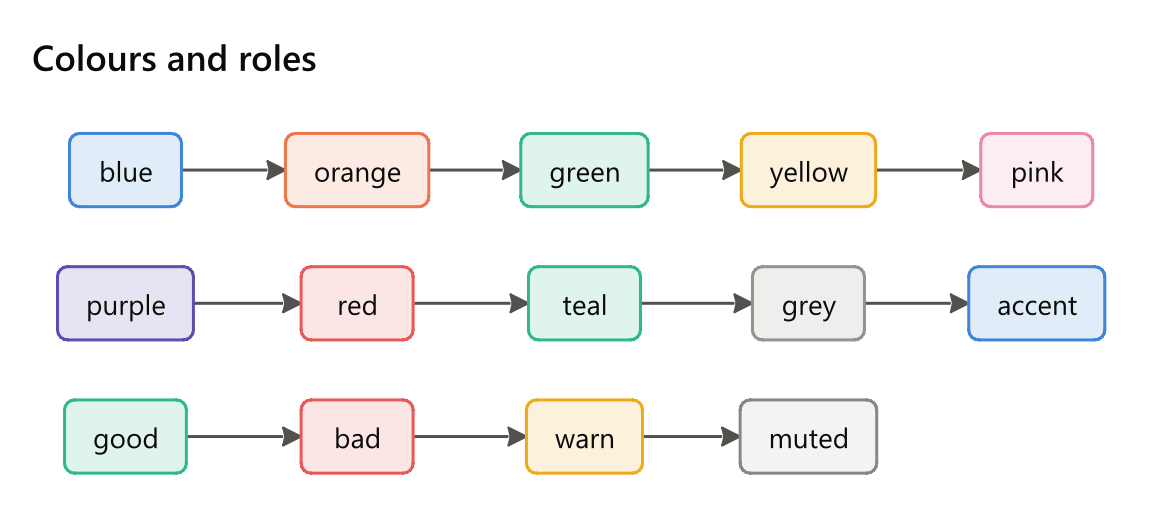
A colour is not a fixed value: it is the colour of the theme's palette nearest that hue, so a diagram drawn in another theme keeps its meaning in that theme's colours. Where a palette has no colour near a hue, the nearest it has is used - in the light theme, teal is its green. A role says what a thing means rather than what it looks like, which is usually the better thing to write.
Values
| Value | Written |
|---|---|
| Number | 12, -3.5, 1_000_000, 1e6 - a dot for decimals in every language; underscores between digits are ignored |
| Percentage | 40%, where a share is meant |
| Range | 0..100, 0 to 100, 0 – 100, 0~100 |
| Date | 2026-11-02, 2026-11-02 14:30, 2026/11/02, 2026-11, 2026 |
| Length of time | 3d, 2w, 4h, 30min, 1d 4h, 1.5 days |
| Switch | on, yes, true, show, or off, no, false, hide, none |
| Direction | down, right, up, left; also TD, TB, top down, vertical, LR, left to right, horizontal, across, BT, bottom up, RL, right to left |
| Size | 800 x 600, in pixels |
| List | items apart by commas: North, South, East |
Arrows
Flowcharts, state, class and entity diagrams and sequence diagrams join two things with an arrow written between their names. A line can chain several - A -> B -> C - and a label after the colon belongs to the last arrow on the line.
| Arrow | Draws |
|---|---|
-> |
a line with an arrowhead |
-->, ..> |
a dashed line with an arrowhead |
=>, ==> |
a thick line with an arrowhead |
->>, -->> |
as -> and --> |
<-, <--, <.. |
an arrow pointing back at the first name: B <- A is A -> B |
<->, <-->, <=> |
an arrowhead at both ends |
--, --- |
a line with no head |
.. |
a dashed line with no head |
== |
a thick line with no head |
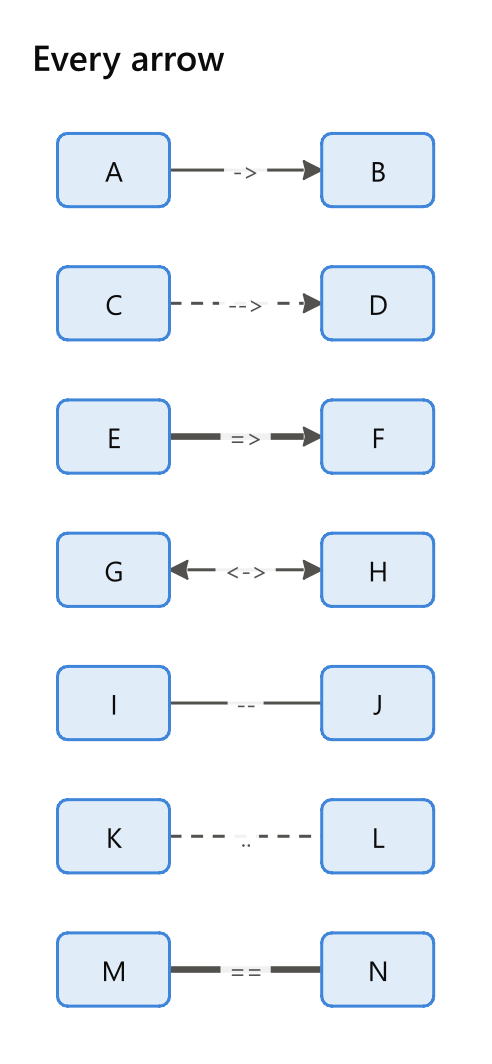
The arrows that could be part of a name - --, ---, .., == - are arrows only with a space on each side, so well-known -- trusted joins two names and well--known is one name. The others need no spaces: A->B is an arrow. Class diagrams add UML's ends and entity diagrams their counts - see Class diagrams and Entity diagrams.
A word drawn like an arrow that the kind has not got - -.->, --x, ~~~ - is said with the arrows the kind has, and its line is left out rather than read as boxes named after its pieces.
Several diagrams in one text
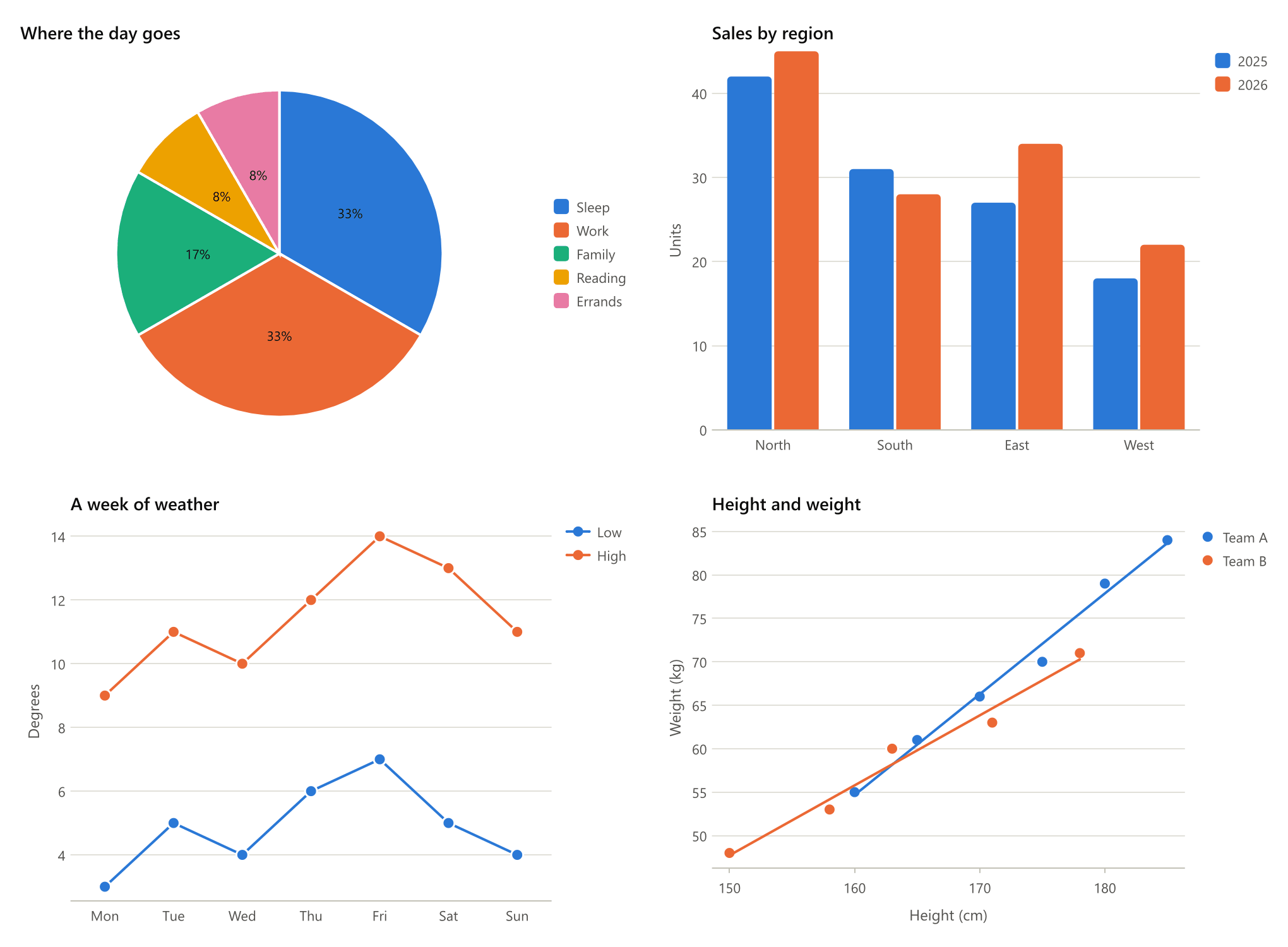
A line of three or more dashes and nothing else ends one diagram and starts the next. Each diagram has its own first line, and they are drawn side by side - two to a row up to four diagrams, three to a row after that - each with its own title, the figure taking the first one's theme, subtitle and caption.
pie Where the day goes
Sleep: 8
Work: 8
Family: 4
Reading: 2
Errands: 2
---
bar Sales by region
labels: North, South, East, West
y axis: Units
2025: 42, 31, 27, 18
2026: 45, 28, 34, 22
---
line A week of weather
labels: Mon, Tue, Wed, Thu, Fri, Sat, Sun
y axis: Degrees
points: on
Low: 3, 5, 4, 6, 7, 5, 4
High: 9, 11, 10, 12, 14, 13, 11
---
xy Height and weight
x axis: Height (cm)
y axis: Weight (kg)
trend: on
Team A: (160, 55), (165, 61), (170, 66), (175, 70), (180, 79), (185, 84)
Team B: (150, 48), (158, 53), (163, 60), (171, 63), (178, 71)
Themes
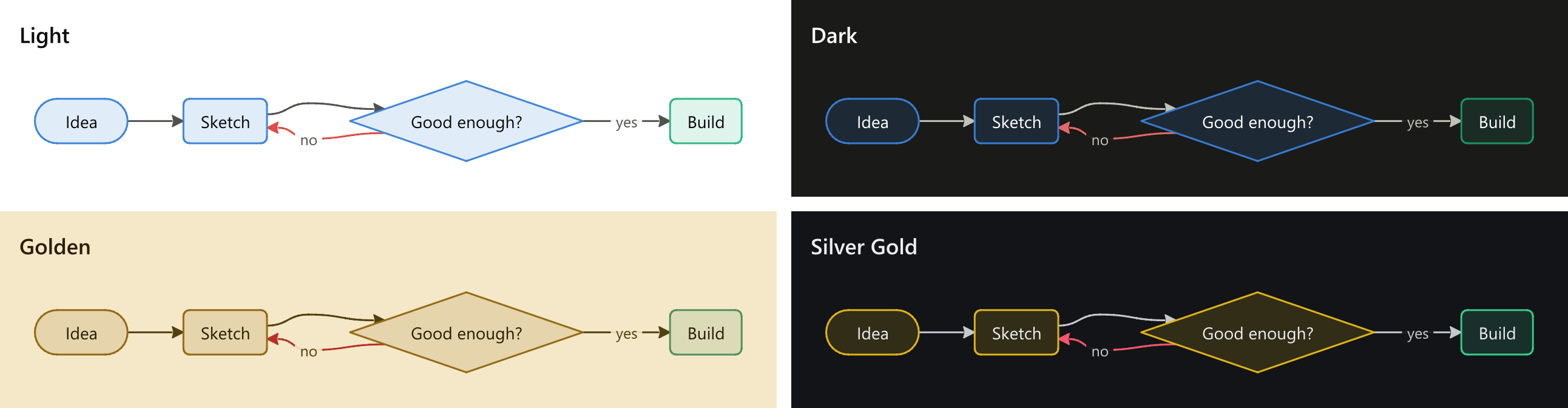
theme: takes any of the plotting framework's themes - light (the default), dark, presentation, minimal, classic, print - or one of the four read off Divooka Compute's palettes: golden, quiet gold, silver gold and high contrast, which wear the editor's own grounds, inks and colours. Nothing in a drawn diagram is a fixed colour, so the plotting framework's Set Theme recolours a Dhole diagram after it is drawn, as it recolours any chart.
The words of the language
The words Dhole reads - flowchart, direction, note, after - are English in every language, as a programming language's keywords are; what a diagram says is in any language, and Chinese, or any script the machine's fonts cover, is drawn as written. What Dhole says about a text is in the reader's language: Write Dhole's card lists problems in the editor's language, and Draw Dhole's Problems output is English, which reads the same on every machine.