
Hosting
In Divooka Compute
Run on a notebook document serves it on 127.0.0.1 - this machine only - at a free port, and opens it in your browser. It runs interpreted, the way Compute runs every document, so you can change the graph and run again. Stop ends it.
dvn
dvn hosts a notebook. It ships with Divooka Compute, beside stew, and opens and runs a document exactly as Compute does - compiled by default, since a hosted notebook is the finished thing.
dvn <document.dvk> [address:port] [options]
| Option | Meaning |
|---|---|
address:port |
Where to answer. 127.0.0.1:5080 by default. |
--interpreted |
Run the document as Compute does, instead of compiled. |
--read-only |
Serve every page read-only. |
--open |
Open the site in this machine's browser once it is serving. |
--sequential |
Compute one visitor's change at a time across the whole site. |
--check |
Visit every page, run every cell once, print what each answered, and stop. |
--help |
Show the options. |
Ctrl+C stops the site.
Serving a local network
dvn "Crop Yield Notebook.dvk" 0.0.0.0:5080
0.0.0.0 answers on every network the machine is on. dvn prints the addresses it answers on, this machine's network address among them - that is the address colleagues type. Your firewall may ask whether to allow it.
A notebook has no sign-in. Serve it on a network you trust, and only what you would show everyone on it.
Many visitors
Every visitor gets an instance of the document of their own, and visitors' changes are computed in parallel. If a function is not safe to run for two visitors at once - it writes one shared file, say - serve with --sequential, and each visitor's change waits for the others.
A visitor's session ends when their page closes, or after 30 minutes without a change; its uploaded and produced files are deleted with it.
Checking a notebook
dvn "Crop Yield Notebook.dvk" --check
The check serves the notebook on this machine, visits each page as a browser would, runs each cell once from its starting value, prints a line for each cell saying what it answered, and stops. It exits with an error if any cell failed. It is how Divooka's own examples are checked, and a quick way to see a notebook works after changing it.
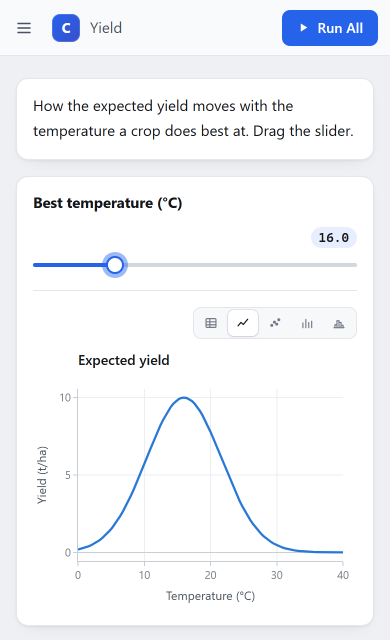
[Yield]
  (static): markdown "How the expected yield moves with the temperature a crop does best at. Drag the slider."
  Best temperature (°C): chart line "Expected yield": Expected yield (101 points, 0.001..10)
[Notes]
  (static): markdown "Each visitor has the notebook to themselves: moving the slider redraws that visitor's chart and nobody else's."