
Charts
Pie, bar, line, scatter and radar charts are the plotting framework's own charts, written as text: each line of data is a name, a colon and its numbers. Several of them - or any other Dhole diagrams - go in one text with a line of three dashes between them, as on the language page.
Numbers are written with a dot for decimals in every language, apart by commas or by spaces. A line of a chart whose name is a slip for a setting's and whose value has no number in it - titel: Sales - is said to be a misspelt setting rather than read as data.
Pie and donut charts
pie Where the day goes
Sleep: 8
Work: 8
Family: 4
Reading: 2
Errands: 2
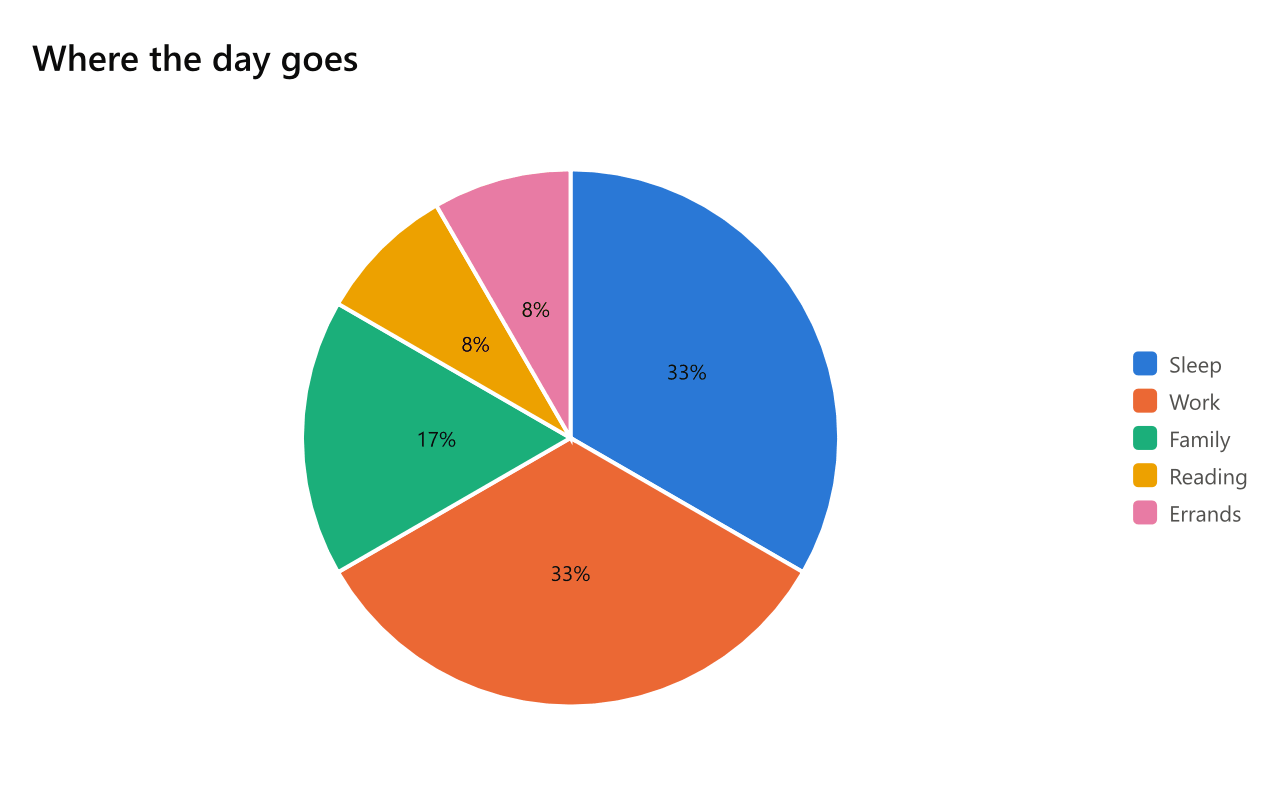
Each line is a slice: a name, a colon and how much. Mermaid's "Name" : 30 and the first Dhole's Slice: Name, 30 are read too. A slice that is not above zero has none, and is warned of.
| Setting | Also | Value |
|---|---|---|
hole |
donut |
on, off, or how much of the pie the hole takes: 0.5, 50% |
labels |
show, slices |
what each slice says: percent (the default), value, name, name and percent, none |
order |
sort |
size, the largest first (the default), or written |
centre |
center, middle, total |
words in the hole |
donut, doughnut or ring in place of pie starts with a hole:
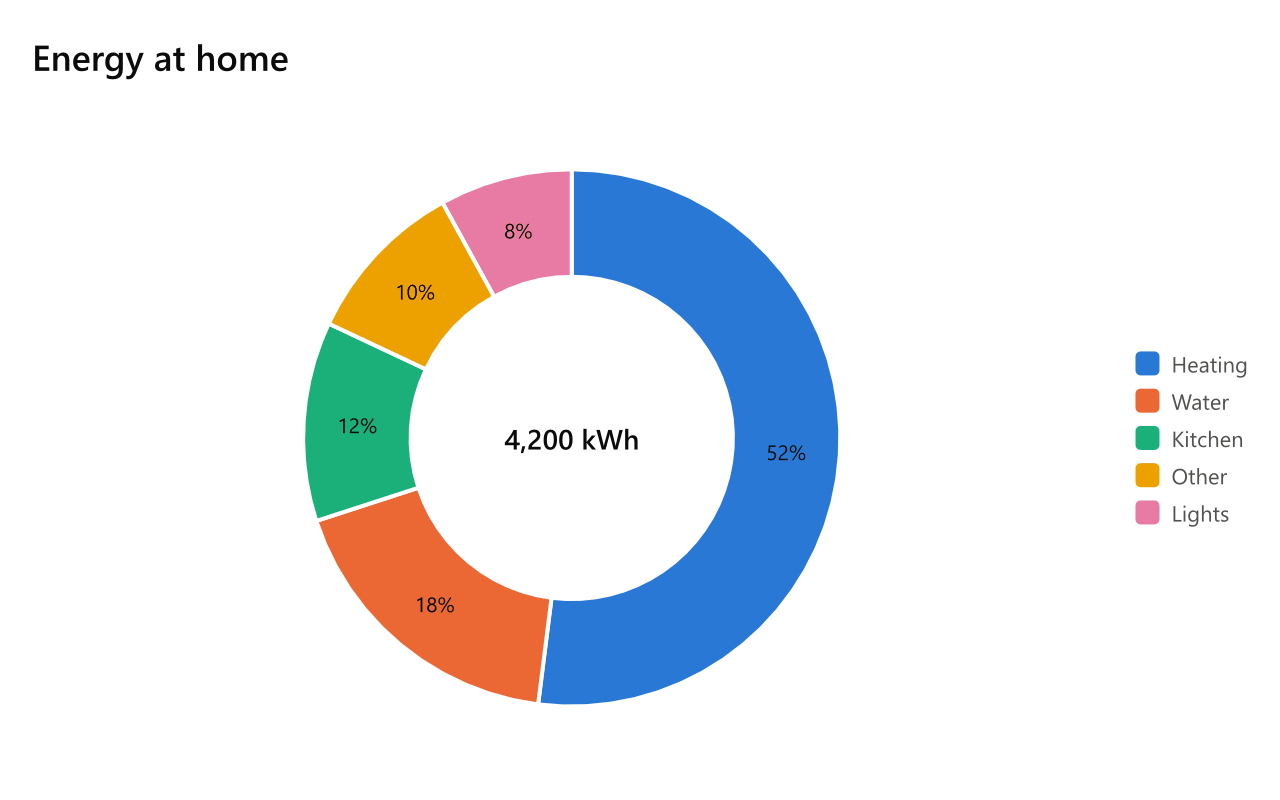
donut Energy at home
centre: 4,200 kWh
Heating: 52
Water: 18
Kitchen: 12
Lights: 8
Other: 10
Bar charts
bar Sales by region
labels: North, South, East, West
y axis: Units
2025: 42, 31, 27, 18
2026: 45, 28, 34, 22
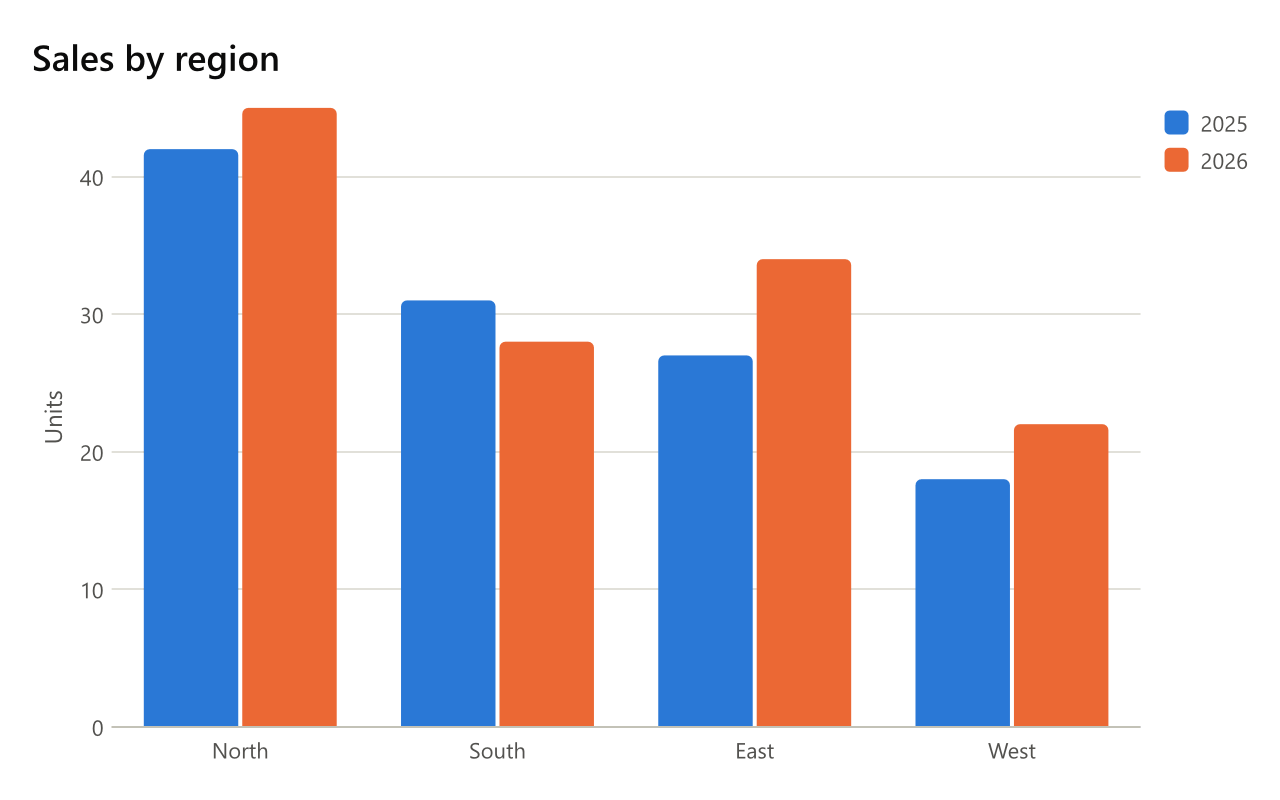
With labels, each line is a series - a name, a colon, and a value for each label - and the series stand side by side. Without labels, each line is one bar: North: 42. Lines of several numbers without labels are counted 1, 2, 3 along the axis.
| Setting | Also | Value |
|---|---|---|
labels |
categories, x labels, columns |
what each value is of, apart by commas |
x axis, y axis |
x title, horizontal axis, y title, vertical axis |
the axes' titles |
range |
y range, scale |
the value axis' range: 0..100 |
stack |
stacked |
on to stack the series, percent to stack them to a hundred, off |
direction |
orientation, bars |
up (the default), or right for bars across the page |
values |
value labels, numbers |
on to write each bar's value on it |
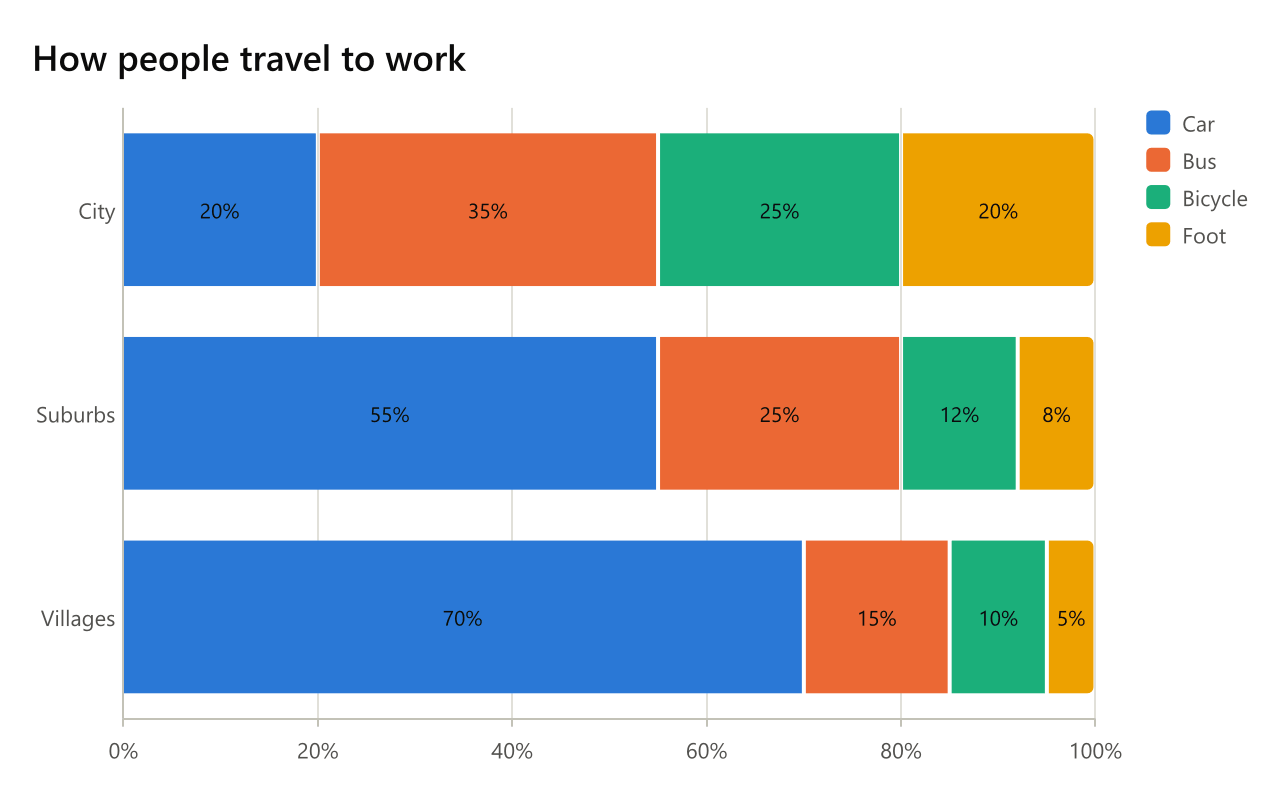
bar How people travel to work
labels: City, Suburbs, Villages
direction: right
stack: percent
values: on
Car: 20, 55, 70
Bus: 35, 25, 15
Bicycle: 25, 12, 10
Foot: 20, 8, 5
Line charts
line A week of weather
labels: Mon, Tue, Wed, Thu, Fri, Sat, Sun
y axis: Degrees
points: on
Low: 3, 5, 4, 6, 7, 5, 4
High: 9, 11, 10, 12, 14, 13, 11
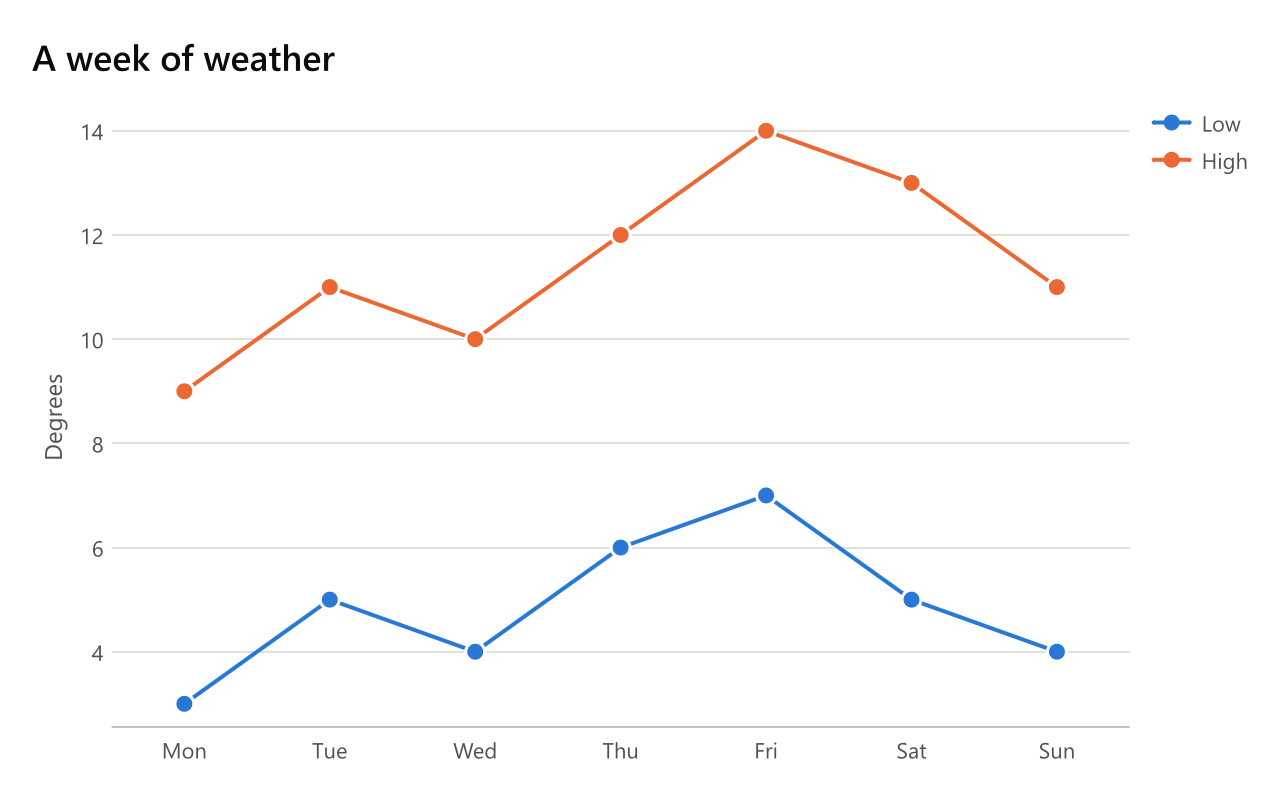
Each line is a series, a value for each label; without labels the values are counted 1, 2, 3.
| Setting | Also | Value |
|---|---|---|
labels, x axis, y axis, range |
as a bar chart's | |
shape |
curve, lines |
straight (the default), smooth or step |
points |
markers, dots |
on to mark each value |
area |
fill, filled |
on to fill under each line |
stack |
stacked |
on to stack the filled areas |
Scatter charts
xy Height and weight
x axis: Height (cm)
y axis: Weight (kg)
trend: on
Team A: (160, 55), (165, 61), (170, 66), (175, 70), (180, 79), (185, 84)
Team B: (150, 48), (158, 53), (163, 60), (171, 63), (178, 71)
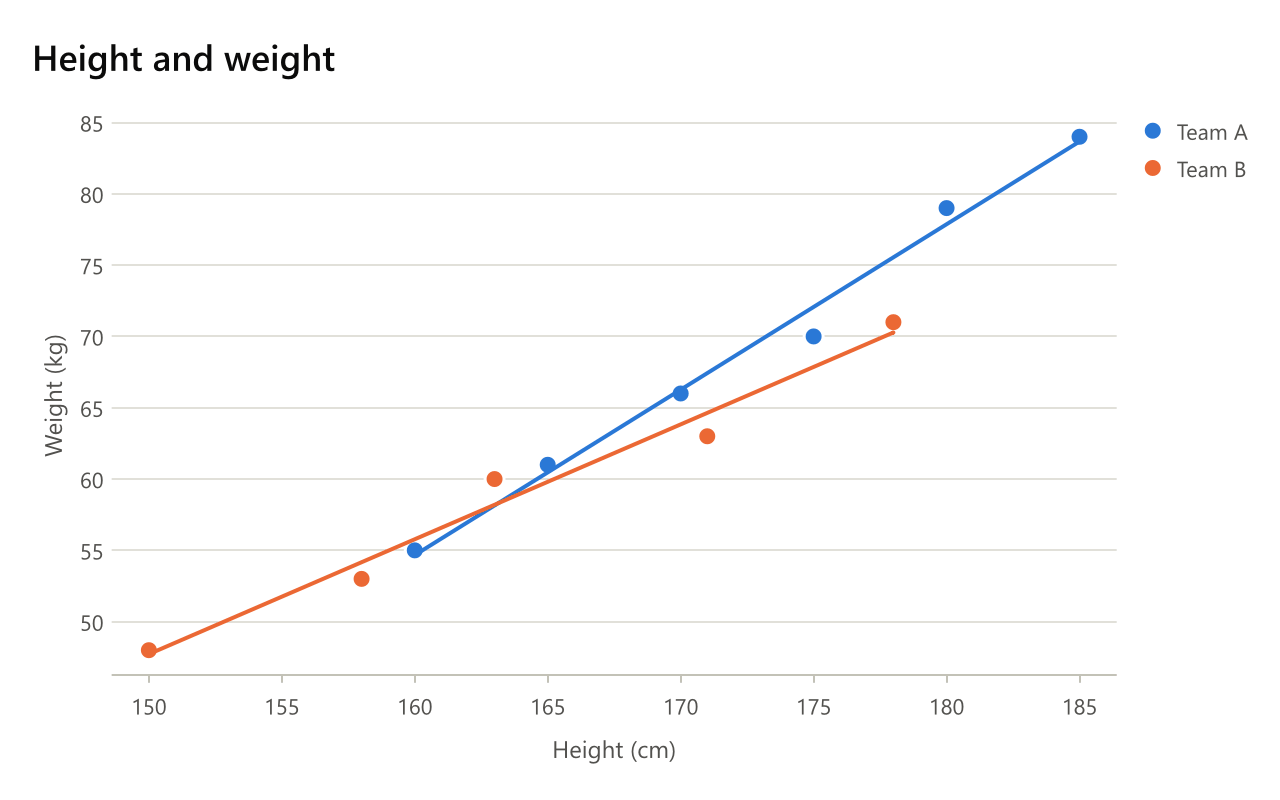
Each line is a series of points, each a pair in brackets. A line of one point with a name of its own - Rome: (12.5, 41.9) - is a labelled point, so a few named places draw as a map of names. A line of just two numbers is one point, and the first Dhole's X: … and Y: … lines are read as one series.
| Setting | Also | Value |
|---|---|---|
x axis, y axis |
the axes' titles | |
x range, range |
the axes' ranges, range the vertical one |
|
trend |
fit, trend line |
on to fit a straight line through each series, in its colour |
lines |
connect, joined |
on to join each series' points |
Radar charts
radar Two phones
labels: Battery, Camera, Screen, Price, Weight
Phone A: 8, 6, 7, 5, 9
Phone B: 6, 9, 8, 4, 6
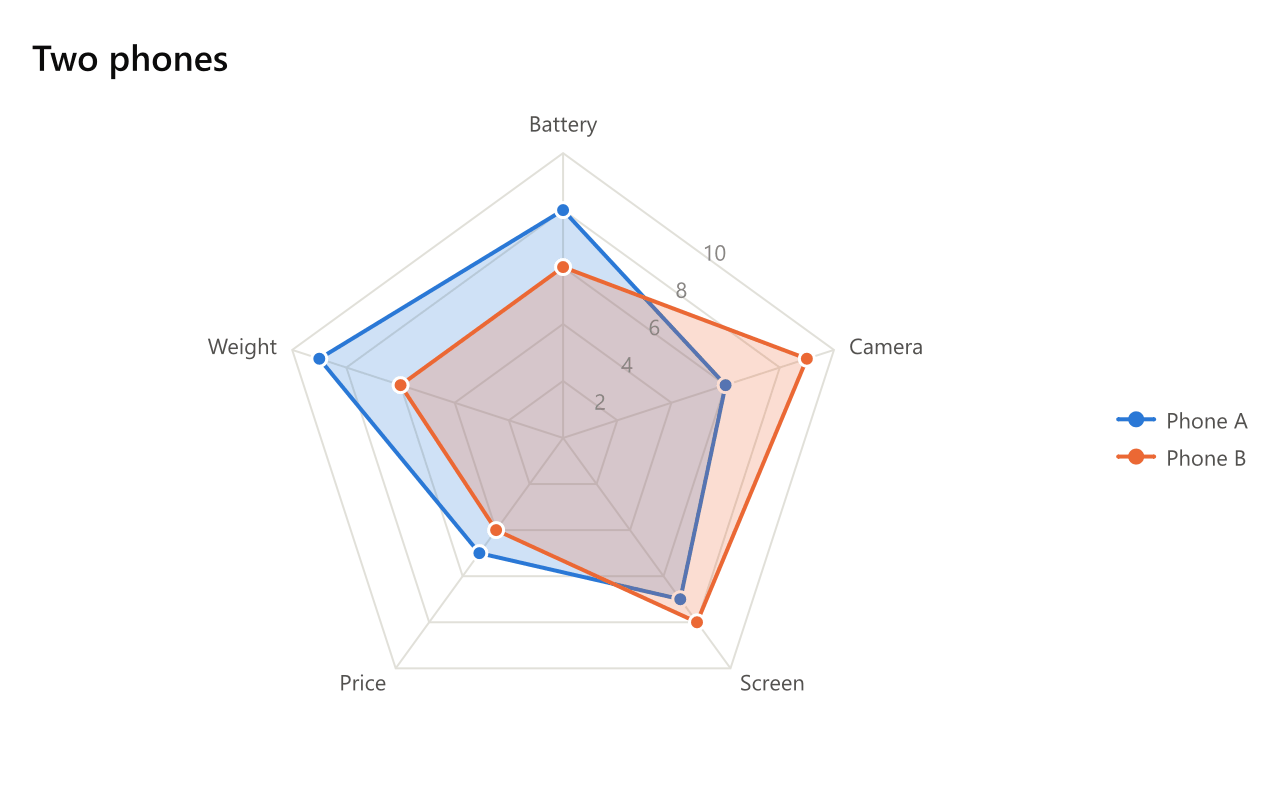
labels (also spokes, axes) names the spokes, and each line is a subject with a value for each spoke. range sets the spokes' range.
Colours
A colour or a role in brackets after a series' name colours it: 2026 [orange]: 45, 28, 34, 22. The others take the theme's palette in order.
Values that do not fit
A series with more or fewer values than there are labels, lines of one value mixed with lines of several, and a number that is not a number are each said, with the line they are on; the rest of the chart is drawn.