
Examples
Methodox Office comes with example documents in its Examples folder, one folder per application and one for automation, with a README.txt saying what each is. Every one of them was written by Methodox Office's own engines when the suite was built, so they show what the applications do today; change anything, and close without saving to keep the original.
Documents that carry code open with a Scripts disabled bar. Click Enable to let their code run; Methodox Office remembers it for that document until its code changes. See Trust.
The Weather Report
Impulse\Weather Report.docx is a one-page weather report for a place, over the free Open-Meteo forecast and air-quality services: the place, the temperature now, eight tiles (feels like, humidity, wind, UV, sunrise, sunset, air quality and rain today), the next 24 hours as a temperature line over chance-of-rain columns, the week ahead, and a sentence the report writes itself.
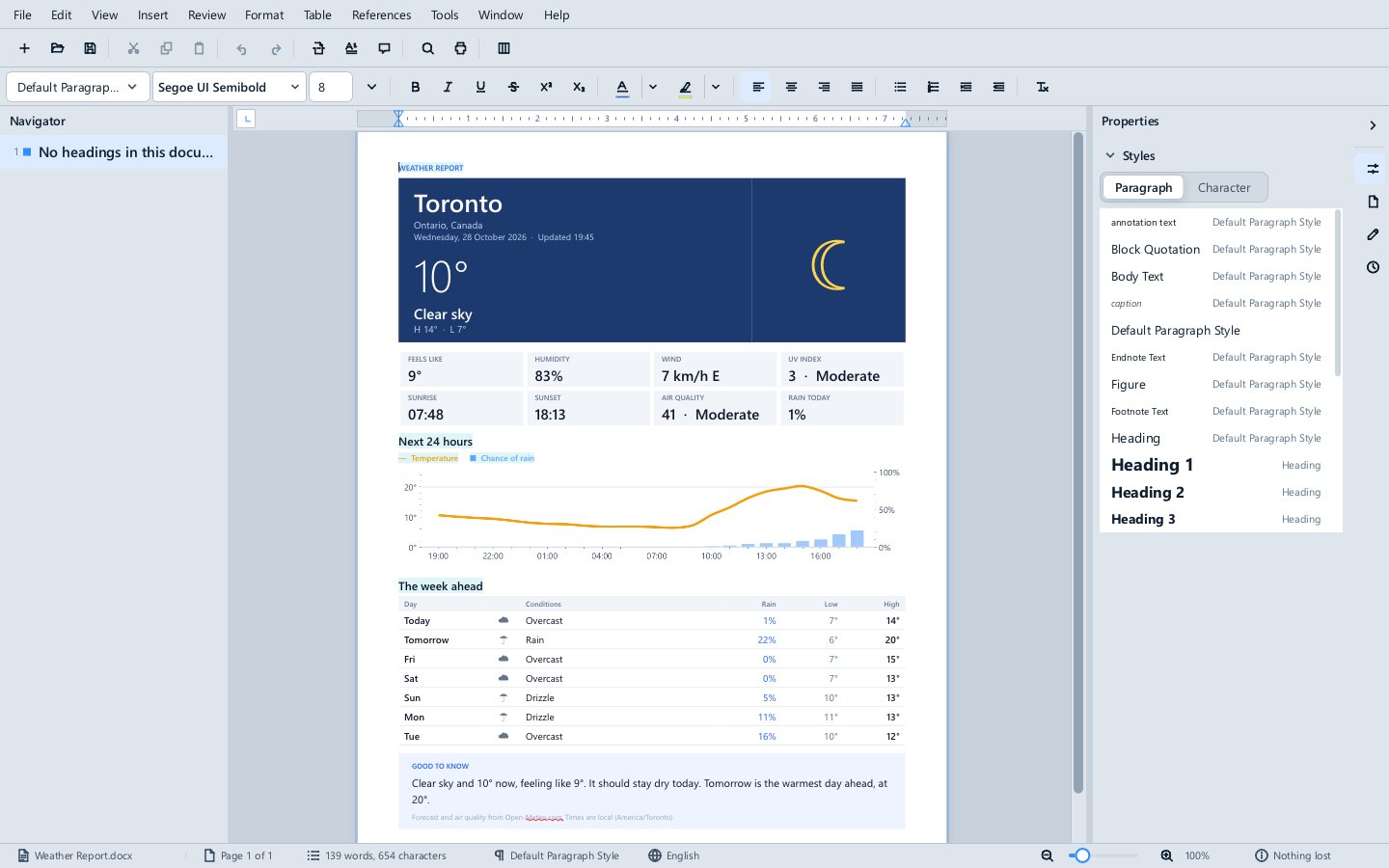
Every live part of the page is one of 33 smart objects; the layout is the document's own tables, fills and fonts, so it reads the same in Word.
- Open it. Without a network, it shows the forecast as it was when the example was built: the values are the document's own text, written by its last refresh.
- Enable, then References ▸ Refresh All (
Ctrl+Shift+F9). The bar asks for GET api.open-meteo.com and GET air-quality-api.open-meteo.com; click Allow, and the whole page refreshes from the live services as one undo step. - Tools ▸ Parameters: change PlaceName, Region, Latitude and Longitude (try Paris, France, 48.8566, 2.3522), Units (
imperialfor °F and mph) or Language (fr,deores), and refresh again: the place, the numbers, the chart, the week and the words all follow. - Tools ▸ Scripts shows how it works:
weather.functions.luaholds the requests, the words in four languages and the functions each smart object calls, andHourly.dvjis the Divooka graph that fetches the next 24 hours and draws the chart as a picture. However many parts read one address, a refresh asks for it once.
Hover over any value to see where it comes from; References ▸ Sources lists them all.
The Market Dashboard
Expo\Market Dashboard.pptx is a four-slide market dashboard over FortuneWealth (fortunewealth.projectnine.world), a Yahoo-Finance-style service over a simulated market that needs no key: a watchlist with sparklines, the first ticker's price over the period with its figures, a comparison of every ticker, and the market's indices with the day's biggest movers.
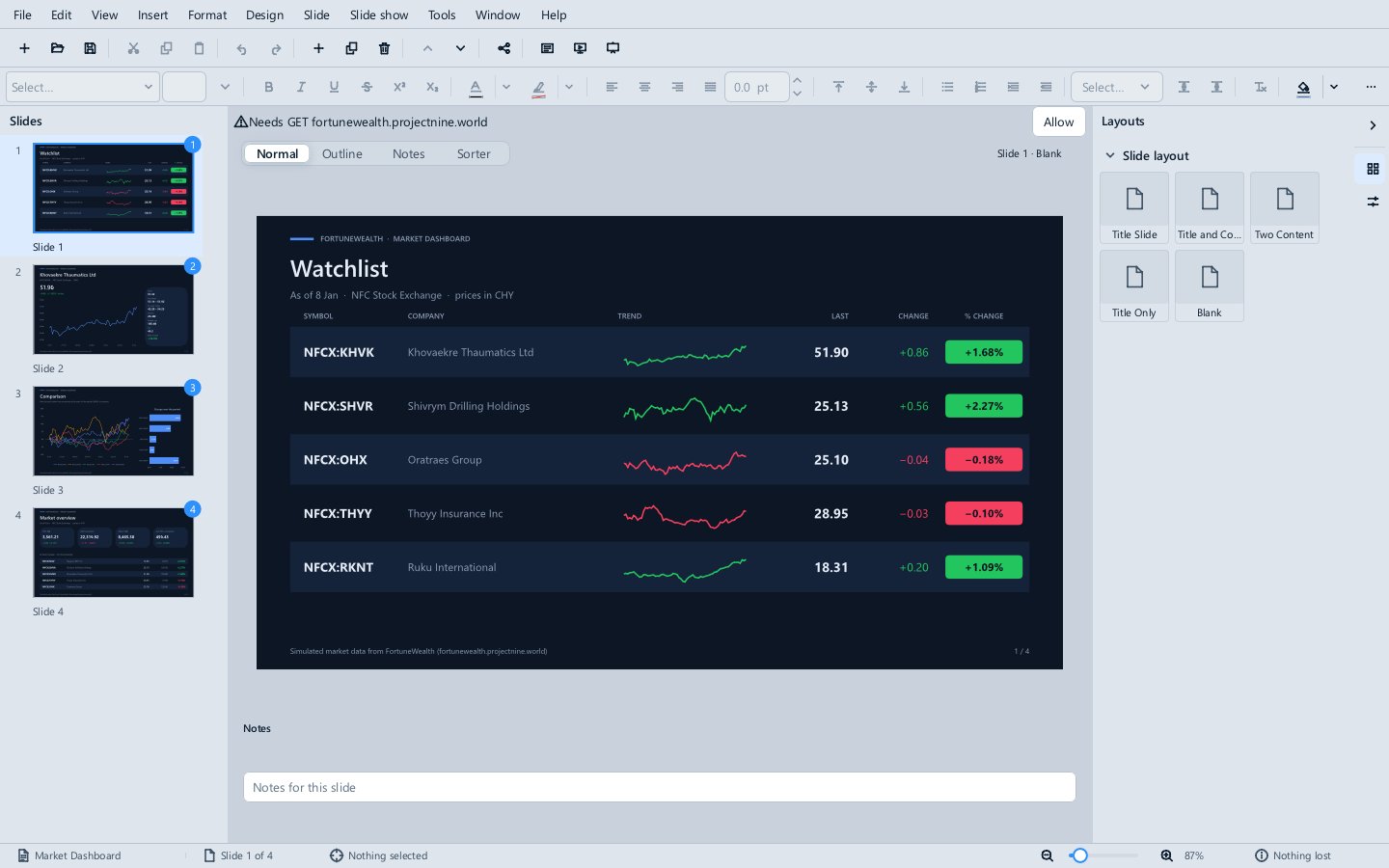
Expo has no smart objects, so the deck draws itself: Refresh.lua fetches the quotes, the history and the market and edits the slides through Expo's object model, and Deck.dvj, an Events graph, runs it when the deck opens and whenever a parameter changes.
- Open it. Without a network, it shows the market as it was recorded.
- Enable. The deck's Opened handler runs, and the bar asks for GET fortunewealth.projectnine.world; click Allow and the deck redraws from the live market, as one undo step.
- Tools ▸ Parameters: set Tickers (for example
NFCX:NGV, NFCX:VWC, NFCX:PAR), Period (1mo,1y) or Indices (up to fourIDX:symbols), and the deck redraws at once. - Tools ▸ Scripts ▸ Refresh.lua ▸ Run refreshes by hand;
Ctrl+Ztakes the whole refresh back.
Its charts are PowerPoint charts with their numbers in them, so the deck opens in PowerPoint as it shows here.
Automation
The Automation folder holds the documents the Automation pages describe:
| Example | What it shows |
|---|---|
| Loan Calculator.xlsx | =DVK.LOANPAYMENT and a spilled =DVK.AMORTIZE schedule, two Divooka graph functions, reading the loan's Principal, Rate and Years parameters. Change one in Tools ▸ Parameters and the sheet follows. |
| Loan Letter.docx | The same graphs as smart objects in a letter. |
| Weather.xlsx | =LUA.HIGH(1) and =DVK.FORECAST(), data-source functions that show #N/A until Data ▸ Refresh Data and Allow, and then answer from what they fetched, offline too. |
| Region Events.xlsx | An Events graph that logs the workbook being opened and every range changed, and the StampRegion Routine, run from Tools ▸ Scripts or as MethodoxFormula --script "Graphs\Report.dvj#StampRegion" --open "Region Events.xlsx" --save-as Stamped.xlsx. |
| Graph Editor.xlsx | The Pricing graph to open in the graph editor, and in B3 a graph with a node the Standard edition refuses, whose error leads to the node. |
| Smart report | Report.docx bound to Budget.xlsx by smart objects over the workbook, Lua and C#. |
| Formula, Impulse, Expo | Sample scripts: a summary sheet with live totals, formatting every table, a deck built from a workbook. |
| Graphs | The graph documents on their own, as .dvj, which Divooka Compute opens. |
Each application
- Impulse: Welcome to Methodox Impulse (a tour of the program written by the program), a letter, and a quarterly report with a chart, notes and a table of contents.
- Formula: Sales analysis (tables, a chart and conditional formatting), a budget, and a loan calculator.
- Expo: Welcome to Methodox Expo, and a pitch deck with speaker notes.
- Nu: a flowchart and a floor plan.
- Math: seven well-known formulas, from the quadratic formula to the normal distribution.