
Smart Objects
A smart object is a span of text, a table or a picture in an Impulse document whose content comes from somewhere else: a cell, range or name in a workbook beside the document, an expression in Lua or C#, or one of the document's Divooka graphs. A report whose figures come from the budget workbook is the typical use: change the workbook, refresh the report, and every figure in it follows.
Smart objects are Functions: refreshing them computes their values and writes them into the document, and nothing else.
Making one
Put the caret where the value goes, or select the text it replaces, or put the caret in a table to fill the table, and choose Insert ▸ Smart Object.
Name: how other smart objects refer to it, such as
Revenue.Fills: text, a table, or Image, a picture filled by a Function that returns one, such as a chart drawn by a graph or
host.getImage(url).Language and Source:
- Formula: a formula over a workbook beside the document, with the workbook's name in brackets:
=[Budget.xlsx]Summary!B4,=[Budget.xlsx]TotalRevenue(a defined name),=SUM([Budget.xlsx]Summary!B2:B5), or a range such as=[Budget.xlsx]Summary!A1:D6to fill a table. - Lua: an expression reading other smart objects as
smart.Name:(smart.Revenue - smart.Cost) / smart.Revenue. - C#: an expression reading them as
Smart["Name"], withNum()andText()to convert:Math.Round(Num(Smart["Revenue"]) * 0.08, 2). - Divooka: one of the document's Function graphs, called by name:
LOANPAYMENT(param.Principal, param.Rate, param.Years).
Lua, C# and Divooka sources also read the document's parameters (
param.Name,Param["Name"]), and changing a parameter refreshes exactly the smart objects that read it. The Source box is a text area with room for a longer expression, and Lua sources can call the functions in the document's Lua function scripts.- Formula: a formula over a workbook beside the document, with the workbook's name in brackets:
Format: a number format for the value, such as
#,##0or0.0%.
The smart object is made and refreshed at once, as one undo step. In the document it is shaded, and hovering over it shows, beside the pointer, its name, source and last refresh.
Refreshing
- References ▸ Refresh All (
Ctrl+Shift+F9) refreshes every smart object, in the order their dependencies need:MarginafterRevenueandCost. - References ▸ Refresh Selection refreshes the one at the caret.
A refresh reads each workbook once, without running any code it carries, computes every value, and then writes them all as one undo step. A span keeps its formatting; a table grows or shrinks to the range and keeps its style. A smart object that fails keeps its last value, and the status bar says how many refreshed and how many failed.
The Sources pane
References ▸ Sources lists every smart object with its source, kind and language, and when it was last refreshed, or why it failed, or that it was edited by hand since. It opens by itself when a refresh fails. Its buttons refresh all or the selected one, and Unbind turns a smart object back into ordinary text. Click a row to select the smart object in the document, and close the pane with its ×.
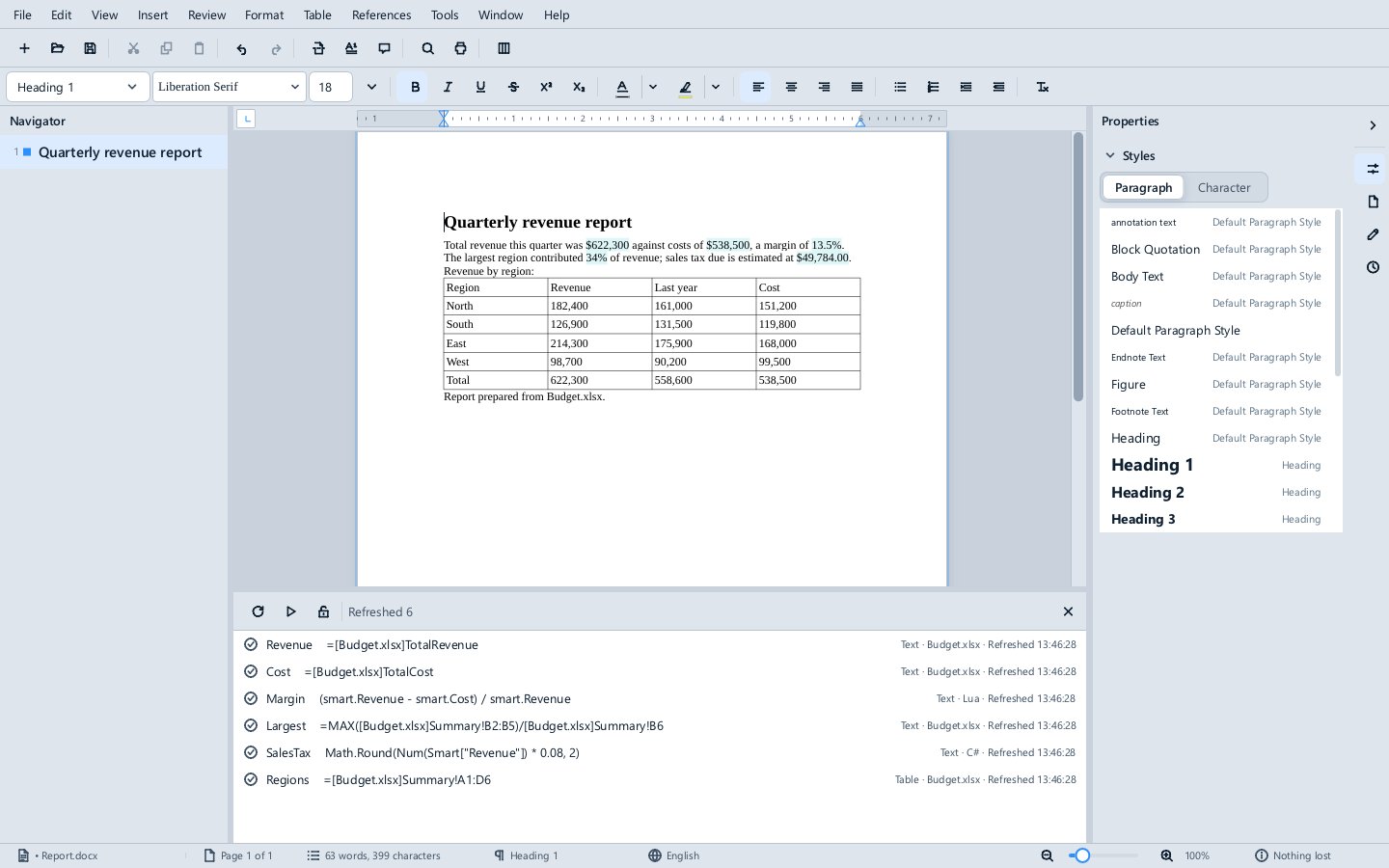
Scripts must be enabled
Lua and C# smart objects are code, so they do not refresh until the document is enabled with the Enable button on the Scripts disabled bar; see Trust. Smart objects that read a workbook are data and refresh either way.
How they are stored
The value of each smart object is ordinary text or an ordinary table in the .docx, inside a Word content control named after it, and the bindings are kept in the document's project part. Word, LibreOffice and a PDF show the last values; Word keeps the content controls and the bindings when it saves, so the document can go to Word and back and still refresh.
From a script
doc.smartObjects in an Impulse script lists them (count, [i], find(name)), adds them (add(range, source, { language, name, format }), addTable(table, source, options), insertTable(afterParagraph, source, options)), and refreshes them (refresh(), refreshOnly(names)). Each has name, kind, language, source, format, text, refreshed, error, isEdited and unbind().
Try it
Examples\Automation\Smart report in the suite holds Report.docx bound to Budget.xlsx. Open the report, enable its scripts, change a number in the workbook and save it, then References ▸ Refresh All in the report.
The Weather Report is a whole page of smart objects, and the Loan Letter's figures come from Divooka graphs.
Not there yet
Expo has no smart objects; it has parameters, scripts and slide-show events instead, which is how the Market Dashboard draws itself.