
Scripts
A script is a Command: Lua or C# code that changes a document when you run it, as one step you can undo. Scripts run in Impulse, Formula and Expo, from the Scripts pane or from the command line. A Divooka graph Routine is a script too, and opens in the graph editor in the same pane.
The Scripts pane
Tools ▸ Scripts (Alt+F11) opens the pane under the document: the document's scripts on the left, the editor in the middle, and what the script printed on the right.
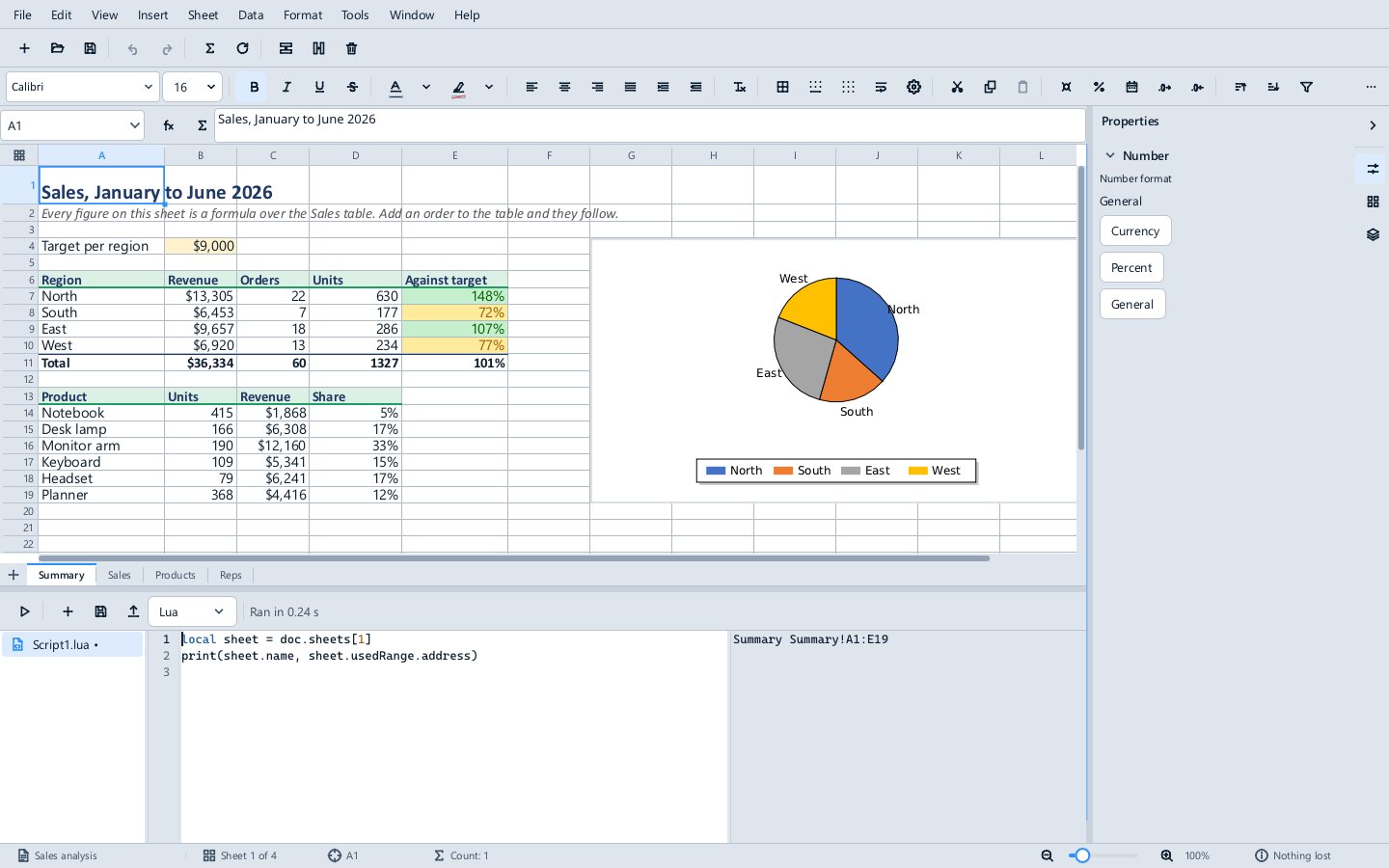
- New script adds one (
Script1.luaand so on) with a starting line for the application; the list beside it chooses Lua or C# for new scripts. - Run (
Ctrl+Enter) runs the script against the open document. The status beside the buttons says how long it took, or that it failed and was rolled back. - Save keeps the script inside the document, as an undoable change that File ▸ Save writes to disk, and Export writes a plain copy beside the document. A scripts folder from an earlier release (
<document name>.scripts\) is taken into the document when it opens. Ctrl+Spaceoffers completions, generated from the object model; typing.(or:in Lua) offers them too.
When a script fails, the output names the file, line and error, and the editor selects the line. A run is one step in Edit ▸ Undo, labelled with the script's name, so Ctrl+Z takes back everything it did.
A first script
-- Format all tables: thin grey borders, a shaded bold header row, and the header repeated at the top of every page the table runs onto.
local count = 0
for t in doc.tables do
  t:setBorders({ style = "single", width = 0.5, color = "#7F7F7F" })
  t:shadeRow(1, "#D9E2F3")
  t:boldRow(1)
  t.headerRows = 1
  count = count + 1
end
print(string.format("Formatted %d table(s).", count))
The same in C#:
int count = 0;
foreach (Table table in Doc.Tables)
{
    table.SetBorders(new Dictionary<string, object?> { ["style"] = "single", ["width"] = 0.5, ["color"] = "#7F7F7F" });
    table.ShadeRow(1, "#D9E2F3");
    table.BoldRow(1);
    table.HeaderRows = 1;
    count++;
}
Print($"Formatted {count} table(s).");
Both are among the samples in the suite's Examples\Automation folder: Impulse\FormatAllTables.lua and .csx, Formula\SummarySheet.lua (a summary sheet with live totals from the first table) and Expo\DeckFromWorkbook.lua (a slide for each sheet of a workbook).
The object models
Three names are always there: app (the application), doc (the document the script runs against) and session (the run itself). In C# they are App, Doc and Session, Doc has the document's own type, and Print(...) writes to the output. In Lua, members are lowerCamel (doc.sheets), methods are called with : (t:boldRow(1)), and collections are walked with for x in collection do. Counting starts at 1 in both languages.
app and session
| Member | What it is |
|---|---|
app.version |
The Methodox Office version |
app.arguments |
The --arg values given on the command line |
app:open(path) |
Opens another .xlsx, .docx or .pptx; it is closed without saving at the end of the run unless the script saves it |
app:new(kind) |
A new document: "formula", "impulse" or "expo" |
doc:save(), doc:saveAs(path), doc:close() |
Save or close a document the script opened |
session.commands |
The application's own commands; see below |
param.Name (C#: Param["Name"]) |
A Document Parameter |
host.get(url), host.getJson(url), host.getImage(url), host.readText(path) (C#: Host.Get and so on) |
Granted network and file access |
Formula
| Object | Main members |
|---|---|
doc (workbook) |
sheets, names, tables, range("Sheet1!A1:C3"), calculate() |
| sheets | count, [1] or ["Sales"], find(name), add(name, before) |
| sheet | name (renaming updates formulas), range("A1:C3"), cells(row, column), usedRange, tables |
| range | value (fills the range), values (rows of values), formula (filled with relative references), formulas, text (as displayed), format, address, read(), write(values, { header = true }), offset(r, c), resize(r, c), currentRegion, clear() |
| range format | bold, italic, fontSize, numberFormat, fontColor, fill, horizontalAlignment |
| names | add(name, refersTo), remove(name), [name] with refersTo and range |
| tables | add(range, name, { style = "TableStyleMedium2" }); a table has name, range, headerRange, dataRange, columns, rows() (records by column name), column(name) |
A value written to a cell is a value: "=1+1" written as a value is text. Formulas go through formula and formulas, which check every formula before changing anything.
Impulse
| Object | Main members |
|---|---|
doc (document) |
paragraphs, tables, styles, text, find(text, { matchCase, wholeWord, regex }), replace(text, replacement, options), addTable(rows, columns, values), smartObjects |
| paragraphs | count, [i], last, add(text, style) |
| paragraph | text, style, alignment, spaceBefore and spaceAfter, lineSpacing, runs, characters(start, length), insertAfter, insertBefore, delete() |
| text range (a run) | text, bold, italic, underline, fontName, fontSize, color, highlight |
| table | rowCount, columnCount, cell(r, c), read(), write(values), headerRows, style, setBorders(...), shadeRow(row, color), boldRow(row), delete() |
smartObjects |
See Smart objects |
doc:replace is one undo step and returns how many it replaced; with regex, $1 in the replacement is the first group.
Expo
| Object | Main members |
|---|---|
doc (presentation) |
slides, layouts, slideWidth, slideHeight (in points) |
| slides | count, [i], add(layout, at) with a layout name such as "Title and Content" |
| slide | title, titleShape, bodyShape, shapes, placeholder(kind), notes, layout, background, duplicate(), moveTo(position), delete() |
| shapes | addTextBox(text, left, top, width, height), addShape(preset, left, top, width, height, text), addChart(kind, data, left, top, width, height, options), find(name) |
| shape | name, text, left, top, width, height, fill, bold, italic, fontSize, color, alignment, delete() |
| chart | setData(rows), which keeps how each series is drawn, and the value range, series colours and where the category labels go |
Impulse documents also take pictures (doc:addPicture(at, bytes, width)), page margins, and table column widths, padding, borders, fills and alignment. Not in the object models yet: deleting a Formula sheet; charts in Formula and Impulse; fields; layouts an Expo deck does not already have.
Calling the application's commands
Everything on the menus is a command with a name, and a script can call it:
session.commands:execute("format.bold")
print(session.commands:isAvailable("edit.undo"))
for id in session.commands:list() do print(id) end
describe(id) lists a command's arguments, which execute takes as a table. A command that needs a dialog or the window's selection works from the Scripts pane but not from a script run on the command line, and says so.
Transactions
A run is one transaction. If the script fails, or a command it calls is refused, everything the run changed is rolled back and the document is as it was; nothing a failed run did can be saved. Reads see the run's own writes: after a script writes a cell, a formula reading it has the new value. In Lua, pcall catches a refusal and the run goes on, because a refused operation changes nothing.
From the command line
MethodoxFormula --script SummarySheet.lua --open Sales.xlsx --save-as Summary.xlsx
MethodoxExpo --script DeckFromWorkbook.lua --arg Sales.xlsx --save-as Sales.pptx
mos --script FormatAllTables.lua --save-as Report-formatted.docx Report.docx
A graph Routine runs the same way, named after its graph document: --script "Report.dvj#StampRegion". --open (or the document named last, with mos) is the document the script runs against; without one, the script gets a new document. --save-as saves the result only if the script succeeded; the opened file is never overwritten unless the script itself calls doc:save(). Each --arg is one value of app.arguments. See Command line and conversion for the exit codes.