
Divooka Graphs
A Methodox Office document can carry Divooka programs, graphs of nodes and wires, as a third language beside Lua and C#. A document's graphs are kept inside it as .dvj documents, the text form of the .dvk that Divooka Compute opens, and each graph plays one of the parts of the programming model:
| Graph | Part | Used as |
|---|---|---|
| A Function graph named in capitals | a Function | =DVK.LOANPAYMENT(B1, B2, B3) in Formula; LOANPAYMENT(param.Principal, param.Rate, param.Years) as an Impulse smart object |
| A Routine | a Command | Run in Tools ▸ Scripts; --script Report.dvj#StampRegion on the command line |
| An Events graph | event handlers | runs when the document is opened, saved, edited, recalculated, refreshed or shown |
Graphs run on Divooka's No-Reflection Interpreter, which prepares a graph once and then calls it as often as needed, so a column of two hundred cells calling one graph prepares it once.
The graph editor
Tools ▸ Scripts (Alt+F11) lists a document's graph documents beside its Lua and C# scripts. Select a .dvj and the graph opens on a canvas where the text editor would be, one tab per graph: Function graphs show an fx icon, Routines a play icon, the Events graph a bell. The editor's tools join the pane's strip.
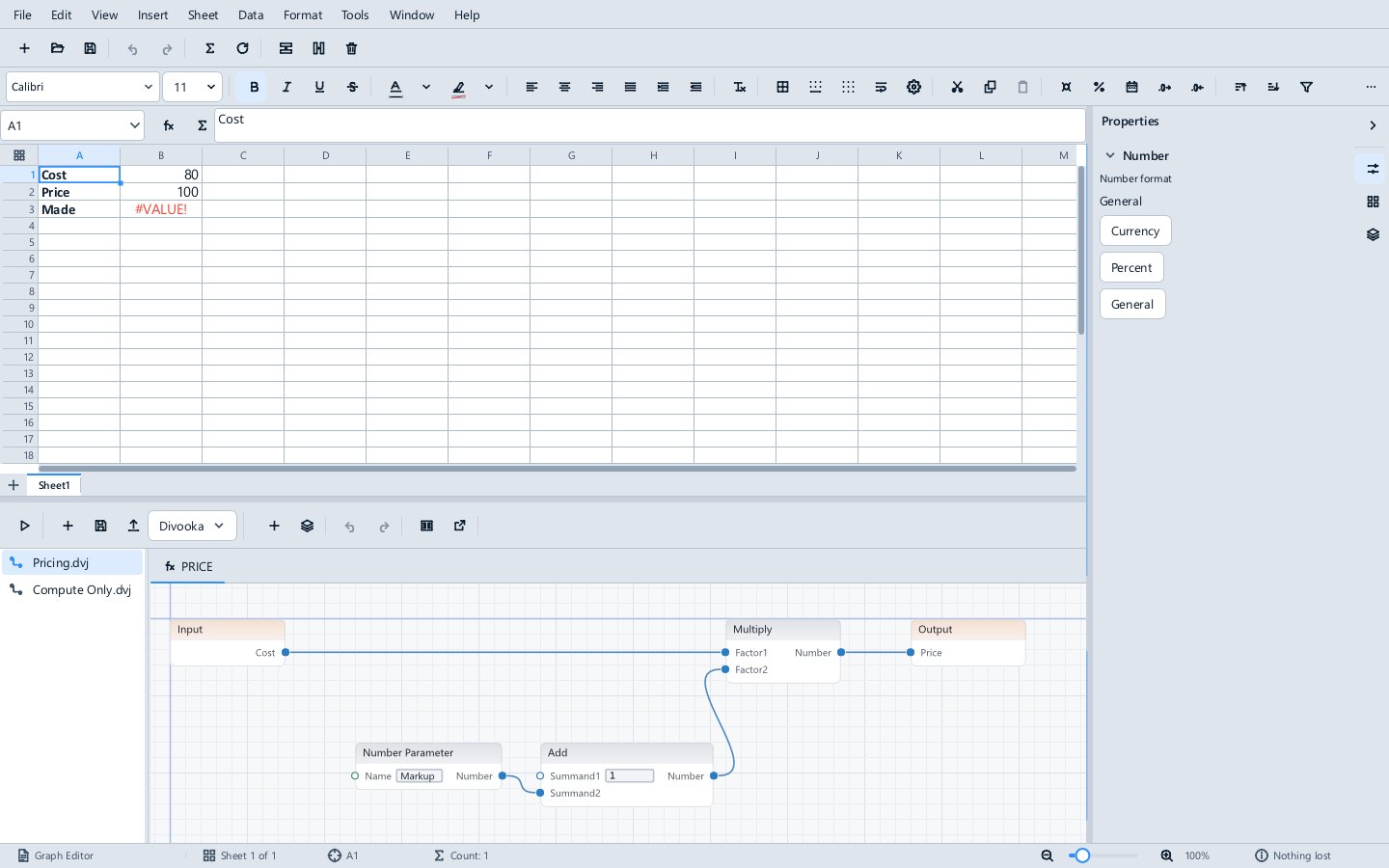
- Moving about. Drag with the middle button, or with
AltorSpaceheld, to pan; the wheel zooms at the pointer;Ffits the graph. A long graph opens at its start at a readable size. - Adding nodes. The + button, or a double-click on the empty canvas, opens a searchable palette there. It lists only what the document's edition runs, value nodes (Number, Text Line, Text, Boolean, Comment), Branch in Routines and Events graphs, the event type's events in an Events graph, and each Document Parameter as a Parameter node by name. Overloads are told apart by their inputs. Calls that change the document are offered only in Routines and Events graphs, never in a Function. Dragging a wire out of a pin and letting go on the empty canvas opens the palette there, and the chosen node is wired to it.
- Wiring and editing. Drag from pin to pin to connect; a wire whose types do not fit is refused, and the strip says why. Alt-click a wire, or draw across it, to disconnect. Literals are edited on the pins.
Deleteremoves the selected nodes with their wires; a graph's Input and Output (or Begin and Return) stay. - New graphs. The layers button adds a Function (with its inputs and outputs, such as
Principal, Rate, Years=30;name:textfor inputs of other types), a Routine, or the document's Events graph on a chosen event type. - Undo.
Ctrl+ZandCtrl+Yin the canvas, and the strip's buttons, step through the editor's own history, one gesture at a time. - Saving. The pane's Save writes the graph into the document, as one undoable change, and the cells and smart objects that use it recalculate, as after editing a Lua script.
- Errors lead to their node. When a cell's or an event handler's error names a node, the bar over the document has a button that opens the graph with that node selected. A Routine that fails on a node selects it after the run. Nodes the edition does not run are marked on the canvas, with the reason on hover.
Open in Divooka Compute, the external-link button, opens the graph in Divooka Compute, the full Divooka editor. Methodox Office finds Compute from the METHODOX_DIVOOKA_COMPUTE variable, beside its own executables, or as the Divooka editor registered on the computer. Save in Compute and the graph comes back into the document as one undoable change; if the document's copy was changed meanwhile, Methodox Office asks which to keep. A graph using nodes the Standard edition does not run is kept as Compute wrote it, and shows why it does not run. For Compute's palette to offer the Office nodes, its plugins folder needs the Divooka.Office.Automation.Nodes.Compute plugin.
Not there yet: changing an existing Function's inputs and outputs (Compute does it), and copying and pasting nodes.
Function graphs
A Function graph whose name is in capitals is a worksheet function: LOANPAYMENT in a workbook's Loan.dvj is called as =DVK.LOANPAYMENT(...). A graph that returns a table spills it, as =DVK.AMORTIZE(B1, B2, B3) spills a loan's schedule. In Impulse the same graph is the source of a smart object, called by name with numbers, quoted text, param.Name and smart.Name as arguments; a graph that returns a picture, such as a chart, fills an image smart object. See Worksheet Functions and Smart objects.
A Function graph that uses a fetching node is a data-source Function, which fetches only when the document is refreshed (Data ▸ Refresh Data, References ▸ Refresh All) and answers from what it last fetched in between.
Routines
A Routine graph is a Command: it changes the document, as one undoable step, when run from Tools ▸ Scripts or from the command line:
MethodoxFormula --script "Report.dvj#StampRegion" --open "Region Events.xlsx" --save-as Stamped.xlsx
#Name after the graph document names the Routine to run.
Event handlers
An Events graph implements one of the Office event types, and its handlers run when the document is enabled and the event happens:
| Event type | Events |
|---|---|
| Every document | Opened, BeforeSave, Saved, ParameterChanged |
| Workbooks | WorkbookOpened, RangeChanged (one range per sheet for each edit), Calculated |
| Text documents | SmartObjectsRefreshed |
| Presentations | SlideShowStarted, SlideShowAdvanced, SlideShowEnded |
Each handler runs as one transaction on the document. An event a handler's own changes cause is not delivered back to it, undo and redo raise no events, and more than 64 events in one second pause the handlers, so a handler cannot loop.
The Office nodes
In the Standard edition, a graph may use the Divooka standard library's pure routines (numbers, text, logic, dates, arrays, lists, sets, dictionaries, conversions) and these Office nodes:
| Group | Nodes |
|---|---|
| Parameters | Parameter, Number Parameter, Text Parameter, Boolean Parameter; Set Parameter in Commands only |
| Data | HTTP Get, HTTP Get Bytes, Read Text File (through the person's grants); Json Number, Json Numbers, Json Text, Json Texts at a dotted path; Format Url |
| Tables | Columns, Sequence, Number Column, Row Count, Amortization Schedule |
| Images | Chart (a table drawn by Formula's chart engine as a picture), From Bytes |
| Document | in Commands: Set Cell, Get Cell, Set Formula, Write Table, Add Sheet, Add Paragraph, Add Slide, Slide Count, Document Name, Log |
The same nodes are offered in Divooka Compute, so a graph made there is the graph Methodox Office runs.
Methodox Office + Divooka Compute also lets a graph use any Divooka package installed beside it. A graph that uses a node its edition does not allow is refused before it runs, and the message names the graph and the node; so does a failure while it runs, in a cell's message or the Scripts pane's output.
Try it
Examples\Automation has:
- Loan Calculator.xlsx:
=DVK.LOANPAYMENTand a spilled=DVK.AMORTIZEschedule, with the loan's terms as Document Parameters (Tools ▸ Parameters). - Loan Letter.docx: the same graphs as smart objects in a letter.
- Weather.xlsx: data-source Functions fetching a forecast from Open-Meteo. The Weather Report draws its 24-hour chart with a graph, and the Market Dashboard redraws itself from an Events graph.
- Region Events.xlsx: an Events graph logging what changes, and the
StampRegionRoutine. - Graph Editor.xlsx: the
Pricinggraph to edit, and a graph that uses a node the Standard edition refuses. Graphs\*.dvj: the graphs on their own, for Divooka Compute.
Enable each document first; the weather examples then ask to Allow their requests to api.open-meteo.com.