
Novella in Divooka
The Divooka.Novella package makes every Novella concept a node, and the nodes compose in all four kinds of graph (see Graph Contexts):
| Graph | What it does with Novella |
|---|---|
| Routine | A procedure that creates a game, configures it, loads its content and runs it. |
| Events | A game written as a class: the graph's base type is Novella Application, and it implements the game's callbacks. |
| Function | Describes a game as data: sequences, conditions, effects, labels, scenes, animations, screens, styles, a story, a Game Definition. |
| Flows | Calls such a function and previews what it returns. |
The procedural graphs are the foundation: a game runs because a graph creates and starts it. The functional graphs are a convenient way to write and preview a story, and their result is handed to a procedural graph to run for real. Installation says which distributions include the package.
The Novella toolbox
Everything is in one toolbox, Novella, with a category per type. Node names below are the names the palette shows.
Novella Game
The game itself, for procedural graphs. Every node but the two constructors takes the game as its receiver (wired in a Routine graph, implicit in an Events graph).
| Node | What it does |
|---|---|
| Make Novella Game | A game with a title, width and height. |
| Make Novella Game From Definition | A game from a Game Definition built by a functional graph. |
| Set Resolution, Set Title | The resolution everything is laid out at, and the title. |
| Set Config, Set Theme | A configuration or theme setting, written as a script would write it; it holds over the scripts' own define of the same key. |
| Add Library Assets | The files embedded in this document's library. The library input is supplied by the document; it needs no wire. |
| Add Asset Folder, Add Asset | A folder on disk, or one file from bytes. |
| Load Script, Load Script File, Load Scripts From Assets | Script text, a script file, or every .novella file among the assets (optionally under a folder). |
| Add Story | A story built by the functional nodes. |
| Add Scene | A Scene from the Scenes nodes, added as a label of its name. |
| Define Character, Define Image, Set Default | Definitions without a script. |
| Register Command | Binds a run command name to a function with no inputs and no outputs (see Function Reference). |
| Register Command Function | Binds a run command name to a function that takes the command's arguments as text and answers text, which the story reads as _return: a number, true or false, otherwise text. |
| Register Expression Function | Binds a name that conditions, $ lines and [interpolation] can call, such as [title_for(trust)], to a function that takes the arguments as text and answers text, read the same way. |
| Validate | The lint: one line per problem. |
| Run | Opens the game in a window and returns when the player quits. |
The same category holds the live script nodes, which play immediately while a live script runs (see Events graphs): Say, Narrate, Show, Scene, Hide, With, Pause, Play, Stop, Menu (returns the chosen index), Input (returns the text), Call Label, Notify, Achieve, Set Variable, Get Variable, Get Number and Random Integer. Random Integer draws from the story's own generator, so rolling back and choosing again draws the same number. Two more serve the Command event: Set Result answers the command being handled, and Translate Text puts text through the story's string translations.
Story Writing
Pure nodes that build a Sequence: each takes a sequence and returns a new one with one more statement, so a chain reads top to bottom like a script.
| Node | Statement |
|---|---|
| Start Sequence | An empty sequence to build on. |
| Say, Narrate | A line of dialogue (character id, text, optional image attributes), or narration. |
| Show, Scene, Hide, With | Stage changes, with positions (left, right, a defined transform) and transitions (dissolve, fade(1.0)). |
| Pause | A click, or some seconds. |
| Play Music, Play Sound, Play, Stop | Audio on the music channel, the sound channel, or any channel. |
| Menu | A caption and two to four Choice values, each carrying the sequence that follows it. |
| If | A Condition from the Conditions nodes, the sequence when it holds, and an optional sequence when it does not. |
| Apply Effect | An Effect from the Effects nodes, such as Add To Variable: the story's variables change at this point. |
| Jump, Call, Return | Flow between labels. |
| Input, Notify, Achieve, Movie, Voice, Window | The matching statements. |
| Run Command | A run command with comma-separated argument expressions. |
| Script | Any statements written as script, for what the other nodes do not cover. |
| Concatenate | One sequence followed by another. |
| Sequence To Script | The sequence as script text, to read what a chain has written. |
The nodes above cover what most stories need. These say the rest of what a script can, option for option:
| Node | Statement |
|---|---|
| Say Line | A line with attributes that stay, attributes for this line only, a transition played as it appears, and an id for translations. |
| Say Briefly, Say As, Extend, Centered, NVL Clear | A line whose attributes last only while it is up; a line from a one-off speaker; the line before, continued; text in the middle of the screen; a fresh NVL page. |
| Show With Options | Every clause of a script's show: at, with, behind, zorder, as and layer, and an Animation from the Animation nodes for a timeline of its own. |
| Scene With Options, Hide With Options | A scene on a layer, placed or animated; a hide on a layer. |
| Hard Pause, Window With Transition | A pause that cannot be clicked through; the dialogue window shown, hidden or set to auto with a transition. |
| Show Screen, Hide Screen, Call Screen | A screen laid over the game while the story carries on, taken away, or shown and waited on, its answer then in _return. Each takes one argument, typed as a number, true, false or text. |
| Play With Options, Queue | Audio with every option of a script's play (fade in, fade out, looping, volume, if_changed); files queued to play after what plays now. |
| Voice Sustain, Movie With Options | The voice kept playing through the next line; a movie that may keep the music playing. |
| Input With Options | Input with a default, a length and the characters allowed. |
| Menu From Choices | A menu with any number of choices, collected with Start Choices and Add Choice, optionally named (so a jump can come back to it) and with a list variable that hides choices already taken, as menu set does. |
| While | Repeats a sequence while a Condition holds. |
| Call With Arguments | Calls a label with up to three arguments for its parameters, each typed. |
| Jump To Variable, Call Variable | Jumps to, or calls, the label a variable names. |
| Jump From Function | Jumps to the label a Function graph names (see Logic in Function graphs). |
| Return Value, Return Variable | Returns from a call with a typed value, or with a variable's value, which the caller reads as _return. |
| Run Command With Values | A run command with up to three arguments, each typed. |
| Python Block | A block of Python, as many lines as it needs, run against the story's variables where the sequence reaches it; what it sets that the story can hold goes back into the story. The package carries Python, so a document needs nothing more for it. |
Choice
Make Choice builds a menu choice from its text, the Sequence that follows it, and an optional Condition, such as Variable At Least (affection, 3), without which the choice is always shown; choices feed the Menu node, or Add Choice for Menu From Choices. Choice With Id gives a choice an id of the author's choosing, so it stays remembered as taken when its text is reworded.
Conditions
A Condition is a test the story makes, built from parts rather than written as text. It feeds If, While, Make Choice, Scene Choice, Branch To Scene, Set To Condition, and the conditions of images, layers, music tracks, gallery entries and screen elements. It becomes the same expression a script's if holds, so it saves, rolls back, is checked by the lint and reads back as script; the one exception is Condition From Function, which has no script form.
| Node | Holds when |
|---|---|
| Always | Always. |
| Compare Variable | A variable compares with a value: ==, !=, <, <=, > or >=. The value is typed as a number, true, false, none, or text. |
| Variable At Least | A number variable is at least a value. |
| Variable Is Set | A variable holds: true, non-zero, non-empty. |
| Has Visited | A label or scene has been reached in this playthrough. |
| List Contains | A list variable holds a value, such as a gift among those given. |
| All Of, Any Of | Every one, or at least one, of two to four conditions holds. |
| Not | A condition does not hold. |
| Compare Variables | Two variables compare: trust > doubt. |
| Visited At Least | A label has been reached at least a number of times in this playthrough: the third visit to the market. |
| Ever Reached | A label has been reached in any playthrough, as an ending once seen. |
| Has Seen Image, Has Heard | An image has been seen, or a piece of audio heard, in any playthrough. |
| Has Achievement | An achievement has been earned. |
| Is Showing | An image with a tag is on the stage now. |
| In Language | The player reads the game in a language, such as zh-Hans. |
| By Chance | By chance, with a probability from 0 to 1, drawn so that rolling back draws the same. |
| Condition From Function | A member Function graph that is given the story's variables answers true or false; see Logic in Function graphs. |
| Condition From Script | A condition written as script, such as affection >= 3 and gift == "fan", for anything the other nodes do not say. |
Effects
An Effect is a change to the story's variables. Apply Effect makes it at a point in a sequence, and a Scene Choice makes it when the choice is taken. Effects become the same assignments a script's $ lines are, so they roll back and save with the story.
| Node | Changes |
|---|---|
| Set Variable | Sets a variable to a typed value. |
| Add To Variable | Adds to a number variable (1 unless told otherwise). |
| Add To List | Adds a value to a list variable. |
| Subtract From Variable | Takes from a number variable (1 unless told otherwise). |
| Remove From List | Removes a value from a list variable. |
| Change Variable | Changes a variable by an operator: =, +=, -=, *=, /=, //= or %=. |
| Change Variable By Variable | Changes a variable by another variable's value, with the same operators: bag -= chosen takes the chosen gift out of the bag, coins += reward adds a reward. |
| Copy Variable | Sets a variable to another's value. |
| Toggle Variable | Turns a true variable false, and a false one true. |
| Random Number | Sets a variable to a whole number from a minimum to a maximum, both included, drawn so that rolling back draws the same. |
| Set To Condition | Sets a variable to whether a Condition holds now. |
| Number From Function, Text From Function | Sets a variable to the number or text a member Function graph answers from the story's variables. |
| Effect From Function | Changes the story's variables however a procedural graph, such as a Routine, says, with Set Number, Set Text, Set Flag and Add. |
| Combine Effects | Two to four effects, in order. |
| Effect From Script | A change written as script, as after $: affection += 1. |
Story Variables
What a graph handed to a From Function node is given: the story's variables, as a Story Variables value.
| Node | What it does |
|---|---|
| Number, Integer, Text, Flag, List | Reads a variable as a number (unset reads as 0), a whole number, text (unset reads as empty), whether it holds (true, non-zero, non-empty), or a list's items. |
| List Contains | Whether a list variable holds a value, compared as text. |
| Visited | Whether a label has been entered in this playthrough. |
| Set Number, Set Text, Set Flag, Add | Sets a variable to a number, text or a boolean, or adds to a number. |
They are members of Story Variables, and Divooka offers a member in a graph by what it does. A Function graph is dataflow: it may be evaluated whenever its result is needed, and cached, so it admits only members that change nothing. The reading members are marked const, which tells Divooka they change nothing, so they appear in Function graphs as well as procedural ones. The writing members change the story, so they are offered only in procedural graphs, such as a Routine given to Effect From Function. The same rule decides where any C# member appears as a node; see C# Tricks. (The Read Number, Read Text, Read Flag, Read List Contains and Read Visited nodes that once stood in for the reading members are gone; use the members.) See Logic in Function graphs.
Scenes
A Scene is the configuration way to write a game, the way Novella One built games: each scene names a background, music, its lines and where the story goes next, and needs no labels, jumps or menus wired by hand. A scene becomes an ordinary label of its name, so it saves, rolls back and mixes with labels and scripts, and the scene named start begins the game. See Concepts. (The Story Writing node Scene is a different thing: a statement that clears the stage and shows a background.)
| Node | What it does |
|---|---|
| Make Scene | A scene: its name, its lines as a Sequence (Say, Show and the other Story Writing nodes), an ending, a background (such as bg plum_garden; empty keeps the stage), the background's transition (fade by default) and music (empty keeps what plays). With no ending, the game ends after it. |
| Go To Scene | An ending: the story goes on to another scene. |
| Choose Scene | An ending: a caption (may be empty) and two to four Scene Choice values; the player chooses which scene comes next. |
| Scene Choice | A choice's text, the scene it leads to, an optional Condition for when it is offered, and an optional Effect made when it is taken. |
| Branch To Scene | An ending: a Condition and two scenes, the first when it holds and the second when it does not. |
| End Game | An ending: the game ends. |
| Add Scene | A story with a scene added. |
Animation
An Animation is a timeline in the style of Ren'Py's ATL, built a step at a time, the way a transform is written in a script. It goes into a Show With Options or Scene With Options for an image's own animation, or into Define Transform to be named and used by any at.
| Node | What it does |
|---|---|
| Start Animation | An empty timeline to build on. |
| Set Property | Sets a property at once: xalign to 0.5. |
| Animate Property | Animates a property to a value over some seconds, eased by a warper (linear, ease, easein, ease_bounce and the rest). |
| Also Change | Changes another property in the step before, so the two change together: a move and a fade at once. |
| Wait | Waits before the next step. |
| Repeat | Starts the timeline, or the block it is in, again: a number of times, or forever when 0. |
| Animation Block | A timeline nested in this one, so a repeat inside it loops only that part. |
| In Parallel | Two or three timelines that run at the same time, each animating its own properties. |
| Include Transform | Runs another transform in place, such as left or one the story defines, with arguments. |
| Show Picture | From here on the image shows this picture, cross-fading over a transition's length if one is given: the frames of a blink, a candle, a waving flag. |
| Choose Between | One of two or three timelines, picked at random by weight each time the animation gets there; the same moment of the same shown image always picks the same. |
| At Time | What follows starts this many seconds after the animation began, cutting short what was running. |
| On Event | A timeline for when the image is shown, replaced or hidden (show, replace, hide, or several separated by commas). An image whose animation handles hide stays on the stage until that timeline ends, so it can fade or slide away. |
| Contains Picture | A picture drawn inside this one, with an optional timeline of its own: sparkles over a lantern. |
| Call Transform Function | Hands the image to a function the game registers for animations, in C#, for as long as the function lasts. |
| Define Transform | A story with a named transform, which may take parameters such as height=20. |
| Add Animated Image | A story with an image that is an animation: Show Picture steps and waits that animate it wherever it is shown, as a script's image name: block does. |
| Animation From Script, Animation To Script | A timeline written as script lines, and a timeline shown as script. |
A value is typed as a script writes it: 0.5 is a share of the stage, 100 is pixels, and (-height) reads a parameter of the transform.
Images
Image sources for Add Image From Source, and layered images for Add Layered Image:
| Node | What it makes |
|---|---|
| Image File | An image file among the game's files. |
| Color Image | A solid colour, filling the screen unless a size is given. |
| Movie Image | A video playing as an image, looping unless told otherwise. |
| Filtered Image | An image with filters: zoom, flips, tint, desaturation, brightness, blur and opacity. |
| Composite Image | A base and up to two more images drawn at offsets on a canvas of one size. |
| Switch Image | One image while a Condition holds and another otherwise, decided as it is drawn: a room by day and by night. |
| Start Layered Image, Add Always Layer, Add Layer Attribute | A layered image: a tag, layers always drawn, and attributes in groups, each with a file, whether it is the group's default, whether the group allows several at once, and an optional Condition. |
Transitions
Each makes the transition text any node's with takes, with its timings filled in: Dissolve (seconds), Fade (out, hold, in and a colour), Flash, Image Dissolve (a grayscale mask, seconds, ramp and direction), Move (seconds and a warper) and Timed Transition (any built-in or defined transition at a length of its own, such as slideleft over two seconds).
Screens
A Screen Layout is a custom screen as data, the node form of a script's screen definition: elements placed on the stage or laid out in boxes, branches and loops, worked out again every frame from the story's variables. Add Screen puts it in a story, and Show Screen, Hide Screen and Call Screen use it by name.
| Node | What it does |
|---|---|
| Start Screen | A screen with a name, whether it dims the game behind it (on by default), a background, whether a shown screen keeps every click (modal), and parameters written as a label's are (question="Who?"). |
| Start Contents | A set of elements with no screen of its own, to fill a box, a branch or a loop; it is built with the Add nodes as a screen is. |
| Add Screen Text | Text, which may show variables and parameters with [name], with a size, a colour and a width to wrap at. |
| Add Screen Image | A picture: an image name or a file, with a zoom. |
| Add Screen Button | A button with text on it, what pressing it does, a size in pixels (0 fits the text), and a Condition for sensitive: pressable only while it holds, and shown greyed otherwise. |
| Add Picture Button | A picture to press, such as a place on a map, with another picture under the pointer, and a Condition for sensitive. |
| Add Screen Bar | A bar showing a variable against a maximum, such as trust out of ten. |
| Add Screen Input | A text field that types into a variable, with a length, the characters allowed and a width. |
| Add Screen Space | Empty space of a size, to hold things apart in a box. |
| Add Screen Timer | Acts when some seconds have passed, as a timed choice runs out; again every time they pass, when repeating. |
| Add Screen Key | Acts when a key is pressed while the screen is up: escape, enter, space, left, a letter, f1. |
| Add Box | A box of the elements from a Start Contents, by kind: vbox one under another, hbox side by side, grid in rows of a number of columns, frame over a panel in the theme's colours, fixed each where its position puts it, viewport one under another, clipped and scrolled with the wheel. It takes spacing, padding, a background colour or image, and a size (0 fits what it holds). |
| Add For Each | The elements from a Start Contents once for every item of a list variable, with the item in a variable of its own: a button for every gift in bag. |
| Add If | Some elements while a Condition holds and, optionally, others while it does not. |
| Add Use Screen | Another screen's elements in place, such as a status bar several screens share, with arguments for its parameters written as a script writes them, separated by commas ("Wen", trust + 1). They are expressions, so an Add For Each row can hand on its item. |
| Add Screen Variable | A variable of the screen's own with its first value, as typed; its buttons can change it, and it lasts as long as the screen. |
| Anchor Last Element | Puts the element added last by a point of itself other than its centre, given as X Anchor and Y Anchor shares of its size: (0, 0) puts its top left corner at its position, (1, 1) its bottom right. With the element's own position this is a script's anchor, and so its pos and align: (1, 1) at (1, 1) sits it in the corner, as align (1.0, 1.0) does. In a vbox, hbox or grid it lines the element up within its place instead. |
| Style Last Element | Gives the element added last a style of the story's, as a script's style "card", and for a box a prefix for the styles of what it holds, as style_prefix "gold". An empty style keeps its kind's. |
| Set Last Element Style Property | Sets a style property on the element added last itself, laid over its style, with its value as a script writes it: outline_width 2. On a button, a property starting text_ styles its label: text_color "#ffffff". |
| Set Screen Style Prefix | A prefix for the styles of everything on the screen: with gold, its buttons draw with gold_button and their labels with gold_button_text when the story has them. |
| Screen To Script | The screen as a script writes it. |
A box, a branch or a loop holds a Start Contents chain, which may hold boxes of its own, so a screen is built as a tree of feeds under Add Screen. Elements in the screen itself, a fixed or a frame take a position, and those in a vbox, hbox, grid or viewport are placed by their box. A position from 0 to 1 is a share of the area and one above 1 is pixels, because a node's number has no decimal point to tell them apart by; each element is centred on its position unless Anchor Last Element puts it by another point. Most elements take an optional Condition, and are shown only while it holds.
What a button, a timer or a key does is a Button Actions value:
| Node | Does |
|---|---|
| Answer | Answers a called screen with a value, as typed, which the story reads as _return. |
| Go To Label | Closes the screen and continues the story at a label. |
| Set Variable Action | Sets a variable to a value, as typed: the screen's own, if it has one of that name, and otherwise the story's. |
| Set Variable To Action | Sets a variable to what an expression gives when the button is pressed, such as the item of an Add For Each row: item. |
| Toggle Variable Action | Turns a true variable false and a false one true. |
| Notify Action | Shows a notification. |
| Play Sound Action | Plays a sound once. |
| Open Menu Action | Opens one of the game's menus: save, load, preferences, history, gallery, music_room, achievements or main_menu. |
| Close Screen | Closes the screen; a called one answers none. |
| Show Screen Action, Hide Screen Action | Shows or hides another screen. |
| Run Command Action | Runs a command the game registers. |
| Then Action | One action and then another: set a variable, then go to a label. |
Story
| Node | What it does |
|---|---|
| Make Label | A label from a name and a sequence; the game starts at start. |
| Start Story | An empty story. |
| Add Label, Add Character, Add Image, Add Default | A story with one more label (replacing one of the same name), character, image or variable default. |
| Make Label With Parameters | A label that takes arguments, written as a script's label line writes them (who, times=1), which Call With Arguments passes and the label reads as variables. |
| Add Image From Source, Add Layered Image | A story with an image from the Images nodes, or a layered image. |
| Add Transition | A story with a named transition made from a built-in one: slow as dissolve(2). |
| Add Audio Name, Add Channel, Add Music Track | A story with a name for an audio file, an audio channel of its own, or a music room track, unlocked once heard or when a Condition holds. |
| Add Constant | A story with a constant, set when a game starts and again after a load, so a changed value reaches old saves. |
| Add Gallery Entry When | A story with a gallery entry unlocked when a Condition holds rather than when its pictures have been seen. |
| Add Screen | A story with a screen from the Screens nodes. |
| Add Style | A story with a style from the Styles nodes: a look of its own, or, under one of Novella's own names such as say_window, a refinement of that part of the game. A second style of the same name adds to the first. |
| Add Python Definitions | A story with Python run once when a game starts, as a script's init python:: the functions it defines can be called from any condition, text or effect, as [title_for(trust)]. |
| Translate Line, Translate Line By Id, Translate String | A story with a line translated, found by its label, speaker and text or by the id Say Line gave it, or with any other text translated: a choice, a name, a prompt, a notification. |
| Story From Script | A story read from script text. |
| Story From Library | A story read from a script file in the document's library. |
| Combine Stories | Two stories as one. |
| Story To Script, Label Names | The story as script text, and its labels' names. |
| Check Story | Checks a story on its own: undefined labels, characters, transforms and transitions. |
Characters
Make Character makes a character from an id, a display name, a name colour, an image tag, and whether it uses a side image or speaks on the NVL page. Style Character returns a copy with a different text colour, font, or quotation marks.
Two more give a character's lines a look of their own, as a script's window_style and what_size 40 do (see Styles). The parts of a line are window (the dialogue window), namebox (the name tab), who (the name) and what (the line).
| Node | What it does |
|---|---|
| Character Part Style | A character whose lines draw a part with a style of the story's: window with ghost_window. |
| Set Character Style Property | A character with a style property set on a part of their lines, for them alone: what, size, 40, or window, background, "#200000". |
Styles
A Style is a named look for text and boxes, the node form of a script's style definition: properties with a parent to inherit the rest from, and variants for the states an element is in. Add Style puts it in a story. A style named like one of Novella's own (say_window, say_dialogue, choice_button, menu_button and the rest) refines that part of every game screen; any other name is a look of the story's own, which a screen's element, a character or a {style=name} span in a line can name.
| Node | What it does |
|---|---|
| Start Style | A style with a name and, optionally, a parent: gold_button from button. |
| Set Style Property | The style with a property set, its value as a script writes it ("#ffd27a" with its quotes for a colour, 40, (24, 12), true, center), for every state, or for one when a state is given: hover, selected, insensitive, idle or visited. A name that is not a style property is refused at once. |
| Style To Script | The style as a script writes it. |
| Built-in Style Names | The names of Novella's own styles, separated by commas: what a story can restyle. |
Start Style (
gold_button,button) → Set Style Property (background,"#3a2a10") → Set Style Property (background,"#6a4a18", statehover) → Set Style Property (corner_radius,12) → Add Style
Styles lists every property and every built-in style, and says how a property is found along a style's parents and states.
Game Definition
| Node | What it does |
|---|---|
| Make Game Definition | A whole game as data: a title, a story, a width and a height. |
| With Config, With Theme | A copy with one setting changed, which holds over the story's own define of the same key. |
| With Library Assets | A copy that reads files from the document's library, optionally also loading the library's scripts into the story. |
| With Asset Folder | A copy that reads files from a folder. |
| With Story | A copy with another story's content added. |
| Check Game | The lint, with the story checked against the files. |
| Run Game Definition | Runs a definition in a window: the procedural end of a functional description. |
The functional nodes return new values and never change their inputs, because a dataflow graph caches values and may hand one to two branches.
Routine graphs
A Routine graph is the C# program as nodes. On its execution path:
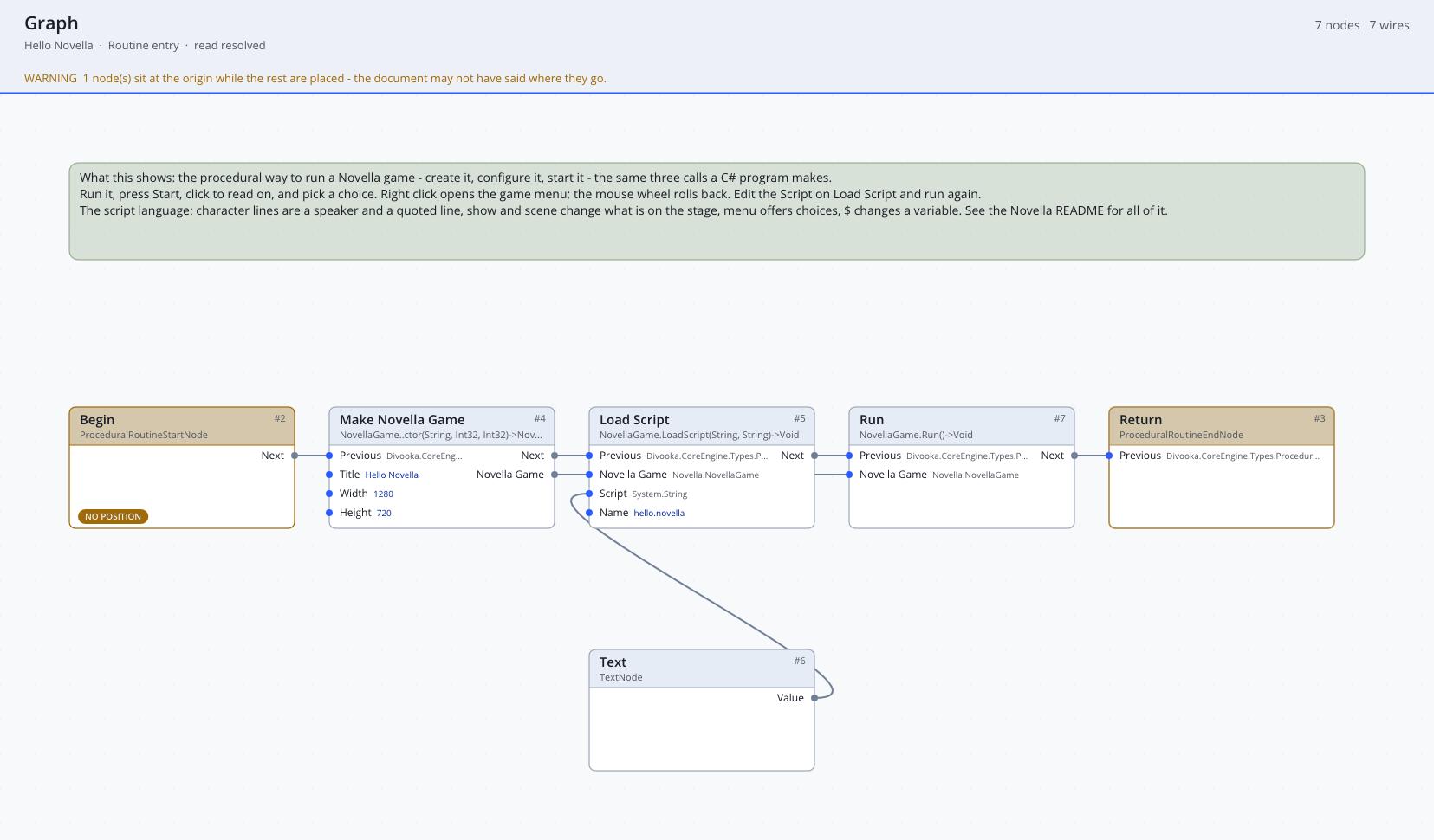
- Make Novella Game: title
The Red Thread, width1920, height1080. - Add Library Assets: the game's images, sounds, fonts and scripts, embedded in the document.
- Load Scripts From Assets: folder
scripts. - Set Config:
autosave_slots,8. - Run.
Run the graph and the game opens in a window. Validate in place of Run, followed by a print of its result, is the lint.
Register Command binds a run command to a function with no inputs and no result, which suits commands that only do something, such as writing a log or opening a web page. Register Command Function binds one to a function that takes the arguments as text and answers, and Register Expression Function does the same for a function the story's expressions call. A command can also be answered by the Command event of an Events graph, as The Red Thread's run fortune is.
Events graphs
In an Events graph, a game is a class. Set the graph's base type to Novella Application (a Novella Game) and the game's callbacks become events the graph can implement, while every Novella Game node acts on the graph's own game without a receiver wired:
| Event | When it runs |
|---|---|
| Setup | Once, before the window opens: settings, assets, scripts, definitions. |
| Script | If implemented, starting a game runs it as a live script instead of the story's start label. |
| Command | For a run command nobody registered: it receives the name and the arguments as text and returns nothing; it answers with Set Result, which the story reads as _return (none if it sets nothing). |
| Label Entered | Whenever the story enters a label. |
| Game Ended | When a story ends, before the main menu returns. |
Only the events a graph actually implements take effect, so leaving Script out keeps the story's labels in charge and leaving Command out makes an unknown command an error.
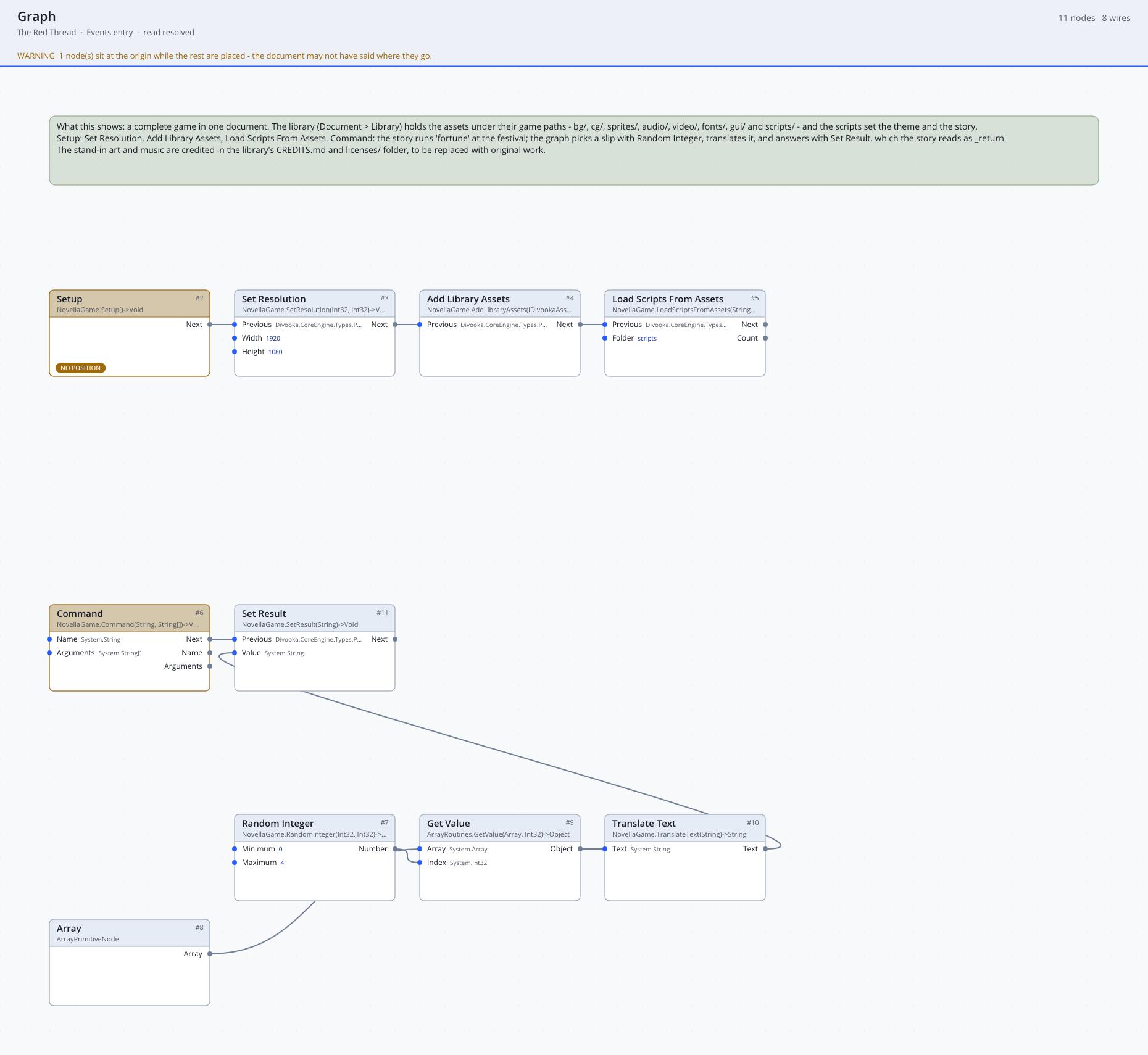
The Red Thread's document answers its story's run fortune this way:
Command → Set Result, fed by Translate Text of one slip from an array of fortunes, the slip picked by Random Integer from 0 to the last index
A Setup that loads scripts from the document's library is a complete game:
Setup → Set Resolution (1920, 1080) → Add Library Assets → Load Scripts From Assets (
scripts)
To run it, run the graph; the Novella framework that the package registers for Novella Application opens the window. Plugins > Frameworks > Novella > Run Novella Game does the same from the menu, for the document's entry graph.
Live scripts as nodes
Implementing Script makes the event's execution path the story. Say, Show, Scene and the rest play one at a time and continue when the player has answered; Menu returns the chosen index for a Branch or Switch, and Input returns what was typed:
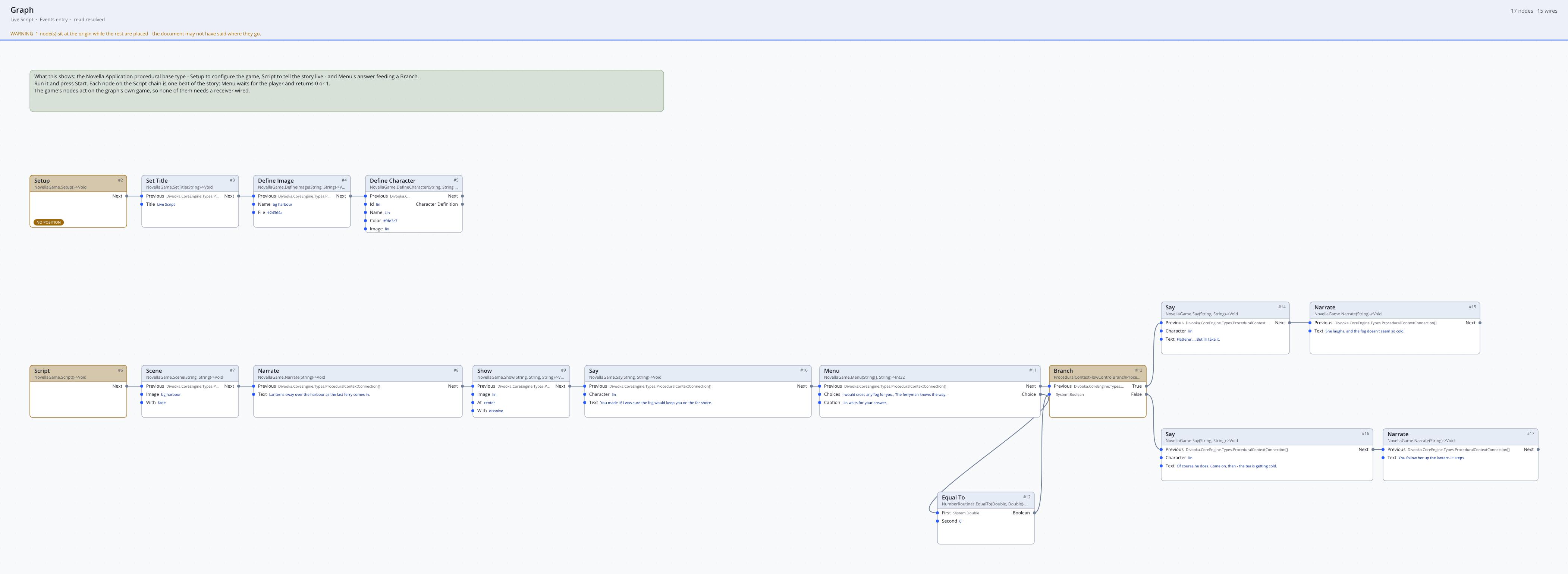
Script → Scene (
bg garden,fade) → Show (qinglan smile,right,dissolve) → Say (q,What hangs in the treetop?) → Menu (A gong,The moon) → Branch on choice = 1 → Say (q,The moon. Correct.)
It is the most direct way to write a small game as nodes. Its limit is stated, not hidden: a graph's execution position is not data, so a live script cannot be saved, loaded or rolled back. Call Label runs a story label from the live script, but saving and rollback stay unavailable while the live script is underneath it. For a game players will save, write the story as labels or scenes, in script or with the functional nodes, and keep the Events graph for setup and commands. See Concepts.
Functional story building
The functional nodes write a story without any script. One label is a chain:
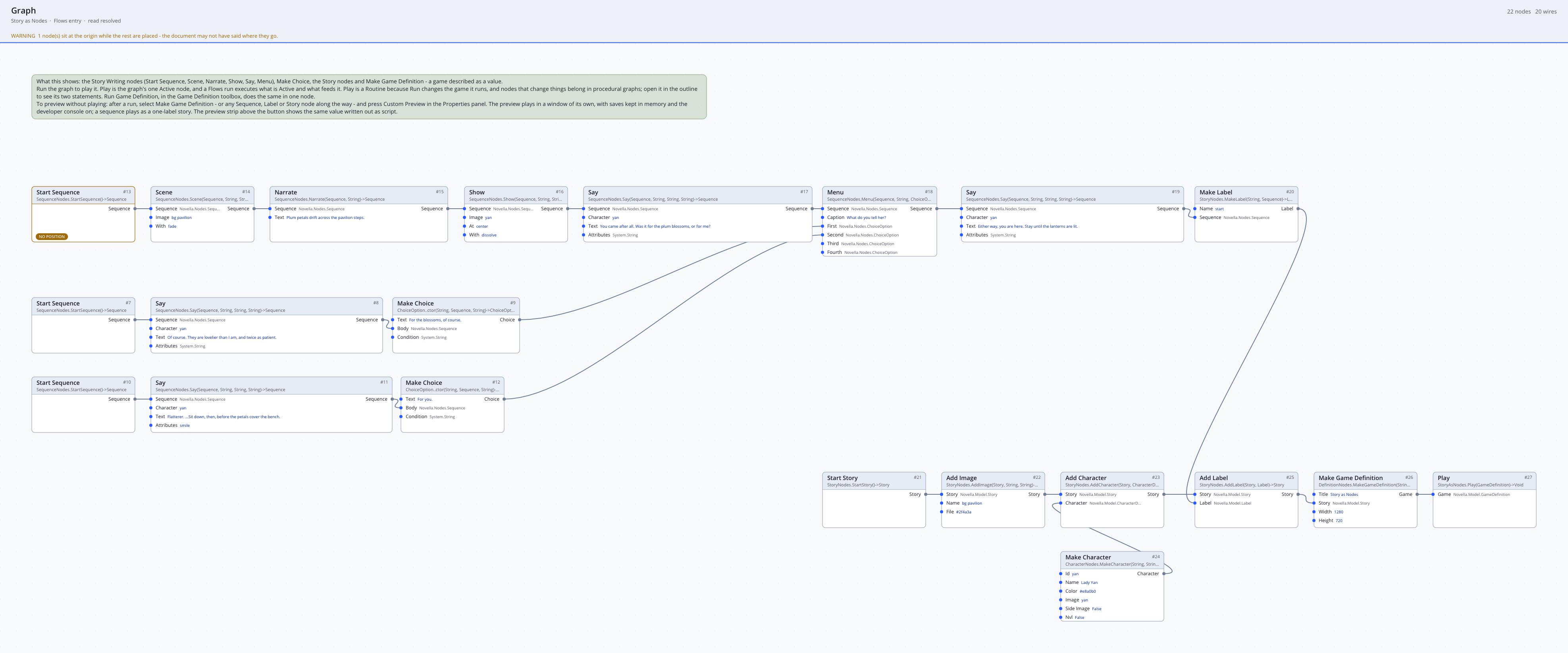
Start Sequence → Scene (
bg garden,fade) → Show (qinglan smile,right,dissolve) → Say (q,You came.) → Menu (caption, Make ChoiceI did.with its own sequence, Make ChoiceI was passing.with its own) → Make Label (start)
and the story collects labels and definitions:
Start Story → Add Label (start) → Add Label (garden) → Add Character (Make Character
q,Qinglan,#c0392b, imageqinglan) → Add Default (affection,0) → Make Game Definition (The Garden, story) → With Library Assets → With Theme (text_size,40)
Logic needs no script either. A branch on a variable and a change to one are nodes too:
Apply Effect (Add To Variable
affection,1) → If (Variable At Leastaffection,3; then a sequence with Sayq,Then stay.; otherwise a sequence with Sayq,Then go.)
and a choice offered only sometimes takes a condition on its Make Choice: All Of (Has Visited market, Not (Variable Is Set gift)).
The two styles mix freely: Story From Script or Script nodes bring in script text where nodes are clumsy, as do Condition From Script and Effect From Script for a single test or change, Combine Stories merges a scripted story with a node-built one, and Story To Script shows any of it as script. A story built from condition and effect nodes prints the same script a person would have written, and that script reads back the same.
A label built from nodes comes from no file, so it does not fall through to the next label as a script's does: reaching its end ends the game, or returns to its caller. End a label that should lead on with Jump, Call or Return. The lint warns when a label built from nodes can run off its end and the label after it is also built from nodes, since that is where a script's label would have fallen through.
Logic in Function graphs
Where the Conditions and Effects nodes cannot put a test or a change together, a Function graph takes over, still without script. Condition From Function, Number From Function, Text From Function and Jump From Function each take a member Function graph of the document that is given the story's variables (a Story Variables), reads them with its const members, Number, Text, Flag and the rest of the Story Variables nodes, and answers: true or false, a number, text, or the name of the label to jump to. Effect From Function takes a procedural graph, such as a Routine, that changes the variables with Set Number, Set Text, Set Flag and Add, which a Function graph does not offer because they change the story. The graph is named on the node's function pin, as any delegate pin names a function.
A member Function graph Is Generous, with an input
Variablesof type Story Variables: Number (Variables,kindness) → Bigger Than Or Equal (2) → its outputHolds. In the story: If (Condition From Function naming Is Generous; then a sequence with Say)
What the graph reads and writes are the story's variables, so its changes save, load and roll back with the story. Like a C# lambda, though, a function has no script form: Sequence To Script shows a description in its place, the lint cannot look inside it, and a story that uses one does not read back from its script. Keep to the Conditions and Effects nodes where they can say it.
Register Command Function and Register Expression Function on Novella Game do the same for the script: a graph implements a run command, or a function the story's expressions call, that takes arguments and answers.
A game as scenes
The Scenes nodes write a game without labels, jumps or menus wired by hand. Each scene is one Make Scene:
Make Scene (
start; lines Start Sequence → NarrateA bridge in the rain.; ending Choose Scene (Cross it?, Scene ChoiceCross.→far_sidewith effect Add To Variablecourage, Scene ChoiceWait.→near_side); backgroundbg bridge)
Make Scene (
far_side; lines NarrateThe far side.; ending Branch To Scene (Variable At Leastcourage,1;brave;near_side))
and the story collects them, with the variables they use:
Start Story → Add Default (
courage,0) → Add Scene (start) → Add Scene (far_side) → Add Scene (near_side) → Add Scene (brave) → Make Game Definition
In a procedural graph, the Novella Game node Add Scene adds each scene to the game instead.
Describe, preview, run
The intended workflow keeps the game's description in one place and plays it from two:
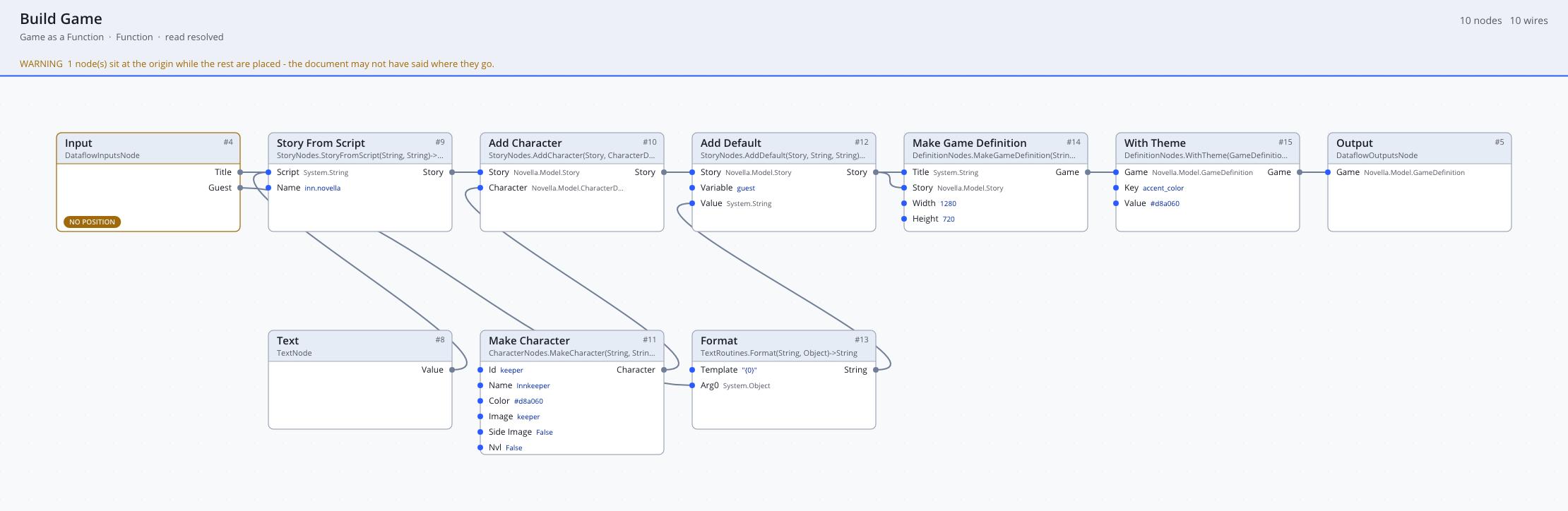
- Describe the game in a Function graph. Build the story, characters and settings with the functional nodes, and return a Game Definition from the graph.
- Call it from a Flows graph to preview it. Place the function in a Flows graph, select its output, and open the Custom Preview in the Properties panel. The game plays in a window of its own, on a thread of its own, with saves kept in memory (a preview never touches a player's real saves) and the developer console on (Shift+O;
jump labelwarps), even if the game's scripts setdeveloper_modeto false. - Hand the same definition to a procedural graph to run it for real: Make Novella Game From Definition → Run, or Run Game Definition.
The Custom Preview plays more than whole games. A Story with no start label starts at its first label, a Label plays as a one-label story, a Sequence plays as the start label, a Scene plays as a one-scene story, and a Novella Game plays its definition, so any node along a chain can be tried on its own. Without the custom preview, the ordinary preview shows the value as script: a sequence, label or story as the script it amounts to, a character as its character line, and a game definition as a summary followed by its script.
Assets in the document
A Divooka document can carry its game: images, sounds, fonts, videos and scripts embedded in the document's asset library (in Divooka Compute, the Asset library, Ctrl+Shift+A, with Import files…). Paths in the library are what scripts refer to, so keep the folders the scripts expect (bg/, sprites/qinglan/, audio/bgm/), and images name themselves from their paths there exactly as on disk.
| Style | Node | What it reads |
|---|---|---|
| Procedural | Add Library Assets | Every file in the library becomes one of the game's files; follow it with Load Scripts From Assets for the scripts. |
| Functional | With Library Assets | The same for a definition; turn on its script option to load the library's scripts into the story too. |
| Functional | Story From Library | One script file from the library, as a story. |
All three take the document's library automatically. Library files and folders can be combined: a later source wins for the same path, so a folder added after the library can override some of its files while testing.
Selecting a text asset in the Asset library shows its first lines in the preview pane, and .novella scripts count as text, so a game's scripts can be told apart and read there without exporting them.
What Divooka does not reach
Everything the script language can say has a node, and so do commands and expression functions that take arguments, with one difference: the arguments a node passes to a label, a command or a screen are values fixed when the graph builds the story, where a script's are expressions worked out as it plays. Add Use Screen is the exception, taking expressions. A few C# extension points have no node: screens written as C# classes (RegisterScreen), for anything the Screens nodes cannot lay out; the functions an animation's function statement calls (RegisterTransformFunction), which Call Transform Function names; commands and functions that work on Values and the runner directly rather than on text; and a live script outside an Events graph. See Development for them.