
Models and the Sun
An ordinary 3D model, a chair or a sign or a lamp, can be stood in a scene so that it looks as if it had been there when the scene was filmed.
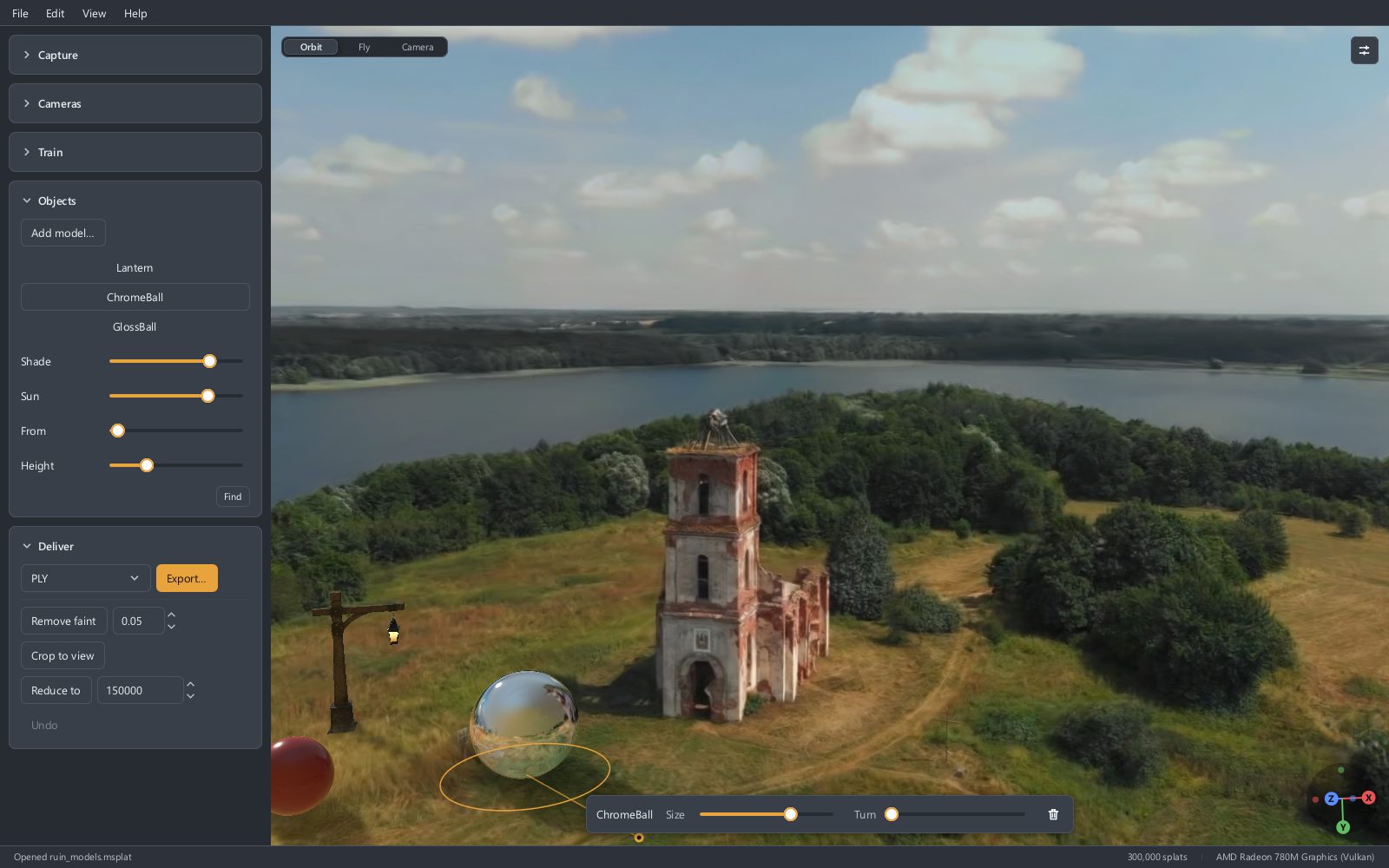
Adding a model
Press Add model… in the Objects section, or drop a .glb, .gltf or .obj file on the view where the model should stand. The Objects section appears once there is a scene.
The model arrives selected, with a ring on the ground round it and a bar under the view.
- Drag the model to move it. Its foot goes where the pointer points: onto the ground, or onto whatever stands there. A drag anywhere else moves the view as usual.
- Size and Turn are on the bar. A scene made from pictures has no size of its own, so how large the model should be beside the things in the scene is yours to say.
- Click another model to select that one, or click neither to select none. Delete removes the one selected.
Why it looks as if it were there
- What is in front of it hides it. The model goes behind a wall that stands in front of it, and in a scene that moves, somebody walking past goes in front of the model.
- It is lit by the place. Under trees it is lit green from above; on a red carpet, warm from below.
- Polished things mirror the scene. A model with metal or glossy parts shows its surroundings in them, as sharply as the part is smooth, and what is close to it is the right size in the reflection.
- It shades the ground. Shade sets how dark that is.
A sun
A scene made from photographs remembers colours, not brightness: the sun in it is a white patch no brighter than the sky next to it. So a model lit by the scene alone is lit softly from all round, which is right for an overcast day and wrong for a sunny one.
Sun, in the Objects section, gives the scene one. Slide it up from nothing and the models are lit from one side and throw shadows away from it.
The easy way to put the sun in the right place is by its shadow. With a sun on, the selected model has a line on the ground to where its shadow ends, and a dot there. Drag the dot until the shadow runs the same way as a shadow the scene already has, a lamp post's or a wall's. The sun goes where it must be to throw it.
From and Height set the same thing by numbers. Find looks for the sun in the scene's own shadows, and tells you when they do not say.
Models and files
A project keeps each model by the name and place of its file; the model itself is not copied into the project. See Files and formats.
If a project is opened where one of its model files is not, that model is not drawn, and the Objects section names it with Locate… beside it. Point to the file and the model stands where it stood, lit as it was. Saving the project in the meantime loses nothing.
Models are drawn in the view and in an exported video. They are not written into a scene exported for other programs, which holds the scene alone.
What to expect
- Nothing is drawn clear: glass looks like plastic.
- A polished model mirrors what the capture saw. Where the capture never looked, a ceiling or the far side of a room, it mirrors a blur.
- A model does not move or play an animation.
- Where the capture saw the ground poorly, at its edges or right under the camera's path, a model can stand a little into it.