
Variables and data members
A program remembers values in two kinds of named place:
| Belongs to | Lives | |
|---|---|---|
| Variable | one routine | while that routine runs |
| Data member | the whole program | for the whole run; every routine reads and sets the same one |
Both are listed with their type first, then their name and what they start at - Number Total = 0 - the way a declaration reads in most programming languages.
Create a variable
- Double-click New variable under the routine's heading, or select it and press
Enter. (Insertamong the variables does the same.) - The Create variable card asks for three things:
- Name - starting with a capital letter, then letters, digits or underscores:
Total,FileCount,Name2. A name the card does not accept says why under it. - Type - what kind of value it holds. The box lists every type the program can use; type a few letters to search it, so
Number,TextandTruthare a keystroke away and a less common type - a date, a list, a file - is found the same way. - Initial value - what it holds when the routine starts, in a box that fits the type.
- Name - starting with a capital letter, then letters, digits or underscores:
- Press OK. The variable appears over the routine's rows, and the picker now offers Set Total and Get Total.
You can also create a variable from the picker while you are filling in a row: New variable… is in its Variables group.
Read and set it
- Set is a row:
Set Total to Total + Current Value. Its card takes the new value, from anywhere a value can come from - typed, another variable, an Operation. - Read it by choosing it as any value's source on a card. A Get Total row exists too, for when you want its value as the result of a row.
Change or remove one
Double-click the variable to open its card again. A new name is followed by every row that reads or sets it, so renaming is safe. Delete on its card, or Delete with it selected, removes it.
Data members
Data members are created the same way, from New data member under Data members at the top of the program, with the Create data member card. Use one when routines need to share a value - a running total several routines add to, a setting read everywhere, a count of how often something happened.
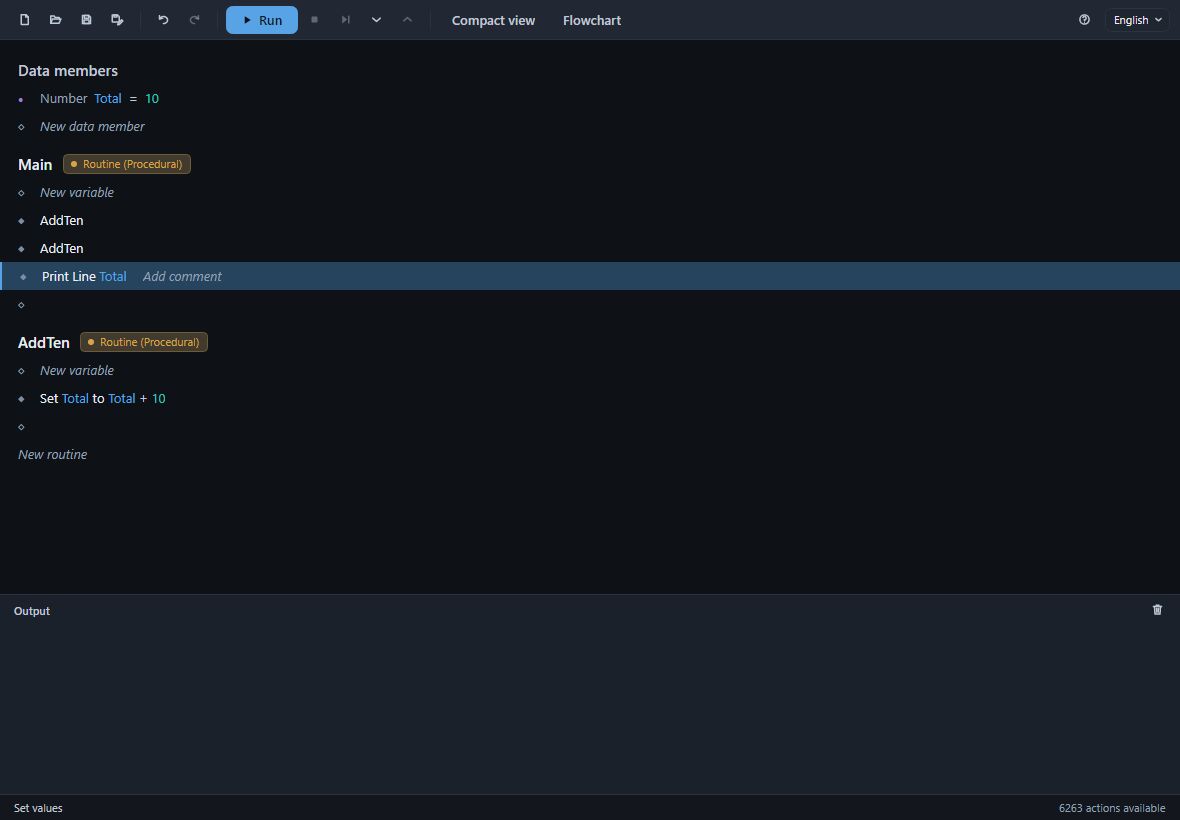
Here Total starts at 10, Main calls AddTen twice, and AddTen sets Total to Total + 10, so Main prints 30: each call found the value the last one left.
A few rules keep names unambiguous: a variable and a data member never share a name, and a data member never takes a routine's name.
A data member may be used outside your rows. It belongs to the document, and a document opened in Divooka Compute can have other graphs that read it. If you remove one that something else uses, Action Maker asks first, and lists what would be left without it.