
Divooka SDK
Every node in Divooka is .NET. A package is a .NET library, a node category is one of its types, and a node is one of their methods, constructors or properties: Tone, in Audio Processing, is the method AudioGenerators.Tone. The Divooka SDK is those libraries used from code, with the tools Divooka Compute ships for it: C# and Python that import Divooka's packages and documents, a .NET SDK to build with, and tools that run a document or build it into a program.
Code does what a graph does, with the same calls, and reaches what a package keeps off the palette too. It works the other way as well: code calls a document's graphs as functions, and a library you write in C# becomes nodes.
What ships with Divooka Compute
| What it is for | |
|---|---|
| The packages | Every package Divooka Compute offers, each a .NET library in its folder; divooka.distribution.json there names them. |
pure |
Divooka Pure: C# scripts and a prompt, importing Divooka's workloads, packages and documents. |
spy |
SteelPython: Python 3.12, importing them too. |
luna |
Lua 5.2 scripts and a prompt. |
dotnet |
A .NET SDK, in Tools\dotnet10: it builds C# projects, and the programs Publish makes. |
stew |
Runs a document from a command line - see Stewer. |
AviatorBeta |
Builds a document into a program of its own, as Publish does - see Exporting a program. |
divooka-mcp |
Lets an AI assistant write, check and run Divooka documents through the Model Context Protocol; divooka-mcp --help names the assistants --config prints the setup for. |
dvn |
Serves a notebook document as a web page - see Divooka Notebook. |
In Divooka Compute's Terminal tab (Ctrl+Shift+`) each of them starts by name, whatever the shell: every session's PATH begins with Divooka Compute's folder, then its .NET SDK. From a command line outside the editor, run them from that folder, or add the folder to your PATH.
C#: Divooka Pure
pure script.cs runs a C# script - statements from the first line, with no project and no Main - and pure alone opens a prompt. Import brings Divooka in:
Import(Divooka.Workloads.AudioProcessing)
var tone = AudioGenerators.Tone(440, 0.5);         // the node Tone
Console.WriteLine(AudioAnalysis.Duration(tone));    // 0.5

Import("Examples/Computational Algorithms/Euclidean Algorithm.dvk")
EuclideanAlgorithm.Run("48", "18");                // the document, run as stew runs it
| To import | Write |
|---|---|
| A package: the types its nodes are methods of | Import(Divooka.Workloads.AudioProcessing) - its library's name, or the name Divooka Compute shows it under |
| A workload: every package it names | Import(audio-processing) - its id, or its name |
A document: a class named after it, with a method for each of its Functions, Routines and Constructs, and Run for the whole document |
Import("Examples/Audio/Tones and Noise.dvk") - a path beside the script, in the working folder, or in Divooka Compute's folder |
A node is called on its type - AudioGenerators.Tone, not Tone alone - because two types may each have a node of the same name. :packages at the prompt lists the workloads and packages Divooka Compute ships. The rest is Pure's own: Include for another script, NuGet packages through Import, and the prompt's keys.
Python: SteelPython
import Divooka.Workloads.AudioProcessing as audio

tone = audio.AudioGenerators.Tone(440, 0.5)
print(audio.AudioAnalysis.Duration(tone))          # 0.5
spy script.py runs a script and spy alone opens a prompt. Divooka's packages, workloads and documents import as Python modules, with no Python installed on the machine: see Python.
Scripts in the editor
Open a .cs or .lua file in Divooka Compute and its toolbar runs it two ways:
- Run (
F5) runs it as the terminal would, withpureorluna, in the file's folder; what it prints comes into the dock's Console. - Automate Editor runs it inside the editor, with
Editorto work on: the open documents, their graphs, nodes and wires, the selection, the view and the status line. Each change it makes is made as your own edit would be, and the whole run is one step of the document's history - Run script GridLayout.cs - which oneCtrl+Ztakes back; a run that fails or is stopped leaves every document as it was. A breakpoint (F9) stops it, with its variables in Locals.
This script runs every document in a folder and says how each went:
var documents = Editor.FindDocuments("Documents");   // a folder beside this script
int failed = 0;
for (int index = 0; index < documents.Length; index++)
{
    Editor.Status($"Running {index + 1} of {documents.Length}: {Path.GetFileName(documents[index])}");
    var result = Editor.Run(documents[index]);
    Console.WriteLine(result);
    if (!result.Succeeded)
        failed++;
}
Console.WriteLine($"{documents.Length - failed} of {documents.Length} ran to the end.");
Lua has the same members, called with a colon: graph:AddNode("Print Line", 0, 0). New from examples has more under Editor Automation, among them Grid Layout in both languages.
A C# project
A program or a library of your own is an ordinary C# project that references Divooka's libraries from Divooka Compute's folder - set DivookaCompute below to where yours is. The terminal's dotnet builds it, with nothing else installed; dotnet new console -n ToneLength starts one.
<Project Sdk="Microsoft.NET.Sdk">

  <PropertyGroup>
    <OutputType>Exe</OutputType>
    <TargetFramework>net10.0</TargetFramework>
    <ImplicitUsings>enable</ImplicitUsings>
    <DivookaCompute>C:\Divooka Compute</DivookaCompute>
  </PropertyGroup>

  <ItemGroup>
    <Reference Include="$(DivookaCompute)\Divooka.Audio.Operations.dll" />
    <Reference Include="$(DivookaCompute)\Divooka.Multimedia.Audio.dll" />
    <Reference Include="$(DivookaCompute)\Divooka.Sounds.Procedural.dll" />
  </ItemGroup>

</Project>
using Divooka.Audio.Operations;

var tone = AudioGenerators.Tone(440, 0.5);
Console.WriteLine(AudioAnalysis.Duration(tone));     // 0.5
dotnet run builds it, copying what those libraries use from the same folder, and runs it. Reference each library whose types your code names; when one is missing, the compiler says which: The type 'WAVAudioPayload' is defined in an assembly that is not referenced. You must add a reference to assembly 'Divooka.Multimedia.Audio'. Divooka's libraries are built for .NET 10, so the project targets net10.0. Some of them are on NuGet too.
A library of your own, as nodes
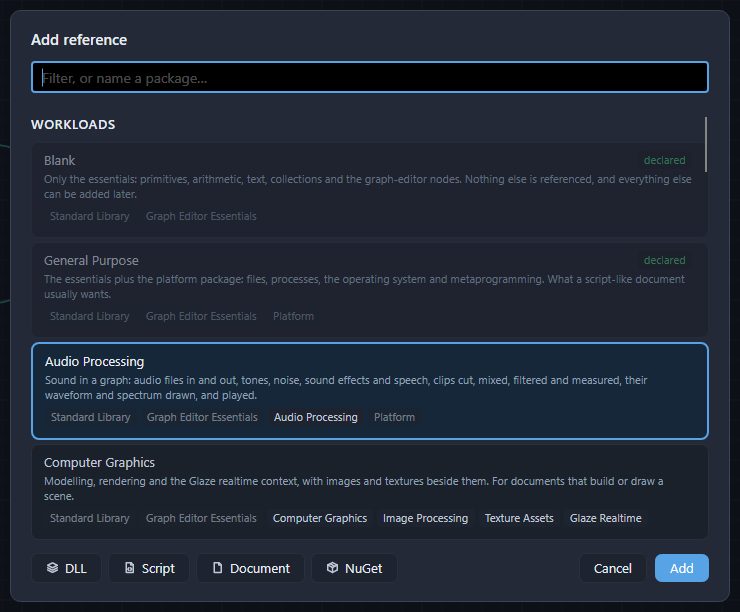
The other way round, what you write in C# becomes nodes. Add reference (Ctrl+Shift+L) takes a C# file with Script, and a library you built with DLL - see References. Both work in Divooka Compute and in Divooka Engine, which has only the essential nodes built in and expects you to bring the rest this way.
using System;

namespace Geometry;

/// <summary>Measures of a circle.</summary>
public static class Circles
{
    /// <summary>The area of a circle.</summary>
    /// <param name="radius">How far the edge is from the centre.</param>
    public static double Area(double radius) => Math.PI * radius * radius;

    /// <summary>The length of a circle's edge.</summary>
    /// <name>Circumference</name>
    /// <returns name="Length">The length.</returns>
    public static double EdgeLength(double radius) => 2 * Math.PI * radius;
}
Built into Geometry.dll with <GenerateDocumentationFile>true</GenerateDocumentationFile>, and referenced with Geometry.xml beside it, this offers a Geometry section holding a Circles category: Area, which takes the radius, with The area of a circle. as its tooltip, and Circumference, whose output is Length.
| In the library | Becomes |
|---|---|
| A public type | A category of that name, in a section named after the file. |
| A public static method | A node offered in every graph: its parameters are its inputs, and what it returns is its output. |
An out parameter |
One more output. |
| A public constructor | Make and the type's name - Make Tally - a node that makes one. |
| A public property | A node that reads it, offered in every graph. |
| A public instance method | A node that takes the object first, offered in Routines, Events graphs and states, where things happen one after another. Mark it <const>true</const>, for a method that changes nothing, and it is offered in every graph. |
| A generic method | A node with a chip for each type argument: choose the type on it, or let the value wired in decide. |
<summary> |
The node's tooltip. |
<name> |
The node's title, in place of its member's name - which otherwise reads as words: DiameterOf is Diameter Of. |
<returns name="..."> |
The name of its output. |
<hidden>true</hidden> |
Keeps the node off the palette; a document that already uses it still opens and runs. |
The documentation's tags take effect for a library with its documentation file beside it. A C# file referenced with Script is compiled when the document opens, with no .NET SDK, and its nodes are named from its code. A translation of the documentation file beside it - Geometry.zh.xml, in the same form - gives the nodes their words in Chinese. C# Tricks has more of the tags.
Plugins
An editor plugin adds commands to the editor, under the toolbar's wrench, and can offer nodes as well. It is a folder in Plugins beside the program, or in your own %AppData%\DivookaCompute\Plugins (%AppData%\DivookaEngine\Plugins for Divooka Engine), which right-clicking the wrench opens; a plugin in yours wins over one of the same name beside the program. The folder holds C# files, which the editor compiles when it starts - no project and no .NET SDK - or a library named after the folder. The sample that ships, Plugins\SayHello\SayHello.cs, is a whole plugin:
[DivookaPlugin("Hello Plugin", Category = PluginMenuCategories.Samples)]
public static class SayHello
{
    [PluginCommand("Say hello", Tooltip = "Writes a line in the status bar, to show that a plugin's command ran.")]
    [PluginText("Chinese", "打个招呼")]
    public static void Greet(PluginMenuContext context)
        => context.Status("Hello from the sample plugin.");
}
Its command is Samples ▸ Hello Plugin ▸ Say hello under the wrench. A plugin is picked up when the editor next starts; see Plugins.
See also
- Python - SteelPython, and Divooka imported as Python modules.
- References - what a document uses beyond the language, and adding it.
- Exporting a program - Publish, stew, and packing a document to hand on.
- Divooka Engine - the editor with only the essential nodes, for distributions of your own.