
Control flow
Rows run from the top down. Control flow changes that: it decides whether rows run, how many times, and where a routine stops. Every control flow row is orange, is picked from the Flow control group at the top of the picker, and holds its rows indented under it. Each block it holds ends in its own New action row, which is where you add to that block.
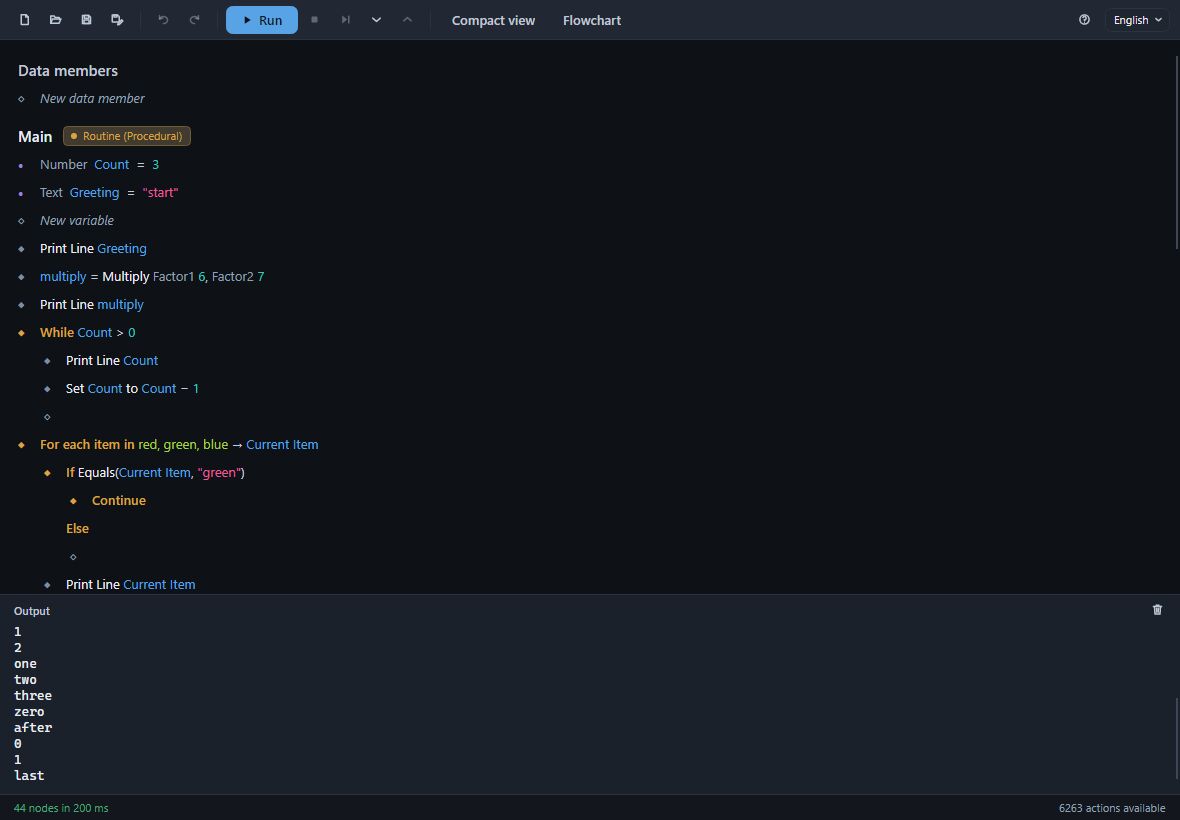
If and Else
If runs the rows under it when its condition holds, and the rows under Else when it does not. Leave the Else block empty when there is nothing to do otherwise.
Its card asks for a Condition, in one of two forms:
- Comparison - two values and how they compare, on one line:
Count > 1,Name = "report". Each side takes its value from anywhere a value can come from. - Boolean Operation… - any action that answers true or false, picked from the picker:
Equals(Current Item, "green"),Is Null Or White Space.
Rows after an If
A block may go on after an If: the rows under it run once the If, or its Else, is finished, as you would expect. (In a Divooka document this is written in a particular way; Action Maker programs and Divooka documents says how, if you also open the program in Divooka Compute.)
Loops
Each loop hands the rows inside it a value, shown after the arrow on its row, which those rows read by name:
| Row | Runs its rows | Hands them |
|---|---|---|
For 1 to 5 → Current Value |
once for each number from the first to the last, optionally , step 2 |
Current Value, the number |
For each item in red, green, blue → Current Item |
once for each item of a list | Current Item, the item |
While Count > 0 |
as long as its condition holds, checked before each time | - |
Repeat 3 times → Current Index |
a fixed number of times | Current Index, which pass this is |
A While's condition is a Comparison or a Boolean Operation, as an If's is. Make sure something inside it changes what the condition reads - in the picture, Set Count to Count − 1 - or it never ends; Stop (Shift+F5) ends a run that will not.
Break, Continue and Return
- Break leaves the loop it is in at once; the rows after the loop run next.
- Continue skips the rest of this time round the loop and starts the next. In the picture, the green item is never printed.
- Return leaves the routine at once, as
returndoes in C#, handing back the routine's outputs if it has any.
Break and Continue are offered only inside a loop, where they mean something. Nothing can run after one of these three in the same block, so a block that ends in one has no empty row after it; to put a row before it, select it and use Insert before (or Insert).
Sequence
A Sequence runs its parts one after another, each part numbered: 1, 2. Its card sets how many parts there are. A Sequence is mostly useful for keeping the steps of a long routine visibly apart; rows written one after another run in order anyway.
Try, Catch and Finally
Try runs its rows, and if one of them fails the run does not stop: the rows under Catch run instead, with the failure handed to them as Exception, so they can print what went wrong, log it or try another way. The rows under Finally run either way, failure or not - the place to close or clean up what the Try rows opened.
Use a Try around rows that can fail for reasons outside your program: a file that is missing, a folder you cannot write to, a web address that does not answer. A failure in a routine the Try rows call is caught too.
Moving rows in and out of blocks
Alt+↑ and Alt+↓ move the selected row past its neighbour - and at the edge of a block, out of it, to just before or after the row that holds it. A flow control row moves with every row it holds. Copy, cut, paste and delete take a row with everything under it too.