
Equations
Impulse, Expo and Formula put equations in documents, slides and sheets with one editor, and typeset them with Methodox Office Math's engine. They are saved as Office's own equations, so Word, PowerPoint and Excel open them as equations they can edit, and the equations those programs write open here.
Inserting one
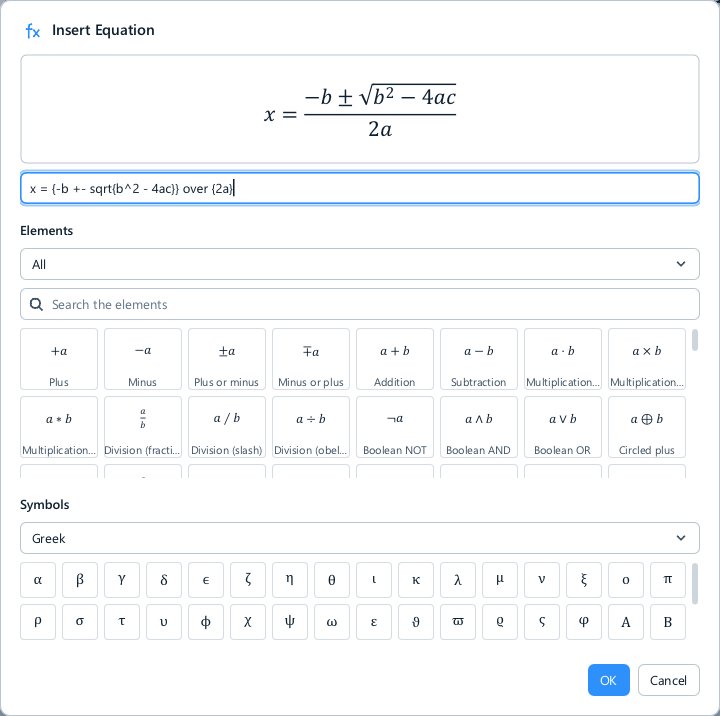
Insert ▸ Equation opens the equation editor. In Impulse and Expo Alt+= opens it too, as in Word and PowerPoint; in Formula Alt+= stays AutoSum, as in Excel.
Type the equation in Math's one-line language, which the preview above it typesets as you type:
x = {-b +- sqrt{b^2 - 4ac}} over {2a}
The Elements and Symbols lists under it insert the structures and characters you do not know the commands for, as Math's decks do. OK puts the equation in as one undo step.
To change an equation, double-click it: the editor opens with its text.
Where it goes
- Impulse: at the caret. Inserted among words, the equation is inline and set in the line; inserted into an empty paragraph, it is a display equation on a line of its own. It is anchored in the text, so typing before it carries it along.
- Expo: on the slide, as a text box holding the equation, which you move, resize and format like any text box.
- Formula: on the sheet, as a text box over the cells, which moves and resizes like the sheet's other objects.
Equations from Word, PowerPoint and Excel
Equations made in Word, PowerPoint and Excel open as equations, set in Cambria Math as Office sets them, and are written back as they came unless you edit them. An equation you insert or edit is saved as Office Math Markup; on a slide or a sheet it also carries its text, which programs that cannot show equations show instead.
See also
- Methodox Office Math, the formula editor of the suite