
Document Parameters and the Document Session
Document Parameters are named values that belong to a document: a principal, a city, a region, a rate. Its formulas, smart objects, Data Sources and code all read them, so changing one changes everything that depends on it. Each is a number, text, a logical value or a date, and is saved in the document.
This page also explains how a Divooka graph reaches the document it works on, which is what lets the same graph run inside Methodox Office and in Divooka Compute.
Editing parameters
Tools ▸ Parameters opens them in the sidebar's Parameters deck, where each row is a parameter you edit in place. Every change is one undo step, and what reads the parameter recalculates or refreshes with it.
Reading and setting them
Functions and smart objects only read parameters. Only a Command, or an event handler, may set one, as part of its undoable transaction.
| Where | Reads a parameter as |
|---|---|
| Formula | =PARAM("Region") |
| Lua, Python | param.Region |
| C# | Param["Region"] |
| Divooka graph | a Number, Text or Boolean Parameter node, wired from This Document (see below) |
| Data Source | param.Region in its query |
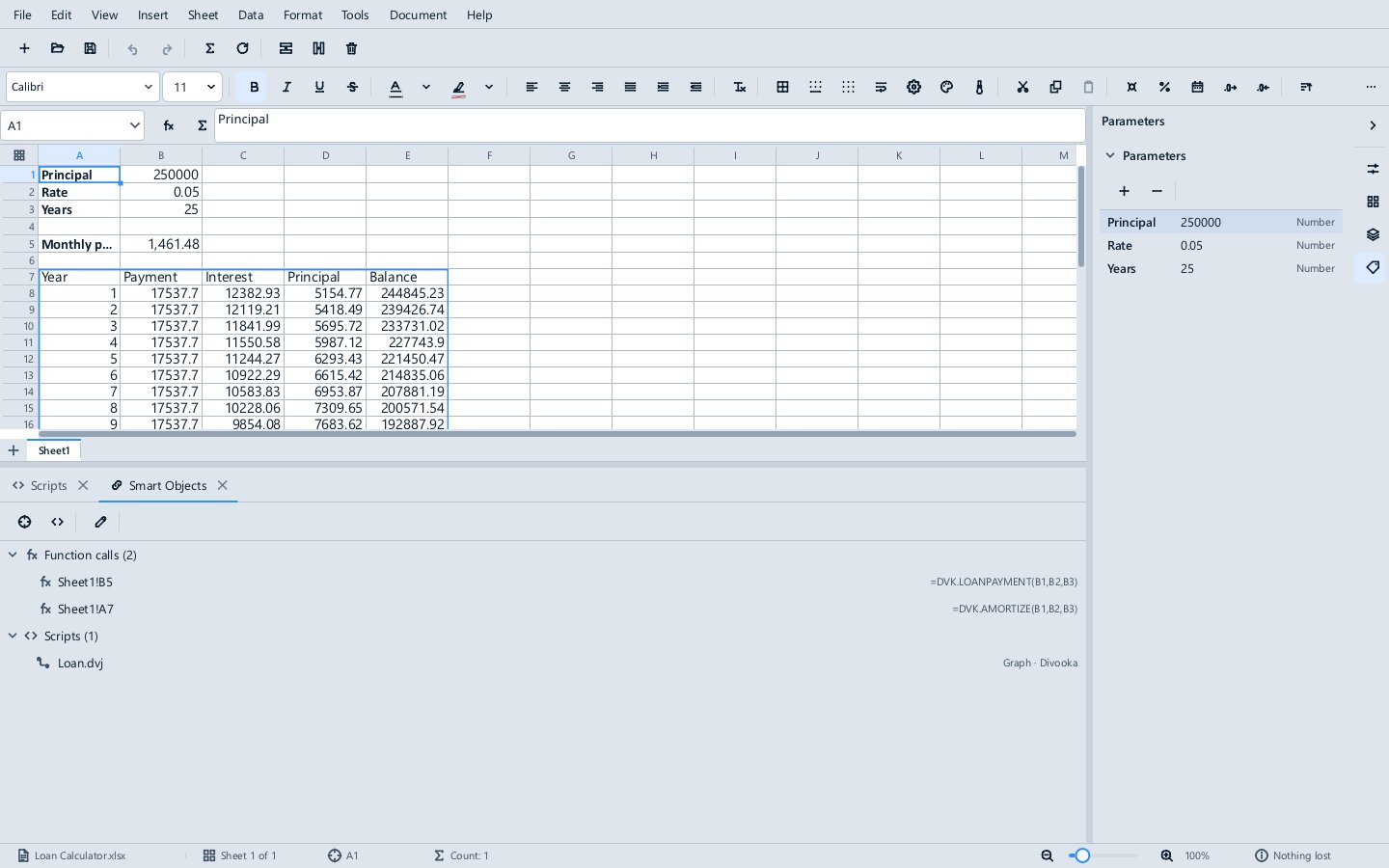
Every read is recorded, so changing a parameter recalculates exactly the cells, and refreshes exactly the smart objects and Data Sources, that read it, as one undo step with the change. =PARAM() answers as soon as the document opens, before its code is enabled, because a parameter is data, not code.
The document session
A parameter is a member of the document, the way a sheet or a paragraph is. So a graph that reads one first needs the document itself, and gets it from a node:
- This Document gives the document the graph belongs to. Inside Methodox Office, that is the open document, which the window passes into every run of a Function, a Command or an event handler.
- Open Office Document gives a document from a file, a Formula workbook, an Impulse document or an Expo presentation. It is for Divooka Compute; inside Methodox Office it ignores the path and gives the graph's own document.
Everything a graph does to a document is then a node that takes the document as its first input: the parameter reads (Parameter, Number Parameter, Text Parameter, Boolean Parameter, Has Parameter, Parameter Names), Set Parameter, and the document edits (Get Cell, Set Cell, Set Formula, Write Table, Add Sheet, Add Paragraph, Add Slide, Slide Count, Document Name, Document Path, Run Command). The edits and Set Parameter are offered only in Routines and Events graphs, never in a Function.
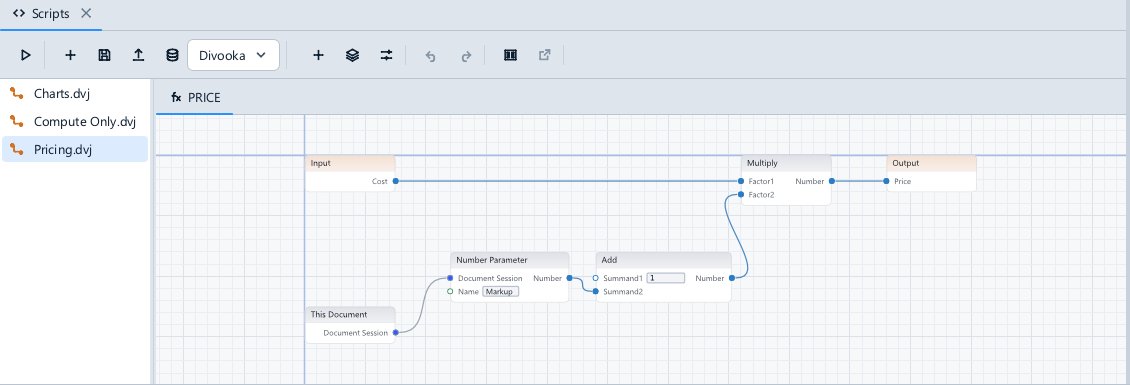
You rarely place This Document yourself. When you add a parameter from the graph editor's add-node menu, which lists the document's parameters by name, the read is placed with its name filled in and wired to the graph's This Document, which is added beside it the first time.
The same graph in Divooka Compute
Because the document is an input rather than something the node finds on its own, Divooka Compute can supply it too. There are two ways:
- Open in Divooka Compute, on the graph editor's strip, sends the graph to the installed Compute together with a copy of the document as it is in the window, saved or not. In Compute, This Document gives that copy, and the add-node menu lists its parameters under Office ▸ Parameters, each placing the read of that parameter by name, just as Office's own editor does. Run the graph there and it reads and changes the copy, never your file. Save in Compute and the graph comes back into the document as one undoable change.
- Open Office Document, given a path, opens a workbook, document or presentation in Compute, so a graph can be written and debugged against a real file without Methodox Office running. Save Office Document saves what it changed.
Either way the graph is the same graph: what you wrote or debugged in Compute runs in Methodox Office unchanged, and the other way round. Methodox Office sends its Office nodes along with the graph, so Compute offers them whatever its own installation includes, and takes that reference out again when the graph comes back, so the document never carries a path from your computer. This needs a current Divooka Compute; an older one, which cannot load the nodes a graph names, opens the graph without them.
Why it is safe
Inside Methodox Office, a graph only ever works on its own document. Open Office Document never opens a file there, in either edition, so a document's graph cannot read another document through it. Only Divooka Compute, where you run graphs yourself, lets it open files. A Command still changes the document only after you enable the document's code, with only the access you granted it (see Trust).
Graphs from earlier releases
Earlier releases had Parameter nodes that found the document by themselves. They worked inside Methodox Office, but in Compute they were valid nodes with nothing to read from, and failed when they ran.
A graph with those nodes is brought to the new shape when it is read: each old node becomes the same read or edit on the document, at the same place and with the same literals, label and wires, fed by one This Document node per graph. Nothing else in the graph changes, and a graph with no old nodes is left exactly as it was. The document's saved text takes the new shape the next time you edit that graph, and Open in Divooka Compute sends the new shape.
Scripts are unaffected: Lua, C# and Python read parameters as param.Region as before.