
Assistant
A prototype. The Assistant works, and is in this release so you can try it, but it is early: expect rough edges and changes. Signing in with Methodox One is written but not running yet, so for now it needs your own Claude API key, or an AI tool of your own through
mos mcp.
The Assistant helps you study and edit your documents and add automation to them: ask what a workbook computes, have a table reformatted, a summary sheet written, or a worksheet Function or a smart object added. It works through the same object models, undo and trust rules as everything else in Methodox Office, and it lives in the Start Centre rather than inside each application, so the applications stay as they are whether you use it or not.
It comes in two forms, which share one set of tools:
- The Assistant page of the Start Centre, a conversation with Claude;
mos mcp, which offers the same tools to any AI assistant that speaks the Model Context Protocol (MCP), such as Claude Code, Claude Desktop, Cursor or Codex, with no Methodox account.
The Assistant page
Open Methodox Office, the Start Centre, and choose Assistant.
- The first time, Connect… asks how to reach Claude. Choose My Claude API key and paste a key from platform.claude.com; it is kept in the Windows Credential Manager, never in a file or a document. Model chooses the Claude model, Claude Opus 5.5 unless you change it.
- Attach a document, or Browse…, to give the conversation the documents it is about. Any document the suite opens can be attached; documents already open in Impulse, Formula, Expo or Nu can be reached without attaching them.
- Type a question or a request and Send. Stop ends an answer early, and New conversation starts again.
What the Assistant reads, it reads straight away, and lists as it goes. Everything that changes a document asks first: each edit, script, save or run of a Command is shown as a card saying what it will do, with a script's code in full, and happens only when you press Allow. Decline refuses it, and the Assistant is told.
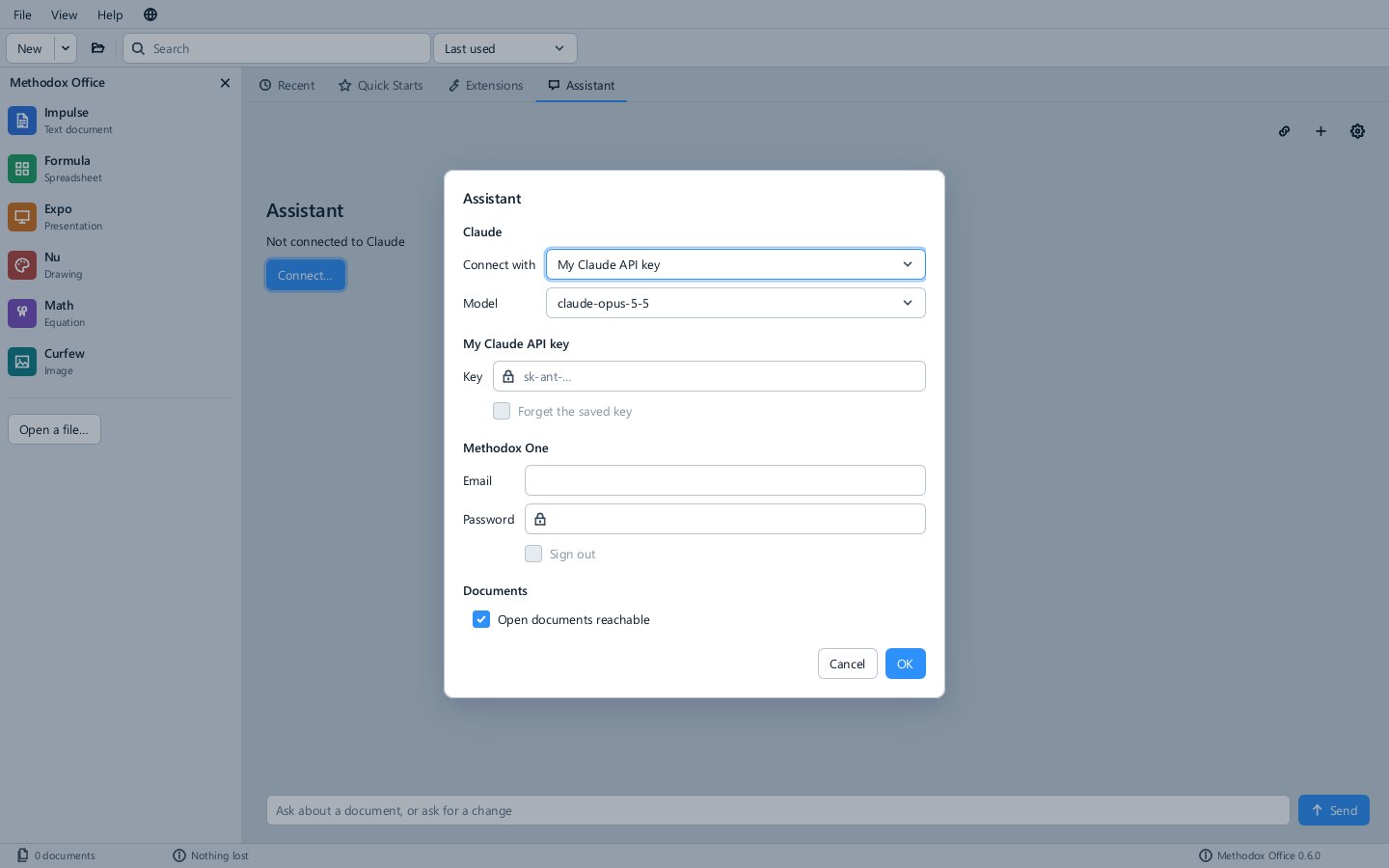
Assistant settings has the key (Forget the saved key removes it), the model, and Open documents reachable, which lets the Assistant and MCP clients edit documents open in the applications; it applies to applications started afterwards.
How an edit reaches your document
- A document open in an application is edited in its window, live: you see each change as it happens, a notice says the Assistant changed it, and each change is one step of that window's Edit ▸ Undo. You save it yourself, as usual.
- Any other document is opened from its file by the Assistant and nothing is written to the file until it saves the document, which, like any other edit, you allow first.
Edits go through the documents' object models, so what the Assistant can do is what a script can do, and a list of changes is applied all or nothing.
Trust stays yours
The Assistant cannot enable a document's code or grant it anything; only you can, in the application, with the code in front of you (see Trust).
- Code the Assistant writes into a document, a script, a Function or a smart object, does not run until you enable it. Writing code into a document that is open withdraws its enablement, so you see and enable the new code yourself.
- A Command the Assistant runs runs only in a document you have already enabled, and only with the network and file access you granted it.
- The Assistant's own Lua, which it uses to look at or change a document, runs in Lua's sandbox with no network or files, and is refused on a document whose code is waiting for you to enable it.
mos mcp
mos mcp serves the Assistant's tools to an AI assistant you already use. The assistant starts it and talks to it over standard input and output; there is no server to run, no port, and no Methodox account.
mos mcp                          serve the tools (what the AI assistant starts)
mos mcp --readonly               only the tools that read
mos mcp --config <client>        print what to add to claude, claude-code, cursor or codex
--config prints the lines for that client with the path of your installation, for instance for Claude Code:
mos mcp --config claude-code
claude mcp add methodox-office -- "C:\Users\<you>\AppData\Local\Programs\Methodox Office\mos.exe" mcp
and for Claude Desktop, Cursor and Codex the entry for their configuration files. Documents open in the applications are edited live in their windows, as from the Start Centre, while Open documents reachable is on; setting the environment variable DIVOOKA_OFFICE_ASSISTANT_BRIDGE to 0 turns that off for the applications started with it. Your AI assistant's own rules decide what it asks you before calling a tool; the trust rules above hold either way.
The tools
| Tool | What it does |
|---|---|
get_guide |
How Methodox Office automation works: the object models, Commands, Functions, smart objects, Data Sources, parameters, events, extensions and trust |
list_documents |
The documents open in the applications, the ones mos mcp holds open, and the recent documents |
read_document |
A document's structure and content: sheets, ranges and formulas; paragraphs and tables; slides and shapes; pages and shapes |
read_automation |
Its scripts, Functions, graphs, smart objects, Data Sources and parameters, whether its code is enabled, and the access granted it |
read_script |
The code of one of its scripts |
edit_document |
Changes content with a list of operations, all or nothing, as one undo step |
run_lua |
Runs Lua against the document as one undo step, in Lua's sandbox |
write_script, delete_script |
Adds, replaces or removes a Command or a worksheet Function script, after checking it compiles |
write_smart_object |
Changes a smart object's source, or in Impulse adds one |
set_parameter |
Sets or defines a Document Parameter |
run_command |
Runs one of the document's own Commands, if you have enabled its code |
undo |
Takes back the last step or steps of the document's undo history |
save_document |
Saves the document, or saves it as a new file |
close_document |
Lets go of a document mos mcp opened from its file |
create_document |
Makes a new workbook, document or presentation |
convert_document |
Converts a file to another format, as mos --convert-to does |
With --readonly, only the first five are offered.
Nu drawings are edited live in Nu and saved from Nu; create_document makes Formula, Impulse and Expo documents.
Not there yet
Signing in with Methodox One, so that Claude is reached through Methodox without a key of your own, is written and waiting to be put online. The Assistant page is not yet rebuilt when you change the Start Centre's language; reopen the Start Centre to see it in the new language.