
Dhole Tutorial
This tutorial starts from an example that comes with Divooka Compute, runs it, and changes it step by step into diagrams of your own. It needs nothing but Divooka Compute; if you have never used it, Your first program shows the window and how a document runs.
1. Open the Flowchart example
Press Ctrl+Shift+E for New from examples, choose Dhole on the left and Flowchart in the middle, and press Open a copy. Save the copy where you like; it opens in a tab of its own.
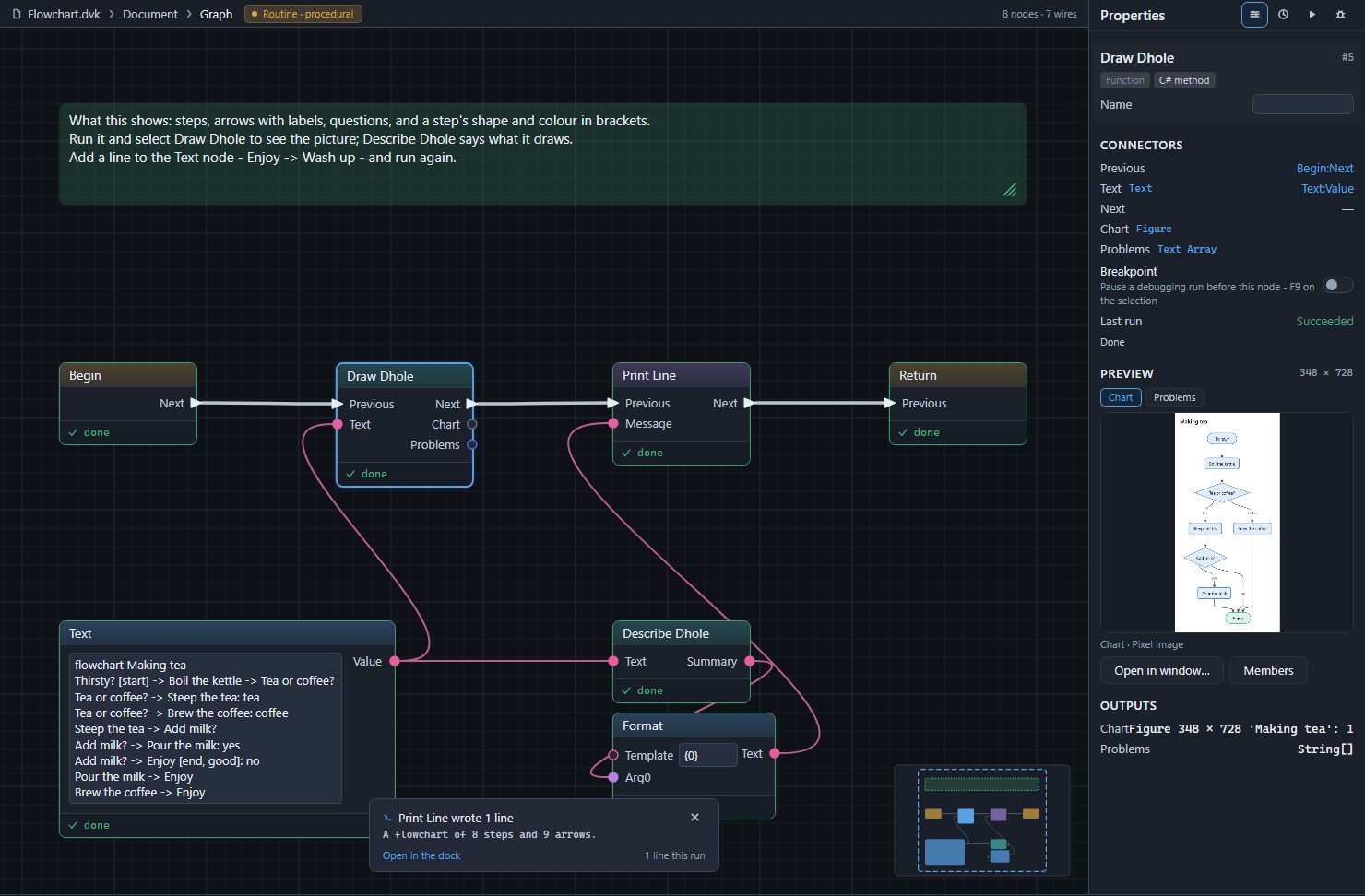
The document is a Routine: Begin, then Draw Dhole, then Print Line, then Return. Under Begin, a Text node holds the Dhole text, and its value goes to two places: Draw Dhole's Text, which draws it, and Describe Dhole's, whose sentence Print Line prints. The green note says what the example shows.
2. Run it and see the picture
Press Run (F5). The console says what was drawn:
A flowchart of 8 steps and 9 arrows.
Click Draw Dhole. Properties shows the picture under Preview; Open in window… shows it larger. The Problems tab beside Chart shows what Draw Dhole said about the text - nothing, this time.
3. Change the text
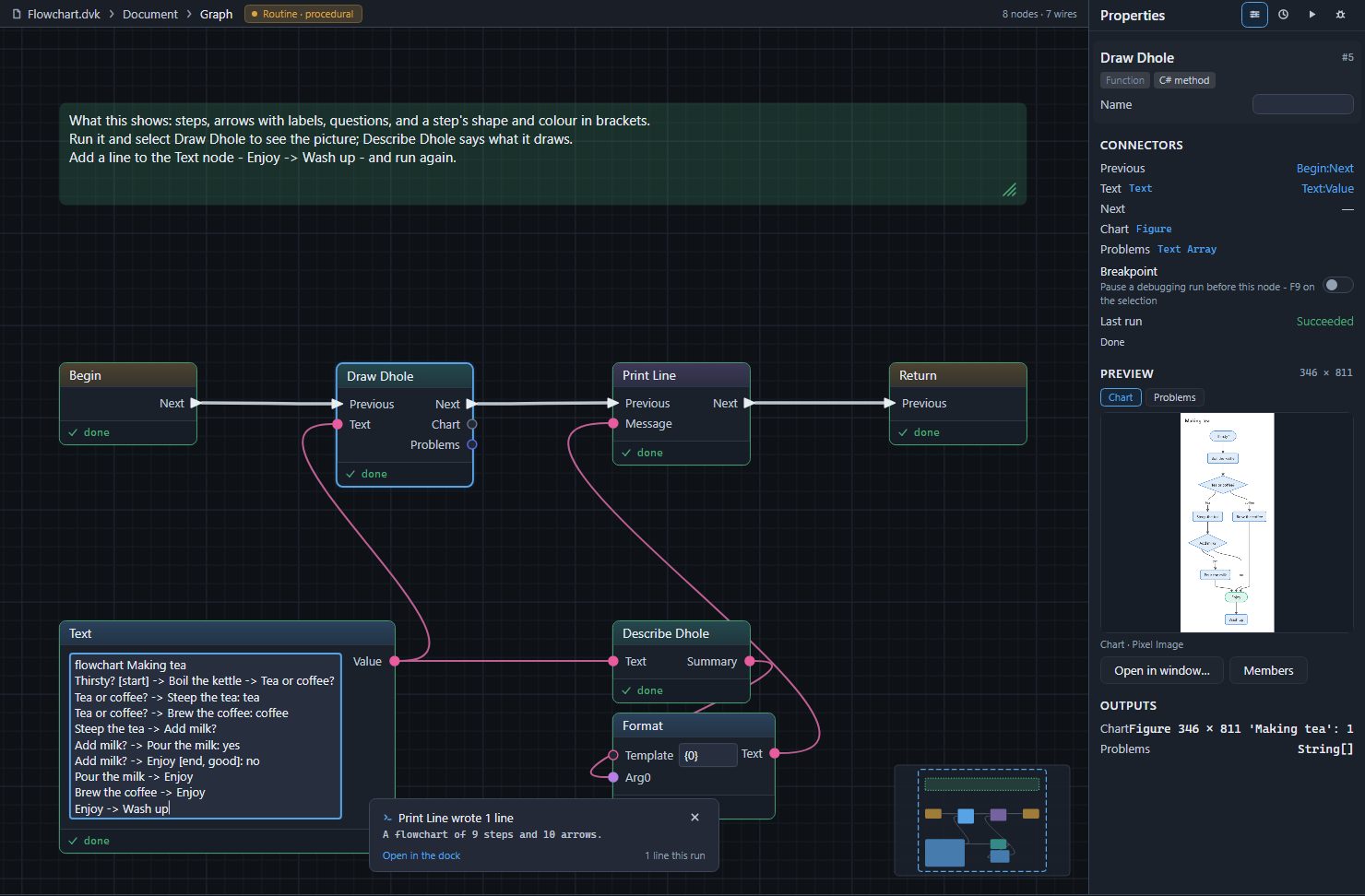
Click into the text in the Text node, press Ctrl+End to go to its end, press Enter for a new line, and type:
Enjoy -> Wash up
Press Ctrl+Enter, or click an empty part of the canvas, to keep it - in the Text node Enter starts a new line. Run again. The console now says A flowchart of 9 steps and 10 arrows., and the picture has a step under Enjoy. A step is made where it is first named, so naming Wash up made it, and the arrow -> joined it to Enjoy.
4. Write a flowchart of your own
Click into the text, press Ctrl+A to select all of it, and type - or paste - this in its place; keep it with Ctrl+Enter and run:
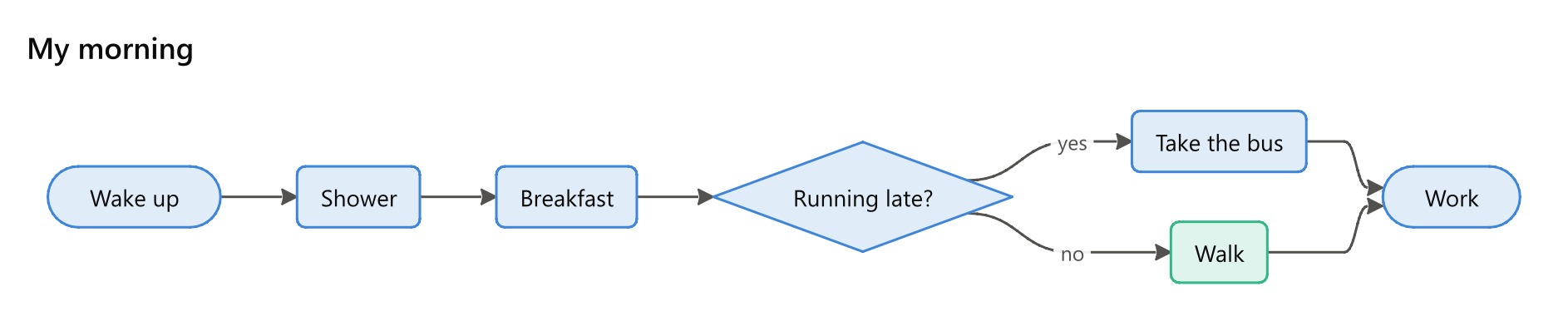
flowchart My morning
Wake up -> Shower -> Breakfast
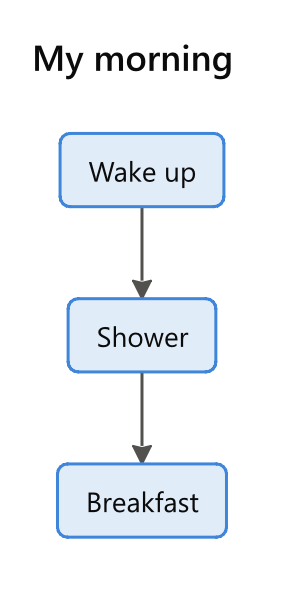
The first line says what to draw - a flowchart - and its title. Each line after it is a chain of steps joined by arrows. Now add a question with two answers:
flowchart My morning
Wake up [start] -> Shower -> Breakfast
Breakfast -> Running late?
Running late? -> Take the bus: yes
Running late? -> Walk [good]: no
Take the bus -> Work [end]
Walk -> Work
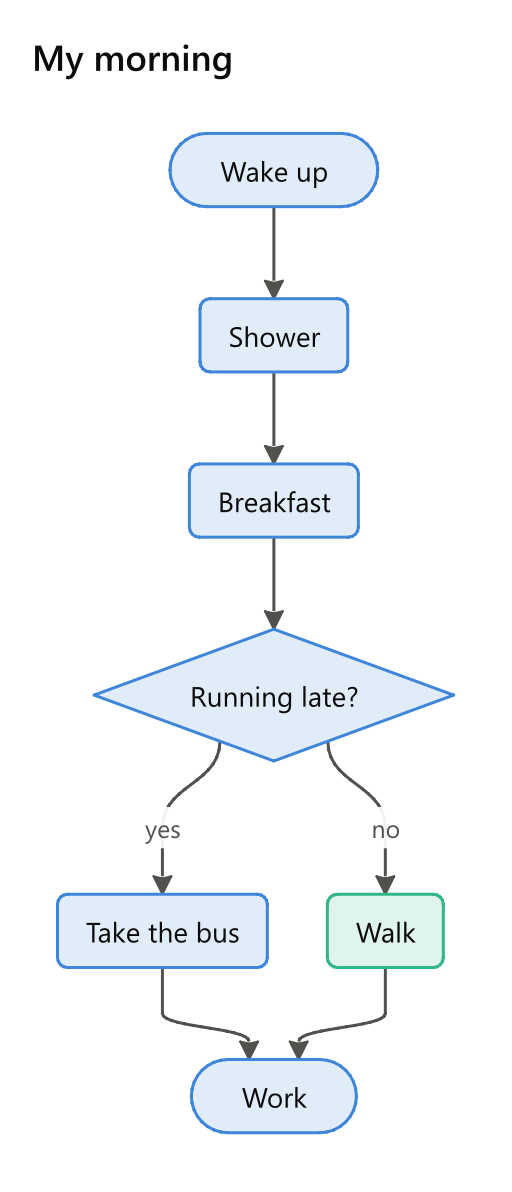
Three things are new:
- A step whose words end in a question mark is drawn as a question, a diamond.
- The words after a colon are the arrow's label:
yes,no. - Words in square brackets after a step are its attributes:
[start]and[end]round it off, and[good]colours it green. The language lists every colour, and Flowcharts every shape.
A setting is a word, a colon and a value on a line of its own. Add this under the first line to draw the same morning across the page:
direction: right
5. Draw a chart
The first line decides what is drawn, so the same node draws charts too. Replace the text with this, and run:
pie My week
Work: 40
Sleep: 56
Family: 30
Everything else: 42
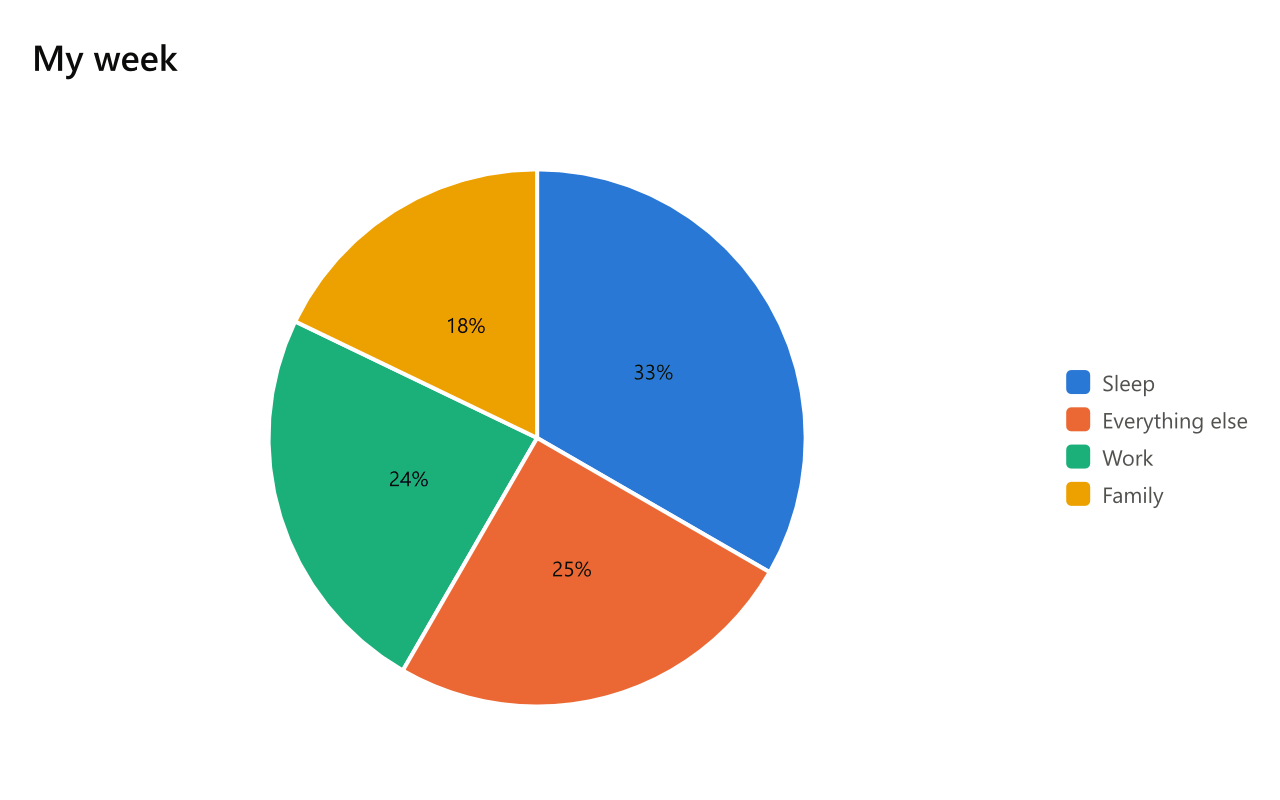
Each line is a slice: a name, a colon and how much. Charts shows bars, lines, scatter and radar charts, and the language how a line of three dashes puts several charts in one picture.
6. Write on the node: Write Dhole
Write Dhole keeps its text on the node itself and draws it while you type. Open the Write Dhole example the way you opened Flowchart, or type Dhole in the node tray (Ctrl+Space) and place Write Dhole on a document of your own.
Double-click Write Dhole. Its card opens: the text on the left, the picture on the right.
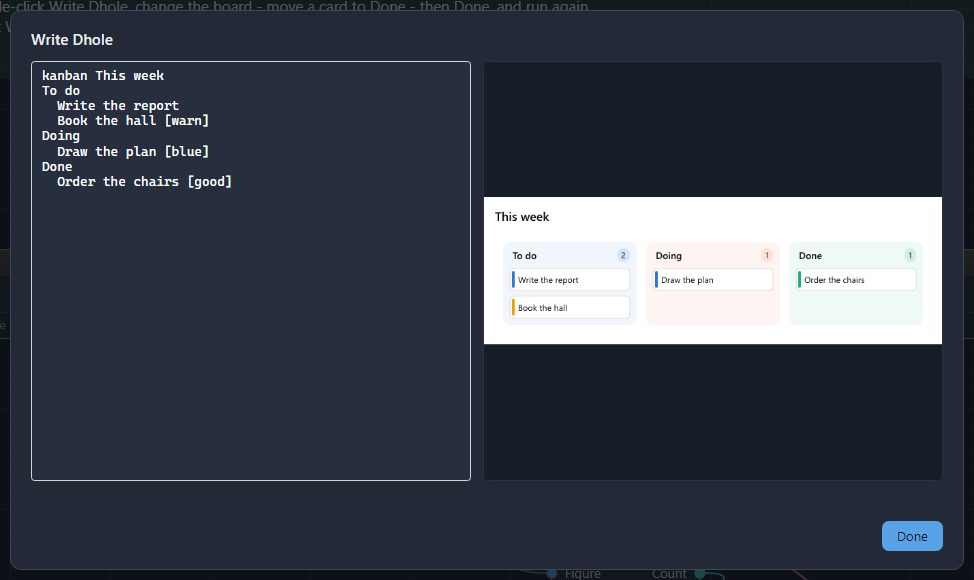
Type, and a moment after you stop the picture follows. Anything Dhole cannot read is listed under the picture, with its line, its column and what to write instead, and the rest of the text is still drawn:
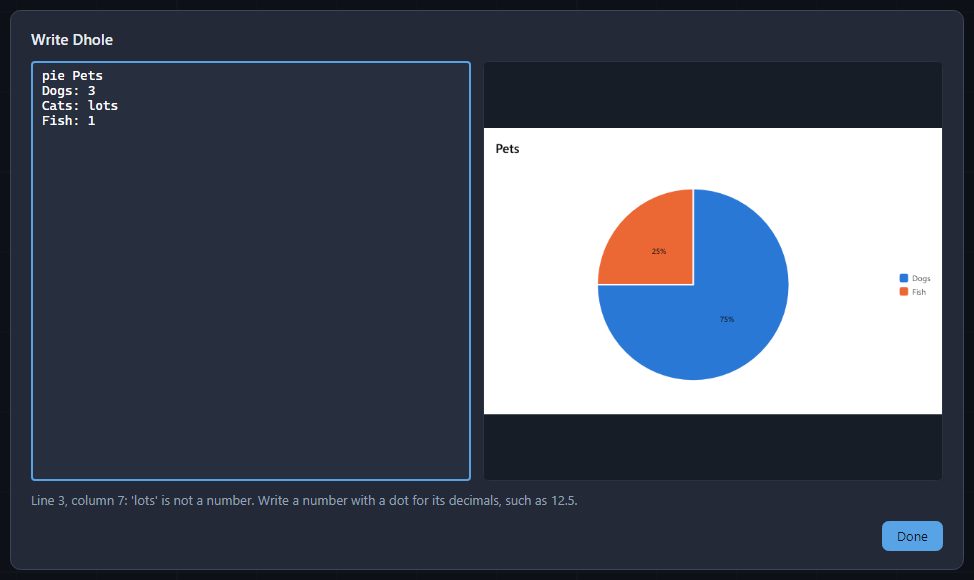
Press Done to keep the text on the node - the status bar says Wrote Dhole; Ctrl+Z to undo, and one Ctrl+Z takes it back. Esc closes the card and changes nothing. Run the document and select Write Dhole to see its picture in Properties.
7. See what Dhole says about mistakes
Open the Mistakes example and run it. Its text has four mistakes, and Draw Dhole's Problems output, printed one to a line, says each with where it is and what to write instead:
Line 1, column 1: 'flowchrt' is not something Dhole draws, so this is drawn as a flowchart. Write 'flowchart' if a flowchart is what you mean.
Line 2, column 12: 'sideways' is not a direction. Write down, right, up or left.
Line 3, column 33: (warning) 'rond' is not something a step can be. Write 'round' if that is what you mean.
Line 4, column 1: The arrow comes from nothing. Write what the arrow starts at before it.
Mend them one at a time and run again until nothing is printed. Problems lists everything Dhole can say.
8. Save the picture
Wire Draw Dhole's Chart into Save Chart (Plotting toolbox, Chart Export) and type a Path. The path's extension says the format: .png for a picture - its Dpi of 192 makes it twice as sharp as the screen - .svg or .pdf for a drawing whose words stay words, and .pptx, .xlsx or .docx for an Office document. Set Theme before it recolours the diagram in any of the plotting framework's themes, the editor's palettes among them.
Where next
- The language - everything every kind shares.
- The page of the kind you need, from Flowcharts to Tables and boards.
- Examples - fourteen of them, one for each major kind.