
Flowcharts
A flowchart is steps and the arrows between them. It starts with flowchart and its title.
flowchart Ordering online
direction: right
cart: Fill the cart
group Checkout
  pay: Pay [io]
  check: Card accepted?
  pay -> check
group Warehouse [teal]
  pick: Pick the items
  pack: Pack the box
  pick -> pack
db: Orders [database]
cart -> pay
check -> pick: yes
check -> pay: no, try again [bad]
pick --> db: record
pack -> Ship it [end]

Settings
| Setting | Also | Value |
|---|---|---|
direction |
flow, orientation, layout, rankdir |
which way the arrows run: down (the default), right, up or left - or TD, LR, BT, RL |
flowchart LR or graph TD on the first line, as Mermaid writes it, is the direction too. The settings every kind takes - title, subtitle, caption, theme, font, size - are on the language page.
Steps
A step is made where it is first named, on a line of arrows or on a line of its own. Named again, in any case and with any spacing, it is the same step.
id: Label on a line of its own gives a step a short name to write arrows with and a longer label to show: pay: Pay at the till. Attributes go after the name or after the label.
Arrows and labels
A line of steps joined by arrows draws an arrow between each pair: Wake up -> Shower -> Breakfast. Words after a colon are the label of the line's last arrow, and attributes after the label change the arrow:
check -> pay: no, try again [bad, dashed]
| Arrow attribute | Draws the arrow |
|---|---|
| a colour or a role | in that colour |
muted |
in the theme's quiet ink |
dashed (also dotted) |
dashed |
thick (also bold) |
thick |
solid |
solid |
Every arrow ->, -->, ..>, =>, <-, <->, --, .., == and its kin is on the language page.
Shapes
A step is a box unless a word in its brackets names another shape. A step whose words end in a question mark is a question - a diamond - unless its brackets give it another shape.
| Shape | Also |
|---|---|
box |
rect, rectangle, step, process |
round |
rounded, soft |
pill |
stadium, start, end, stop, terminal, begin |
circle |
|
diamond |
decision, choice, question, if |
hexagon |
prepare, preparation |
io |
input, output, data, parallelogram |
database |
db, store, storage, cylinder |
document |
doc, file, report |
subroutine |
call, predefined |
note |
comment |
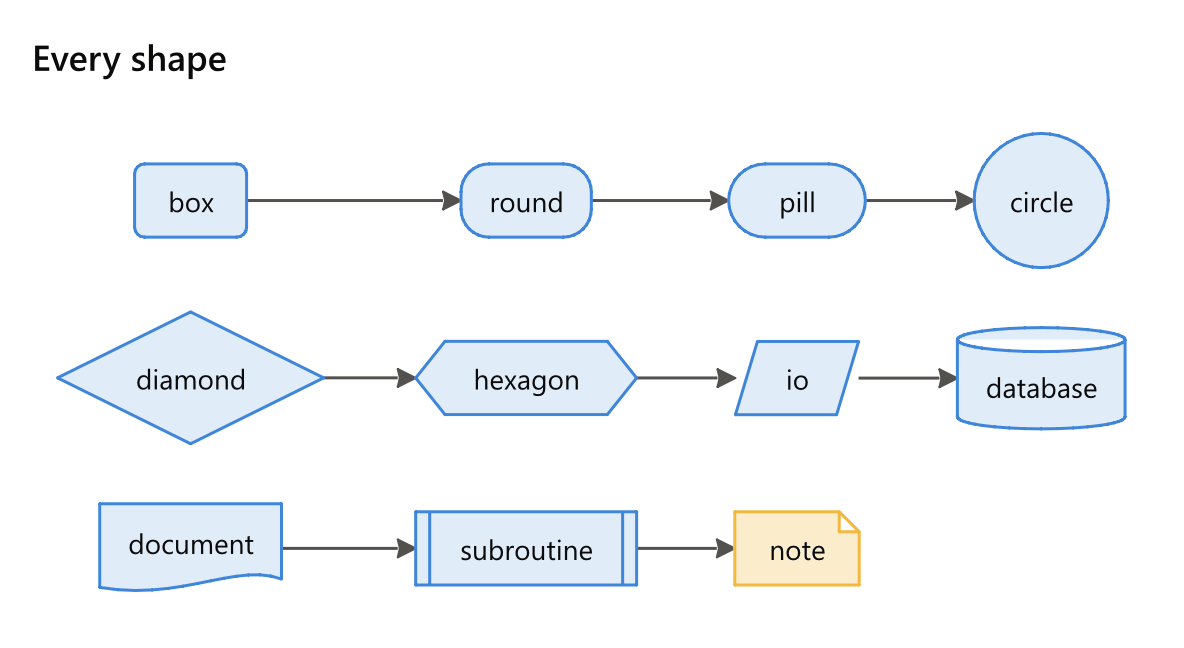
A shape and a colour go together in one pair of brackets: Ship it [end, good]. The colours and roles are on the language page.
Groups
group Name, with the lines that belong to it indented under it, draws a frame round them. subgraph is the same word. group id: Label gives the group a short name and a longer label, groups nest, and a colour in brackets washes the group in it: group Warehouse [teal].
group Kitchen [orange]
  Boil -> Pour
A group with nothing indented under it is warned of. An arrow into or out of a group's steps runs to the step it names.
Notes
note Step: what to say puts a note beside a step, joined to it by a dashed line:
note Pour: Mind the steam
How it is laid out
The steps are ranked along the direction by the arrows between them, so arrows run one way; an arrow that would close a loop runs back against it. The steps of each rank are ordered to keep arrows from crossing, each arrow's label sits on its line, chains of single steps stay in a straight line, and the lines into and out of a group are drawn to the step they name. The same text always lands in the same place.