
Saving
A Divooka Explore document is a .dvk file, and it is a file from the moment it is created: New document asks where it lives before anything else. Everything in it is saved together - its graphs, their layout, the comments and drawings, and the pictures and sounds placed on its canvas.
Saving
- Save -
Ctrl+S, or the disk on the toolbar - writes the document to its file. The status bar reads Saved Hello.dvk. - Save as - the disk with a pencil, beside it - writes it to a new file and carries on with that one. It has no key.
Auto-save
Appearance and settings ▸ Auto-save saves a document with unsaved changes every 1 min, 5 min or 15 min, or never (Off, the default). It never saves in the middle of a run, while a question is on screen, or while you are dragging; it waits and tries again.
With the Copy switch beside it on, as it starts, auto-save writes a copy to the Autosaves folder - %AppData%\DivookaExplore\Autosaves - and leaves your document as it was: the status bar reads Autosaved Hello.dvk, and the document still has unsaved changes until you save it. The copy goes when the document is saved or closed. If the session ends with the document unsaved - a crash, a power cut - the next time you open the document it asks Recover unsaved changes? - Hello.dvk has changes autosaved at a time that were never saved. - and Recover opens the copy in its place, unsaved, Discard throws the copy away, and Cancel keeps it for next time. The folder button beside the switch opens the Autosaves folder.
With Copy off, auto-save saves the document itself, as Ctrl+S does, and the status bar reads Saved Hello.dvk.
Closing
Ctrl+W closes the document and brings the start screen back. Opening another document - from the start screen, Ctrl+O, an example's copy - closes the one that is open, because one document is open at a time.
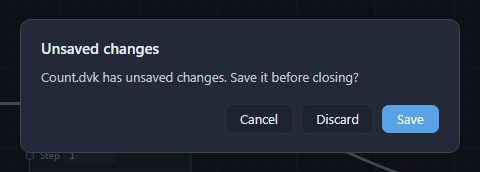
If the document has unsaved changes, you are asked first - Count.dvk has unsaved changes. Save it before closing? - and Save writes it and goes on, Discard drops the changes and goes on, and Cancel leaves everything as it was. Opening another document, or quitting, asks the same three ways.
Reopening
Ctrl+Shift+Treopens the documentCtrl+Wclosed last; pressed again, the one before it.- The start screen's Recent list has every document you opened, newest first. Right-click one for Open containing folder, or Remove from Recent, which leaves the file alone.
Undo
Ctrl+Z undoes and Ctrl+Y (or Ctrl+Shift+Z) redoes, across every kind of edit. The History face of the Properties panel lists the steps; click one to go back to it. Appearance and settings ▸ History steps sets how many steps are kept. The history belongs to the session: reopening a document starts a new one.