
Dhole 示例
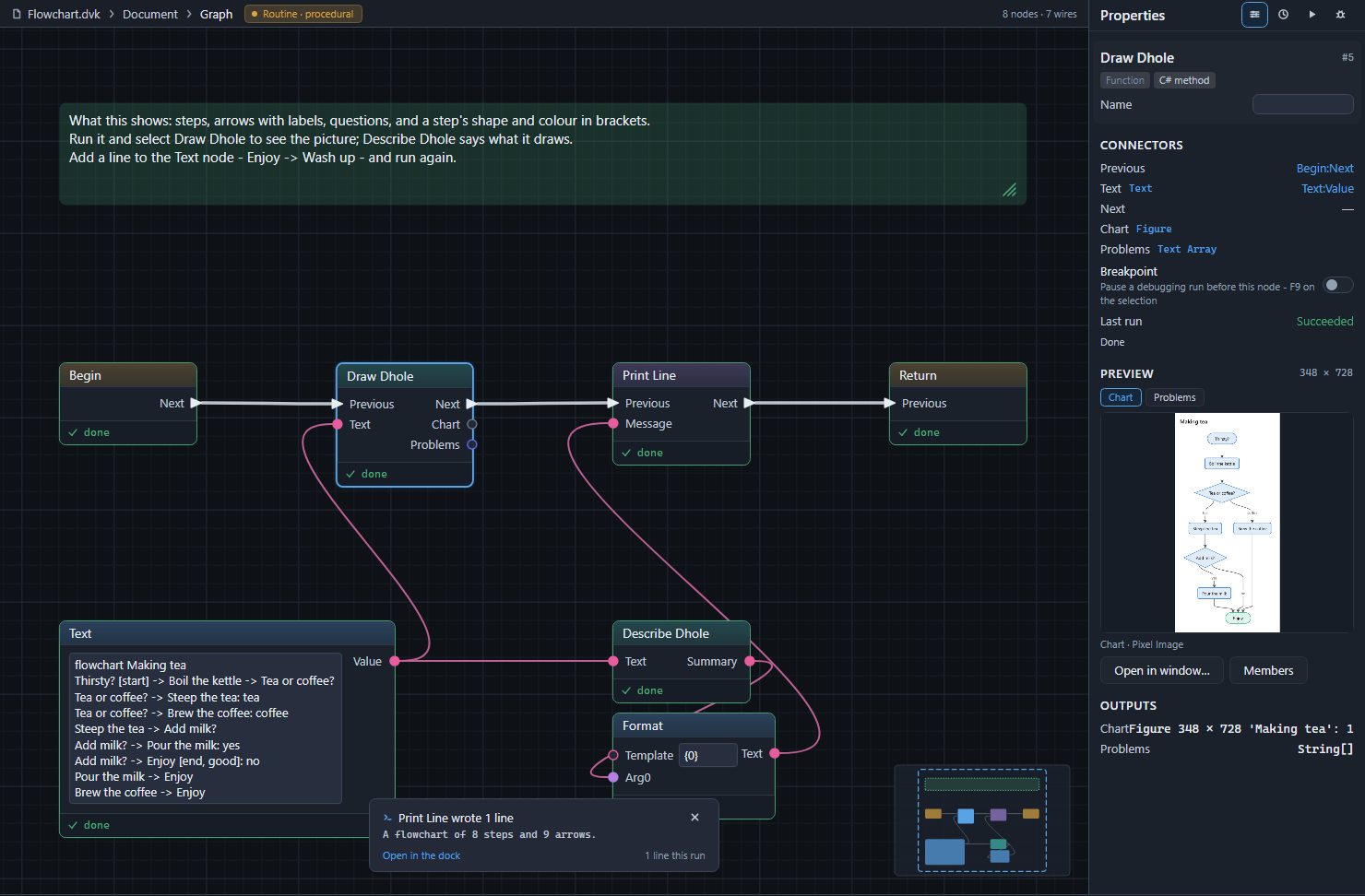
Divooka Compute 附带十四个 Dhole 示例,位于 New from examples(Ctrl+Shift+E)的 Dhole 类别中。每个示例都是一个 Routine:Begin 下方的 Text 节点保存 Dhole 文本,并将其传给负责绘制的 Draw Dhole,以及 Describe Dhole,后者生成的句子由 Print Line 打印出来。运行一个示例,选中 Draw Dhole,图片就会显示在 Properties 中;修改文本后再次运行即可。每个示例都附有一条注释,说明它展示了什么,以及可以尝试的一件事。
| 示例 | 展示内容 | 打印内容 |
|---|---|---|
| Flowchart | 步骤、带标签的箭头、问题、在方括号中指定步骤的形状和颜色 | A flowchart of 8 steps and 9 arrows. |
| Flowchart with Groups | direction: right、分组、短名称配长标签、形状、一条虚线箭头和一条彩色箭头 |
A flowchart of 7 steps and 7 arrows in 2 groups. |
| Sequence Diagram | 参与者(actor 和 participant)、调用和回复及其激活条、if 和 else、一条注释 | A sequence diagram of 4 participants and 8 messages. |
| State Diagram | 起点、以事件命名的转换、带有自身起点的复合状态 | A state diagram of 5 states and 9 transitions. |
| Class Diagram | 带成员的类、继承、带标签的聚合、构造型 | A class diagram of 4 classes and 3 relationships. |
| Entity Diagram | 带键的实体、根据基数以鸦脚符号绘制的关系 | An entity diagram of 4 entities and 3 relationships. |
| Mind Map | 中心、按缩进划分的分支、方括号中的颜色 | A mind map of 15 ideas on 4 branches. |
| Timeline | 包含一个或多个事件的时间点、分节 | A timeline of 5 times and 6 events. |
| Gantt Chart | 工期、等待其他任务的任务、跳过周末、标记的日期、任务状态、里程碑 | A Gantt chart of 6 tasks from 2026-11-02 to 2026-11-24. |
| Four Charts | 在一段文本中的饼图、条形图、折线图和散点图 | 每张图表各一句话 |
| Quadrant Chart | 坐标轴两端、各象限的名称、数据点 | A quadrant chart of 5 points. |
| Sankey Diagram | 带数量的流、单位 | A Sankey diagram of 7 nodes and 7 flows carrying 101 GWh. |
| Write Dhole | 保存在节点上、在 Write Dhole 卡片中编写的看板 | The figure holds 1 chart. |
| Mistakes | Draw Dhole 的 Problems 输出,以及一段尽可能按可读部分绘制的文本 | 它的四个问题 |
大多数示例的图片都在各自种类的页面上:流程图、时序图、状态图、类图、实体图、思维导图、时间线、甘特图、图表、象限图、桑基图以及表格和看板;Mistakes 在问题页面上。
Flowchart
flowchart Making tea
Thirsty? [start] -> Boil the kettle -> Tea or coffee?
Tea or coffee? -> Steep the tea: tea
Tea or coffee? -> Brew the coffee: coffee
Steep the tea -> Add milk?
Add milk? -> Pour the milk: yes
Add milk? -> Enjoy [end, good]: no
Pour the milk -> Enjoy
Brew the coffee -> Enjoy
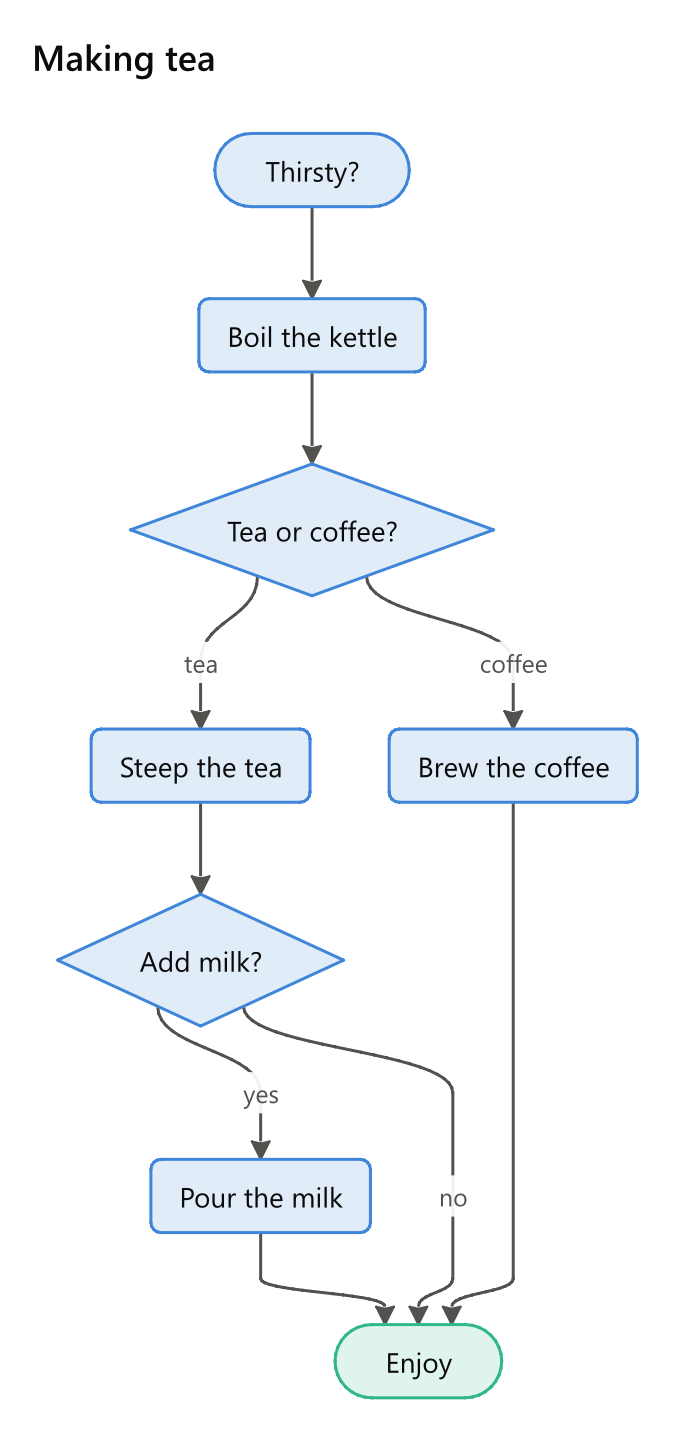
试着像教程中那样,在末尾加上 Enjoy -> Wash up。
Write Dhole
该示例的 Write Dhole 节点把一个看板保存在节点本身上。双击它,将一张卡片移到 Done,按下 Done,运行,然后选中 Write Dhole,即可看到你离开时的看板。由于文本在节点上而不在 Text 节点中,这里用一个 Chart Count 节点为 Print Line 统计图形中的图表数。
Mistakes
一张含有四处错误的流程图,尽可能按可读部分绘制,其 Problems 输出逐行打印。在 Text 节点中逐个修正这些错误,并反复运行,直到不再打印任何内容。