
Dhole 示例
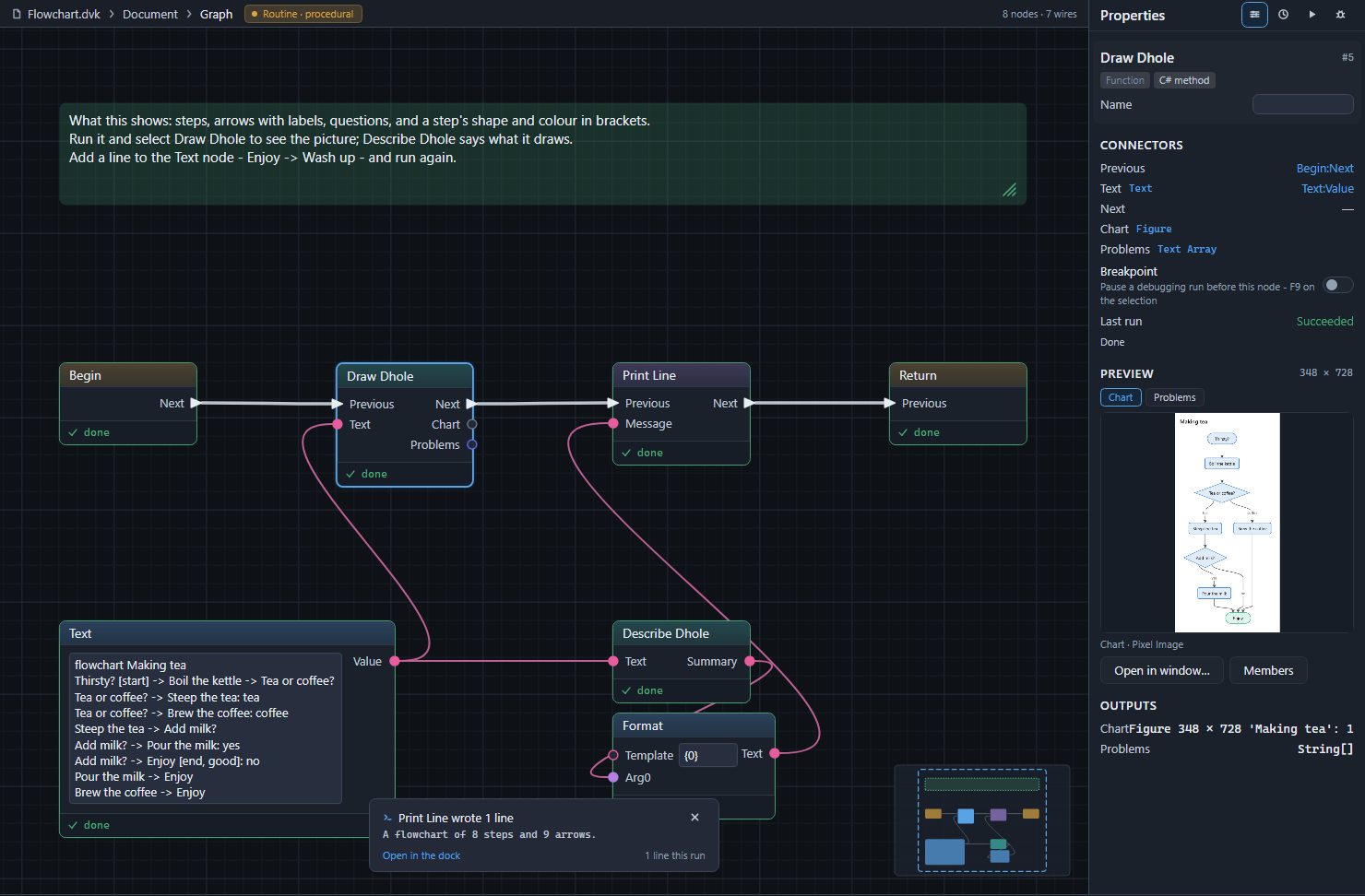
Divooka Compute 附帶十四個 Dhole 示例,位於 New from examples(Ctrl+Shift+E)的 Dhole 類別中。每個示例都是一個 Routine:Begin 下方的 Text 節點儲存 Dhole 文字,並將其傳給負責繪製的 Draw Dhole,以及 Describe Dhole,後者生成的句子由 Print Line 列印出來。執行一個示例,選中 Draw Dhole,圖片就會顯示在 Properties 中;修改文字後再次執行即可。每個示例都附有一條註解,說明它展示了什麼,以及可以嘗試的一件事。
| 示例 | 展示內容 | 列印內容 |
|---|---|---|
| Flowchart | 步驟、帶標籤的箭頭、問題、在方括號中指定步驟的形狀和顏色 | A flowchart of 8 steps and 9 arrows. |
| Flowchart with Groups | direction: right、分組、短名稱配長標籤、形狀、一條虛線箭頭和一條彩色箭頭 |
A flowchart of 7 steps and 7 arrows in 2 groups. |
| Sequence Diagram | 參與者(actor 和 participant)、呼叫和回覆及其啟用條、if 和 else、一條註解 | A sequence diagram of 4 participants and 8 messages. |
| State Diagram | 起點、以事件命名的轉換、帶有自身起點的複合狀態 | A state diagram of 5 states and 9 transitions. |
| Class Diagram | 帶成員的類、繼承、帶標籤的聚合、構造型 | A class diagram of 4 classes and 3 relationships. |
| Entity Diagram | 帶鍵的實體、根據基數以鴉腳符號繪製的關係 | An entity diagram of 4 entities and 3 relationships. |
| Mind Map | 中心、按縮排劃分的分支、方括號中的顏色 | A mind map of 15 ideas on 4 branches. |
| Timeline | 包含一個或多個事件的時間點、分節 | A timeline of 5 times and 6 events. |
| Gantt Chart | 工期、等待其他任務的任務、跳過週末、標記的日期、任務狀態、里程碑 | A Gantt chart of 6 tasks from 2026-11-02 to 2026-11-24. |
| Four Charts | 在一段文字中的餅圖、條形圖、折線圖和散點圖 | 每張圖表各一句話 |
| Quadrant Chart | 座標軸兩端、各象限的名稱、資料點 | A quadrant chart of 5 points. |
| Sankey Diagram | 帶數量的流、單位 | A Sankey diagram of 7 nodes and 7 flows carrying 101 GWh. |
| Write Dhole | 儲存在節點上、在 Write Dhole 卡片中編寫的看板 | The figure holds 1 chart. |
| Mistakes | Draw Dhole 的 Problems 輸出,以及一段儘可能按可讀部分繪製的文字 | 它的四個問題 |
大多數示例的圖片都在各自種類的頁面上:流程圖、時序圖、狀態圖、類圖、實體圖、思維導圖、時間線、甘特圖、圖表、象限圖、桑基圖以及表格和看板;Mistakes 在問題頁面上。
Flowchart
flowchart Making tea
Thirsty? [start] -> Boil the kettle -> Tea or coffee?
Tea or coffee? -> Steep the tea: tea
Tea or coffee? -> Brew the coffee: coffee
Steep the tea -> Add milk?
Add milk? -> Pour the milk: yes
Add milk? -> Enjoy [end, good]: no
Pour the milk -> Enjoy
Brew the coffee -> Enjoy
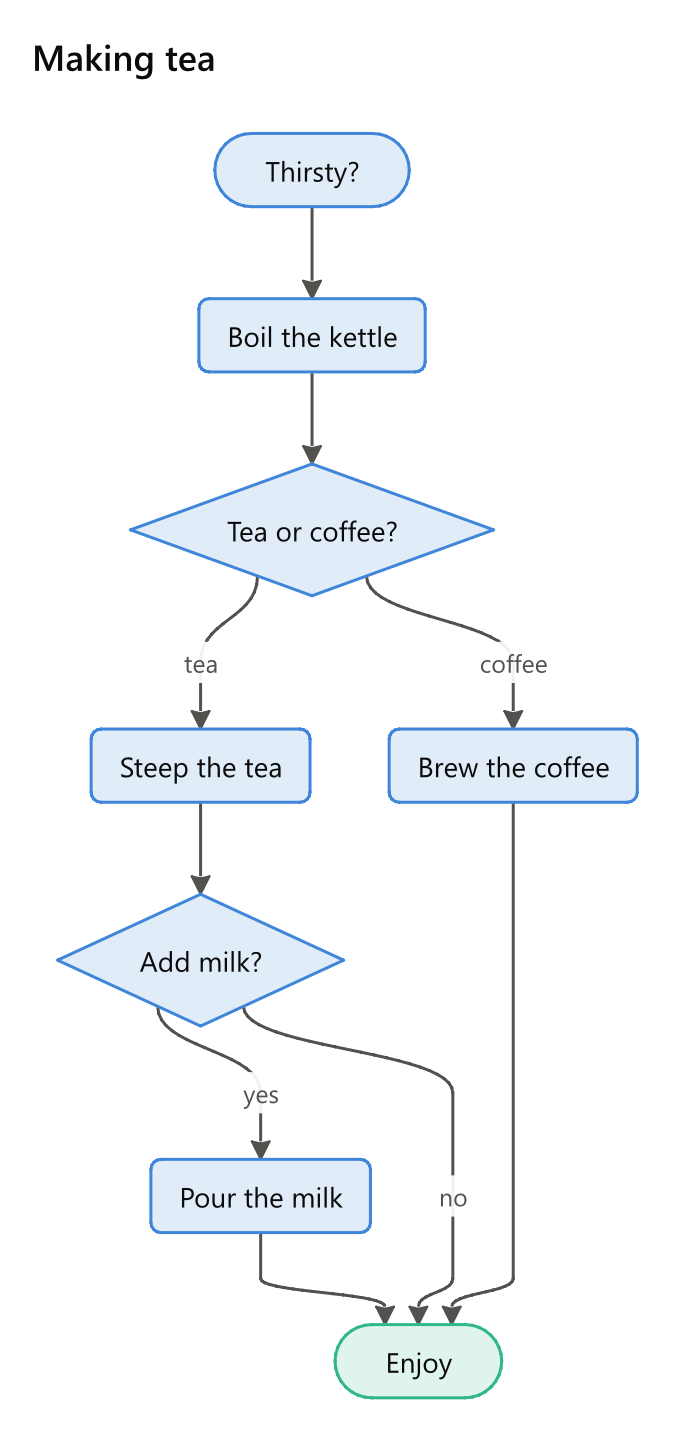
試著像教程中那樣,在末尾加上 Enjoy -> Wash up。
Write Dhole
該示例的 Write Dhole 節點把一個看板儲存在節點本身上。按兩下它,將一張卡片移到 Done,按下 Done,執行,然後選中 Write Dhole,即可看到你離開時的看板。由於文字在節點上而不在 Text 節點中,這裡用一個 Chart Count 節點為 Print Line 統計圖形中的圖表數。
Mistakes
一張含有四處錯誤的流程圖,儘可能按可讀部分繪製,其 Problems 輸出逐行列印。在 Text 節點中逐個修正這些錯誤,並反覆執行,直到不再列印任何內容。