
Divooka SDK
Divooka 中的每個節點都是 .NET。一個包就是一個 .NET 庫,一個節點類別就是其中的一個型別,而一個節點就是這些型別的一個方法、建構函式或屬性:Audio Processing 中的 Tone 就是方法 AudioGenerators.Tone。Divooka SDK 就是從程式碼中使用這些庫,並配合 Divooka Compute 為此附帶的工具:可以匯入 Divooka 的包和文件的 C# 和 Python、用於構建的 .NET SDK,以及執行文件或將其構建為程式的工具。
程式碼能做圖所做的事,呼叫的也是同樣的函式,而且還能用到包沒有放在節點面板上的內容。反過來也行得通:程式碼可以把文件的圖當作函式來呼叫,而你用 C# 編寫的庫可以變成節點。
Divooka Compute 附帶的內容
| 用途 | |
|---|---|
| 包 | Divooka Compute 提供的每個包,各自是其資料夾中的一個 .NET 庫;該資料夾中的 divooka.distribution.json 列出了它們。 |
pure |
Divooka Pure:C# 指令碼和互動式提示符,可匯入 Divooka 的工作負載、包和文件。 |
spy |
SteelPython:Python 3.12,同樣可以匯入它們。 |
luna |
Lua 5.2 指令碼和互動式提示符。 |
dotnet |
一個 .NET SDK,位於 Tools\dotnet10:它用於構建 C# 專案,以及 Publish 生成的程式。 |
stew |
從命令列執行文件——請參閱 Stewer。 |
AviatorBeta |
像 Publish 一樣,將文件構建為獨立的程式——請參閱匯出程式。 |
divooka-mcp |
讓 AI 助手通過 Model Context Protocol 編寫、檢查和執行 Divooka 文件;divooka-mcp --help 會列出 --config 能為哪些助手列印配置。 |
dvn |
將筆記本文件作為網頁提供服務——請參閱 Divooka Notebook。 |
在 Divooka Compute 的 Terminal(終端)標籤頁(Ctrl+Shift+`)中,無論使用哪種 shell,都可以直接按名稱啟動它們:每個會話的 PATH 都以 Divooka Compute 的資料夾開頭,其後是它的 .NET SDK。在編輯器之外的命令列中,請從該資料夾執行它們,或者將該資料夾新增到你的 PATH 中。
C#:Divooka Pure
pure script.cs 執行一個 C# 指令碼——從第一行起就是語句,不需要專案,也不需要 Main——而單獨執行 pure 會開啟一個互動式提示符。Import 用於引入 Divooka:
Import(Divooka.Workloads.AudioProcessing)
var tone = AudioGenerators.Tone(440, 0.5);         // the node Tone
Console.WriteLine(AudioAnalysis.Duration(tone));    // 0.5

Import("Examples/Computational Algorithms/Euclidean Algorithm.dvk")
EuclideanAlgorithm.Run("48", "18");                // the document, run as stew runs it
| 要匯入 | 寫法 |
|---|---|
| 一個包:以其節點為方法的那些型別 | Import(Divooka.Workloads.AudioProcessing)——使用其庫的名稱,或 Divooka Compute 顯示它時所用的名稱 |
| 一個工作負載:它列出的每個包 | Import(audio-processing)——使用其 id 或名稱 |
一個文件:以文件命名的類,其中的每個 Function、Routine 和 Construct 各對應一個方法,並有一個執行整個文件的 Run |
Import("Examples/Audio/Tones and Noise.dvk")——位於指令碼旁邊、工作資料夾中或 Divooka Compute 資料夾中的路徑 |
節點要通過其型別來呼叫——寫 AudioGenerators.Tone,而不是單獨的 Tone——因為兩個型別可能各自有一個同名節點。在提示符中輸入 :packages 會列出 Divooka Compute 附帶的工作負載和包。其餘功能屬於 Pure 本身:用 Include 引入另一個指令碼、通過 Import 使用 NuGet 包,以及提示符的按鍵操作。
Python:SteelPython
import Divooka.Workloads.AudioProcessing as audio

tone = audio.AudioGenerators.Tone(440, 0.5)
print(audio.AudioAnalysis.Duration(tone))          # 0.5
spy script.py 執行一個指令碼,單獨執行 spy 則開啟一個互動式提示符。Divooka 的包、工作負載和文件可以作為 Python 模組匯入,而機器上無需安裝 Python:請參閱 Python。
編輯器中的指令碼
在 Divooka Compute 中開啟一個 .cs 或 .lua 檔案,它的工具列提供兩種執行方式:
- Run(執行,
F5)以終端的方式執行它,使用pure或luna,在檔案所在的資料夾中執行;它列印的內容會顯示在停靠欄的 Console 中。 - Automate Editor 在編輯器內部執行它,並提供
Editor供其操作:開啟的文件、文件中的圖、節點和連線、目前選擇、檢視以及狀態列。它所做的每項更改都與你親手編輯的效果相同,整個執行過程在文件歷史中算作一步——Run script GridLayout.cs——按一次Ctrl+Z即可復原;執行失敗或被中止時,所有文件都保持原樣。斷點(F9)會讓它暫停,其變數顯示在 Locals 中。
下面的指令碼會執行一個資料夾中的每個文件,並報告每個文件的執行情況:
var documents = Editor.FindDocuments("Documents");   // a folder beside this script
int failed = 0;
for (int index = 0; index < documents.Length; index++)
{
    Editor.Status($"Running {index + 1} of {documents.Length}: {Path.GetFileName(documents[index])}");
    var result = Editor.Run(documents[index]);
    Console.WriteLine(result);
    if (!result.Succeeded)
        failed++;
}
Console.WriteLine($"{documents.Length - failed} of {documents.Length} ran to the end.");
Lua 擁有相同的成員,使用冒號呼叫:graph:AddNode("Print Line", 0, 0)。New from examples 中的 Editor Automation 下還有更多示例,其中包括兩種語言版本的 Grid Layout。
C# 專案
你自己的程式或庫就是一個普通的 C# 專案,它從 Divooka Compute 的資料夾中引用 Divooka 的庫——請將下面的 DivookaCompute 設定為你的安裝位置。終端中的 dotnet 無需安裝其他任何東西即可構建它;dotnet new console -n ToneLength 可以新建一個專案。
<Project Sdk="Microsoft.NET.Sdk">

  <PropertyGroup>
    <OutputType>Exe</OutputType>
    <TargetFramework>net10.0</TargetFramework>
    <ImplicitUsings>enable</ImplicitUsings>
    <DivookaCompute>C:\Divooka Compute</DivookaCompute>
  </PropertyGroup>

  <ItemGroup>
    <Reference Include="$(DivookaCompute)\Divooka.Audio.Operations.dll" />
    <Reference Include="$(DivookaCompute)\Divooka.Multimedia.Audio.dll" />
    <Reference Include="$(DivookaCompute)\Divooka.Sounds.Procedural.dll" />
  </ItemGroup>

</Project>
using Divooka.Audio.Operations;

var tone = AudioGenerators.Tone(440, 0.5);
Console.WriteLine(AudioAnalysis.Duration(tone));     // 0.5
dotnet run 會構建它(同時從同一資料夾複製這些庫所用到的內容)並執行它。你的程式碼用到了哪個庫中的型別,就要引用哪個庫;缺少某個庫時,編譯器會指出是哪一個:The type 'WAVAudioPayload' is defined in an assembly that is not referenced. You must add a reference to assembly 'Divooka.Multimedia.Audio'。Divooka 的庫是為 .NET 10 構建的,因此專案的目標框架為 net10.0。其中一些庫也釋出在 NuGet 上。
把你自己的庫做成節點
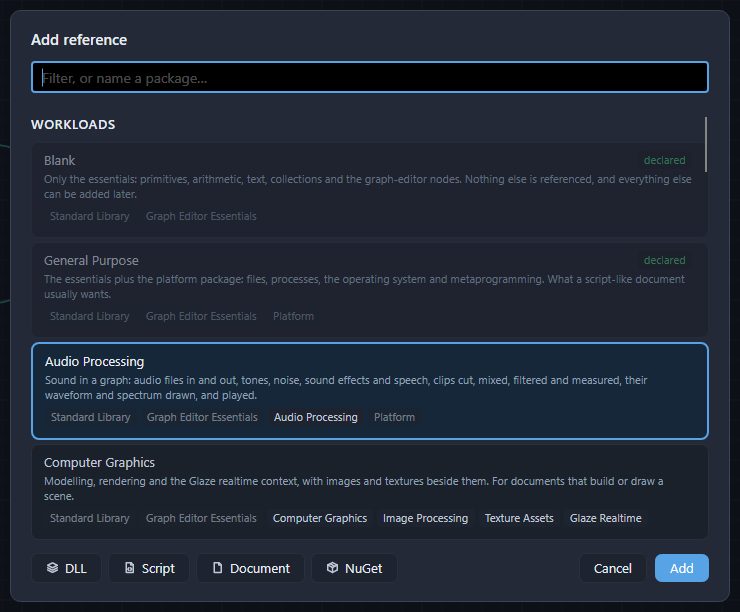
反過來,你用 C# 編寫的內容也可以變成節點。Add reference(新增引用,Ctrl+Shift+L)通過 Script 新增 C# 檔案,通過 DLL 新增你構建好的庫——請參閱引用。兩者在 Divooka Compute 和 Divooka Engine 中都適用;Divooka Engine 只內建了必不可少的節點,其餘節點需要你通過這種方式自行引入。
using System;

namespace Geometry;

/// <summary>Measures of a circle.</summary>
public static class Circles
{
    /// <summary>The area of a circle.</summary>
    /// <param name="radius">How far the edge is from the centre.</param>
    public static double Area(double radius) => Math.PI * radius * radius;

    /// <summary>The length of a circle's edge.</summary>
    /// <name>Circumference</name>
    /// <returns name="Length">The length.</returns>
    public static double EdgeLength(double radius) => 2 * Math.PI * radius;
}
使用 <GenerateDocumentationFile>true</GenerateDocumentationFile> 構建為 Geometry.dll,並在旁邊放置 Geometry.xml 後引用,它會提供一個 Geometry 分割槽,其中包含一個 Circles 類別:Area 接受半徑,其工具提示為 The area of a circle.;Circumference 的輸出為 Length。
| 庫中的內容 | 變成 |
|---|---|
| 公共型別 | 一個同名類別,位於以檔案命名的分割槽中。 |
| 公共靜態方法 | 一個在所有圖中都可用的節點:其參數是節點的輸入,其返回值是節點的輸出。 |
out 參數 |
多一個輸出。 |
| 公共建構函式 | 一個建立該型別物件的節點,名稱為 Make 加型別名——Make Tally。 |
| 公共屬性 | 一個讀取該屬性的節點,在所有圖中都可用。 |
| 公共例項方法 | 一個以物件作為第一個輸入的節點,在 Routine、Events 圖和狀態中可用,這些地方的操作是一個接一個發生的。如果方法不改變任何東西,可以將其標記為 <const>true</const>,這樣它在所有圖中都可用。 |
| 泛型方法 | 一個為每個型別實參各帶一個選擇塊的節點:在其上選擇型別,或者由連入的值來決定。 |
<summary> |
節點的工具提示。 |
<name> |
節點的標題,用來代替其成員名——否則成員名會被拆分為單詞顯示:DiameterOf 顯示為 Diameter Of。 |
<returns name="..."> |
其輸出的名稱。 |
<hidden>true</hidden> |
使該節點不出現在節點面板上;已經使用它的文件仍可正常開啟和執行。 |
對於庫,只有當其文件檔案放在旁邊時,文件註解中的標籤才會生效。通過 Script 引用的 C# 檔案會在文件開啟時編譯,無需 .NET SDK,其節點名稱取自程式碼。在其旁邊放置文件檔案的譯本——採用相同格式的 Geometry.zh.xml——即可為節點提供中文文字。C# 技巧中介紹了更多標籤。
外掛
編輯器外掛會在編輯器工具列的扳手圖示下新增命令,也可以提供節點。外掛是一個資料夾,位於程式旁邊的 Plugins 中,或位於你自己的 %AppData%\DivookaCompute\Plugins 中(Divooka Engine 為 %AppData%\DivookaEngine\Plugins),右鍵按一下扳手即可開啟該資料夾;當你的資料夾中的外掛與程式旁邊的外掛同名時,以你的為準。該資料夾包含 C# 檔案(編輯器在啟動時編譯它們,無需專案,也無需 .NET SDK),或者包含一個以資料夾命名的庫。隨附的示例 Plugins\SayHello\SayHello.cs 就是一個完整的外掛:
[DivookaPlugin("Hello Plugin", Category = PluginMenuCategories.Samples)]
public static class SayHello
{
    [PluginCommand("Say hello", Tooltip = "Writes a line in the status bar, to show that a plugin's command ran.")]
    [PluginText("Chinese", "打个招呼")]
    public static void Greet(PluginMenuContext context)
        => context.Status("Hello from the sample plugin.");
}
它的命令位於扳手下的 Samples ▸ Hello Plugin ▸ Say hello。外掛會在編輯器下次啟動時被載入;請參閱外掛。
另請參閱
- Python——SteelPython,以及作為 Python 模組匯入的 Divooka。
- 引用——文件在語言之外所使用的內容,以及如何新增它們。
- 匯出程式——Publish、stew,以及將文件打包交給他人。
- Divooka Engine——只帶有必不可少節點的編輯器,用於構建你自己的發行版。