
在 Divooka 中處理二進位制資料
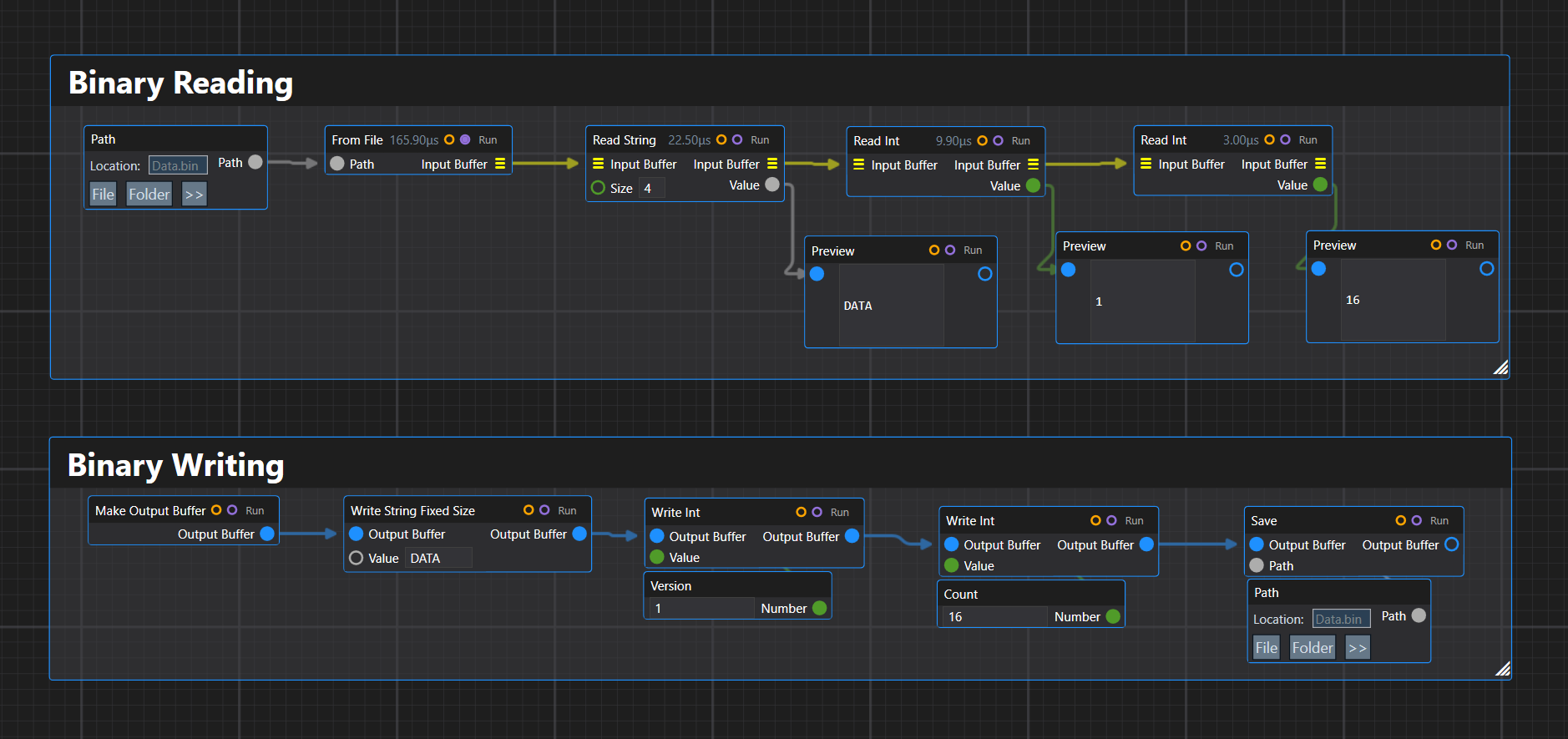
二進位制格式無處不在:影像、網格、存檔檔案、網路資料包、自訂資源包、壓縮流、硬體協議、遊戲資料,以及幾十年後仍然有用的舊檔案格式。
然而在應用程式程式碼中,二進位制解析往往很快就會變得雜亂。你從一個 byte[] 開始,接著是一個表示偏移量的整數,然後是幾個輔助方法,再然後是巢狀的偏移量計算,很快解析器就同時承擔了兩項職責:理解檔案格式,以及手動管理遊標所在的位置。
ImmutableByteArray、ConstructiveByteArray 和 ImmutableConstructiveByteArray 的目標,就是把這種遊標管理邏輯移到一個小巧的流式抽象中。
與其編寫這樣的程式碼:
int offset = 0;

string magic = Encoding.ASCII.GetString(bytes, offset, 4);
offset += 4;

int version = BinaryPrimitives.ReadInt32LittleEndian(bytes.AsSpan(offset, 4));
offset += 4;

int count = BinaryPrimitives.ReadInt32LittleEndian(bytes.AsSpan(offset, 4));
offset += 4;
我們更希望這樣寫:
var remaining = ImmutableByteArray.FromFile("Data.bin")
    .ReadString(4, out string magic)
    .ReadInt(out int version)
    .ReadInt(out int count);
解析器讀起來就像二進位制格式本身。
寫入器與之相對應:
var data = new ConstructiveByteArray()
    .WriteStringFixedSize("DATA")
    .WriteInt(version)
    .WriteInt(count);
思路很簡單:二進位制資料應當表示為一系列顯式的讀寫操作,而不是零散的偏移量算術。
讀取二進位制資料
讀取器:ImmutableByteArray
ImmutableByteArray 是面向讀取的二進位制資料抽象。
它是不可變的。從中讀取資料不會改變目前物件,而是由讀取操作返回緩衝區中尚未讀取的剩餘部分。
主要的 API 形式如下:
public ImmutableByteArray ReadInt(out int value);
public int ReadInt();
public int ReadIntWithOffset(int byteIndex);
這三種形式覆蓋了三種常見的用例。
out 形式用於流式解析:
var remaining = data
    .ReadString(4, out string magic)
    .ReadInt(out int width)
    .ReadInt(out int height);
直接返回的形式用於在不需要剩餘資料時,從緩衝區開頭讀取一個值:
int width = data.ReadInt();
偏移量形式用於隨機存取,不消耗任何資料:
int width = data.ReadIntWithOffset(4);
這為該型別確立了一條清晰的規則:
順序讀取通過返回新的剩餘緩衝區來消耗資料;偏移量讀取不消耗資料。
在內部,ImmutableByteArray 可以安全地使用一個私有的 byte[] 加上偏移量和長度。外部輸入應在構造時複製,但內部切片無需複製,因為底層陣列是私有的,從不以可變方式對外公開。
這意味著下面這類操作的開銷很小:
var remaining = data.ReadBytes(32, out ImmutableByteArray header);
remaining 和 header 都可以是同一個內部位元組陣列上的檢視。由於兩個物件都無法修改底層儲存,這樣做仍然是安全的。
讀取塊
二進位制格式經常包含固定大小的塊。例如,一個檔案可能包含一個 32 位元組的檔案頭,然後是 32 位元組的填充,再然後是記錄。
位元組的 API 形式如下:
public ImmutableByteArray ReadBytes(int count, out ImmutableByteArray value);
public ImmutableByteArray ReadBytes(int count);
public ImmutableByteArray ReadBytesWithOffset(int byteIndex, int count);
public ImmutableByteArray ReadBytes(int count, out ImmutableByteArray value, Action<ImmutableByteArray> continuation);
當需要單獨解析某個子塊時,延續(continuation)形式很有用:
int versionNumber = 0;

var remaining = ImmutableByteArray.FromFile("MyData.bin")
    .ReadString(4, out string magic)
    .ReadBytes(32, out ImmutableByteArray _, header => header.ReadUInt(out versionNumber))
    .ReadBytes(32, out _)
    .ReadInt(out int count);
主資料流前進 32 個位元組,而延續則從隔離出來的檔案頭塊中讀取。
對於塊大小固定、但目前只關心塊內部分欄位的格式,這一點尤其有用。
字串
在二進位制格式中,字串通常以兩種常見形式出現。
第一種是固定大小的:
public ImmutableByteArray ReadString(int size, out string value);
public string ReadString(int size);
public string ReadStringWithOffset(int byteIndex, int size);
例如,檔案的魔數值:
data.ReadString(4, out string magic);
第二種是以零結尾的:
public ImmutableByteArray ReadString(out string value);
public string ReadString();
public string ReadStringWithOffset(int byteIndex);
它會一直讀取到第一個 0x00 位元組為止。
data.ReadString(out string name);
固定大小的字串常見於檔案頭中。以零結尾的字串常見於較舊的二進位制格式、網格檔案、嵌入式後設資料和 C 風格的結構中。
寫入二進位制資料
寫入器:ConstructiveByteArray
ConstructiveByteArray 是可變的寫入器。
它是一個流式的、僅追加的位元組構建器:
var current = new ConstructiveByteArray()
    .WriteStringFixedSize("CBA1")
    .WriteInt(1)
    .WriteDouble(3.14159);
它是就地可變的。每次呼叫都會把位元組追加到同一個底層緩衝區,並返回 this。
這使它成為生成二進位制檔案時實用的預設選擇。
該 API 有意使用顯式的方法名:
WriteInt(...)
WriteUInt(...)
WriteDouble(...)
WriteStringFixedSize(...)
WriteStringZeroTerminated(...)
WriteBytes(...)
這避免了單個過載的 Write(...) 方法帶來的歧義。在二進位制程式碼中,顯式通常值得多打幾個字元。
不可變寫入器:ImmutableConstructiveByteArray
ImmutableConstructiveByteArray 與寫入器的 API 相對應,但每次寫入都會返回一個新物件。
var baseFile = new ImmutableConstructiveByteArray()
    .WriteStringFixedSize("TEST")
    .WriteInt(1);

var pathA = baseFile.WriteStringZeroTerminated("Variant A");
var pathB = baseFile.WriteStringZeroTerminated("Variant B");
當你要嘗試不同的後續寫入路徑時,這會很有用。
例如,你可能有一個公共的檔案頭,然後有幾種可能的負載佈局:
var common = new ImmutableConstructiveByteArray()
    .WriteStringFixedSize("MESH")
    .WriteInt(version);

var triangleMesh = common
    .WriteStringZeroTerminated("triangles")
    .WriteInt(triangleCount);

var pointCloud = common
    .WriteStringZeroTerminated("points")
    .WriteInt(pointCount);
可變寫入器更快,記憶體效率也更高。不可變寫入器則更適合分支、測試和函式式構建模式。
寫入固定大小的塊
寫入器同樣支援固定大小的子塊:
public ConstructiveByteArray WriteBytes(int count);
public ConstructiveByteArray WriteBytes(int count, Action<ConstructiveByteArray> subblock);
public ConstructiveByteArray WriteBytes(ConstructiveByteArray source);
對於可變版本:
int versionNumber = 1;
int count = 15;

ConstructiveByteArray current = new ConstructiveByteArray()
    .WriteStringFixedSize("CBA1")
    .WriteBytes(32, con => con.WriteUInt((uint)versionNumber))
    .WriteBytes(32)
    .WriteInt(count);

for (int i = 0; i < count; i++)
    current = current.WriteBytes(128);

current.Save("Copy1.bin");
current.Save("Copy2.bin");
current.Dispose();
塊延續會寫入一個臨時的子緩衝區。如果寫入的位元組少於 32 個,結果會自動用零填充;如果寫入的位元組多於 32 個,寫入器應當丟擲異常。
這讓固定大小的二進位制結構表達起來容易得多。
不可變版本則改用函式式延續:
ImmutableConstructiveByteArray current = new ImmutableConstructiveByteArray()
    .WriteStringFixedSize("CBA1")
    .WriteBytes(32, con => con.WriteUInt((uint)versionNumber))
    .WriteBytes(32)
    .WriteInt(count);
在內部,該延續的形式應當是:
Func<ImmutableConstructiveByteArray, ImmutableConstructiveByteArray>
因為不可變寫入會返回新物件。
示例
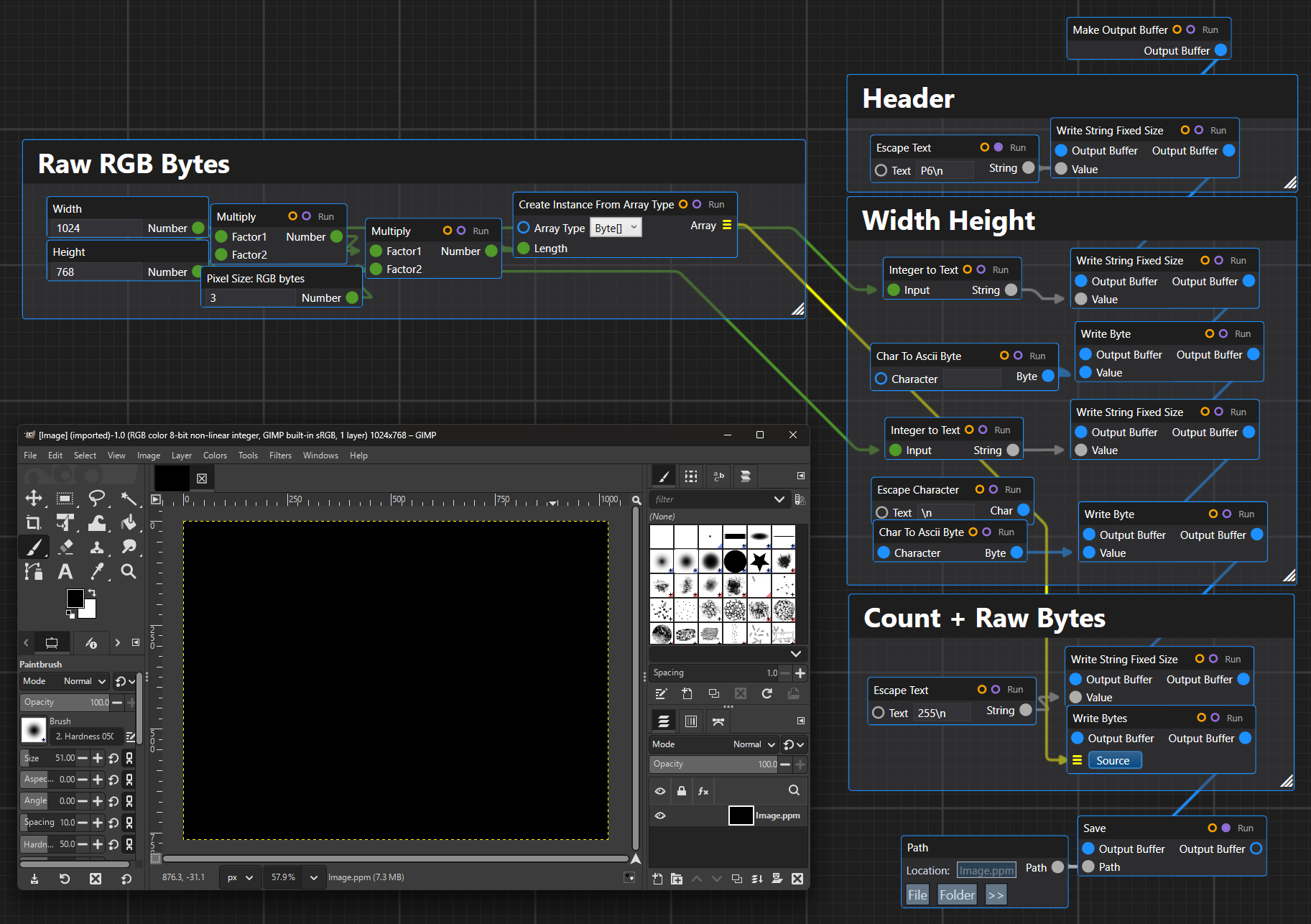
示例:讀取 PPM 影像
PPM 是 Netpbm 家族中一種簡單的影像格式。由於其結構小巧直接,它很適合用作教學格式。
二進位制 PPM 檔案通常以一個 ASCII 檔案頭開頭:
P6
width height
maxValue
其後是原始的 RGB 像素資料。
例如:
P6
256 256
255
<binary RGB bytes>
檔案頭是文字,而像素負載是二進位制的。這使 PPM 成為文字與二進位制混合解析的一個好例子。
一個簡單的 PPM 讀取器可能是這樣的:
public sealed class PpmImage
{
    public int Width { get; }
    public int Height { get; }
    public byte[] Pixels { get; }

    public PpmImage(int width, int height, byte[] pixels)
    {
        Width = width;
        Height = height;
        Pixels = pixels;
    }
}
使用 ImmutableByteArray,可以這樣編寫一個基本的解析器:
public static PpmImage ReadPpm(string path)
{
    ImmutableByteArray data = ImmutableByteArray.FromFile(path);

    data = ReadAsciiToken(data, out string magic);

    if (magic != "P6")
        throw new InvalidDataException("Only binary P6 PPM files are supported.");

    data = ReadAsciiToken(data, out string widthText);
    data = ReadAsciiToken(data, out string heightText);
    data = ReadAsciiToken(data, out string maxValueText);

    int width = int.Parse(widthText);
    int height = int.Parse(heightText);
    int maxValue = int.Parse(maxValueText);

    if (maxValue != 255)
        throw new InvalidDataException("Only 8-bit PPM files with max value 255 are supported.");

    int pixelByteCount = width * height * 3;

    data.ReadBytes(pixelByteCount, out ImmutableByteArray pixelData);

    return new PpmImage(width, height, pixelData.ToArray());
}
輔助的標記讀取器可以實現為作用於不可變緩衝區的一個小例程:
private static ImmutableByteArray ReadAsciiToken(ImmutableByteArray data, out string token)
{
    data = SkipAsciiWhitespace(data);

    int count = 0;

    while (count < data.Length && !IsAsciiWhitespace(data[count]))
        count++;

    token = Encoding.ASCII.GetString(data.AsSpan(0, count));
    return data.Skip(count);
}

private static ImmutableByteArray SkipAsciiWhitespace(ImmutableByteArray data)
{
    int count = 0;

    while (count < data.Length && IsAsciiWhitespace(data[count]))
        count++;

    return data.Skip(count);
}

private static bool IsAsciiWhitespace(byte value)
{
    return value == (byte)' ' || value == (byte)'\t' || value == (byte)'\r' || value == (byte)'\n';
}
解析器無需與偏移量纏鬥。每個輔助方法接收一個緩衝區,並返回剩餘的緩衝區。
這就是核心模式。
示例:寫入 PPM 影像
使用 ConstructiveByteArray 寫入二進位制 PPM 檔案非常簡單。
public static void WritePpm(string path, int width, int height, ReadOnlySpan<byte> rgbPixels)
{
    int expectedLength = width * height * 3;

    if (rgbPixels.Length != expectedLength)
        throw new ArgumentException($"Expected {expectedLength} RGB byte(s).", nameof(rgbPixels));

    new ConstructiveByteArray()
        .WriteStringFixedSize("P6\n")
        .WriteStringFixedSize(width.ToString())
        .WriteByte((byte)' ')
        .WriteStringFixedSize(height.ToString())
        .WriteByte((byte)'\n')
        .WriteStringFixedSize("255\n")
        .WriteBytes(rgbPixels)
        .Save(path)
        .Dispose();
}
它會寫入:
P6
width height
255
然後追加原始的 RGB 位元組。
字串方法依然是顯式的。我們並沒有假裝整個檔案都是文字,而是在構建一個包含若干 ASCII 部分的二進位制位元組序列。
示例:讀取 PLY 多邊形檔案
PLY 是一種常見的多邊形網格格式。它可以是 ASCII 的,也可以是二進位制的。二進位制小端序 PLY 檔案通常以一個 ASCII 檔案頭開頭,其後是二進位制的頂點和麵資料。
一個簡化的二進位制 PLY 檔案頭可能是這樣的:
ply
format binary_little_endian 1.0
element vertex 3
property float x
property float y
property float z
element face 1
property list uchar int vertex_indices
end_header
然後是二進位制主體。
對於這個檔案頭,主體包含:
三個頂點,每個頂點有三個 32 位浮點數:
x y z
x y z
x y z
然後是一個面:
uchar count
int index0
int index1
int index2
一個小型的模型型別:
public readonly record struct Vertex(float X, float Y, float Z);

public sealed class PlyMesh
{
    public List<Vertex> Vertices { get; } = new List<Vertex>();
    public List<int[]> Faces { get; } = new List<int[]>();
}
一個簡化的二進位制 PLY 讀取器:
public static PlyMesh ReadBinaryLittleEndianPly(string path)
{
    ImmutableByteArray data = ImmutableByteArray.FromFile(path, ByteArrayEndianness.LittleEndian, Encoding.ASCII);

    data = ReadPlyHeader(data, out int vertexCount, out int faceCount);

    var mesh = new PlyMesh();

    for (int i = 0; i < vertexCount; i++)
    {
        data = data
            .ReadFloat(out float x)
            .ReadFloat(out float y)
            .ReadFloat(out float z);

        mesh.Vertices.Add(new Vertex(x, y, z));
    }

    for (int i = 0; i < faceCount; i++)
    {
        data = data.ReadByte(out byte indexCount);

        int[] indices = new int[indexCount];

        for (int j = 0; j < indexCount; j++)
            data = data.ReadInt(out indices[j]);

        mesh.Faces.Add(indices);
    }

    return mesh;
}
檔案頭讀取器可以保持面向文字的方式:
private static ImmutableByteArray ReadPlyHeader(ImmutableByteArray data, out int vertexCount, out int faceCount)
{
    vertexCount = 0;
    faceCount = 0;

    var lines = new List<string>();

    while (true)
    {
        data = ReadAsciiLine(data, out string line);
        lines.Add(line);

        if (line == "end_header")
            break;
    }

    foreach (string line in lines)
    {
        string[] parts = line.Split(' ', StringSplitOptions.RemoveEmptyEntries);

        if (parts.Length == 3 && parts[0] == "element" && parts[1] == "vertex")
            vertexCount = int.Parse(parts[2]);

        if (parts.Length == 3 && parts[0] == "element" && parts[1] == "face")
            faceCount = int.Parse(parts[2]);
    }

    return data;
}

private static ImmutableByteArray ReadAsciiLine(ImmutableByteArray data, out string line)
{
    int count = 0;

    while (count < data.Length && data[count] != (byte)'\n')
        count++;

    line = Encoding.ASCII.GetString(data.AsSpan(0, count)).TrimEnd('\r');

    if (count < data.Length)
        count++;

    return data.Skip(count);
}
同樣,二進位制主體的解析器之所以簡潔,是因為遊標隱含在返回的 ImmutableByteArray 中。
示例:寫入二進位制 PLY 檔案
將一個簡單的三角形網格寫入二進位制小端序 PLY:
public static void WriteBinaryLittleEndianPly(string path, IReadOnlyList<Vertex> vertices, IReadOnlyList<int[]> faces)
{
    var current = new ConstructiveByteArray(ByteArrayEndianness.LittleEndian, Encoding.ASCII)
        .WriteStringFixedSize("ply\n")
        .WriteStringFixedSize("format binary_little_endian 1.0\n")
        .WriteStringFixedSize($"element vertex {vertices.Count}\n")
        .WriteStringFixedSize("property float x\n")
        .WriteStringFixedSize("property float y\n")
        .WriteStringFixedSize("property float z\n")
        .WriteStringFixedSize($"element face {faces.Count}\n")
        .WriteStringFixedSize("property list uchar int vertex_indices\n")
        .WriteStringFixedSize("end_header\n");

    foreach (Vertex vertex in vertices)
    {
        current = current
            .WriteFloat(vertex.X)
            .WriteFloat(vertex.Y)
            .WriteFloat(vertex.Z);
    }

    foreach (int[] face in faces)
    {
        if (face.Length > byte.MaxValue)
            throw new InvalidDataException("PLY face has too many indices for uchar list count.");

        current = current.WriteByte((byte)face.Length);

        for (int i = 0; i < face.Length; i++)
            current = current.WriteInt(face[i]);
    }

    current.Save(path);
    current.Dispose();
}
然後可以這樣寫入一個三角形:
var vertices = new[]
{
    new Vertex(0, 0, 0),
    new Vertex(1, 0, 0),
    new Vertex(0, 1, 0),
};

var faces = new[]
{
    new[] { 0, 1, 2 },
};

WriteBinaryLittleEndianPly("Triangle.ply", vertices, faces);
這段程式碼讀起來是一系列格式欄位,而不是一組陣列修改操作。
過程式構建與資料流構建
之所以有兩種寫入器型別,是因為它們解決的是不同的問題。
ConstructiveByteArray 用於普通的構建。它是可變的、僅追加的、高效的,並且可以多次儲存。
var data = new ConstructiveByteArray()
    .WriteStringFixedSize("FILE")
    .WriteInt(1);

data.Save("A.bin");
data.Save("B.bin");
data.Dispose();
ImmutableConstructiveByteArray 用於分支式構建。
var common = new ImmutableConstructiveByteArray()
    .WriteStringFixedSize("FILE")
    .WriteInt(1);

var a = common.WriteStringZeroTerminated("A");
var b = common.WriteStringZeroTerminated("B");
不可變寫入器並不是要在高吞吐量輸出場景中取代可變寫入器。它的存在是為了安全性、實驗,以及可分叉的構建。