
Tutorial - Basic Usages of Pure
Contents
- Library Usage
- Utilities
- Advanced Topics
1. Library Usage
1.1 Library Types
Pure 2 supports importing libraries from the following sources, with the precedence as following:
- Pure 2 Custom Libraries/Snippets/Macros.
- (WIP) (Divooka Package): By name (or though aliases).
- NuGet: By name.
- Specific file DLL.
It's the same syntax: Import(Library). Behind the scene, it compiles the required DLLs and load them automatically.
Sometimes some NuGet packages compile to DLLs that is different from the NuGet package name. In that case, you may want to use Import(Library as DLLName) syntax. We expect to address this issue automatically in future updates.
2. Utilities
2.1 Notebook Program (Currently only available in Windows)
Besides Pure.exe, there is a separate Notebook.exe which provides jupyter notebook like interface for easier debugging and development.
The Notebook interface is only usable for Window - but one can easily develop one for other desktop environments using cross-platform techniques. I didn't bother because I am the only one using Pure.
WARNING: Notice Pure is not for you if you - 1) Need to run and maintain outdated code base that's reluctant to adapt new C# features; 2) Have strong dependancies on custom libraries or legacy codes; 3) Can only use .Net Framework; 4) Need to stick with a single runtime version for long time. In those circumstances, Pure is not for you because Pure will always be updated to latest .Net runtime and backward compatibility is one of the least concern when it comes to adapting new features (though some level of "stability" is apparently assumed).
3. Advanced Topics
3.1 Create a Library for Use in Pure
There are three types of ready-to-use libraries for Pure:
- Any regular C# Net 8 DLL, as published on Nuget. May work with older versions of .Net Core dlls but use discretion; May even also work with .Net Framework dlls but I observed occassions when behaviors are unpredictable.
- Any user-authored scripts that may be included using
Inlcudemacro. - Any user-shared snippets published on Central Snippets or similar places.
The intended usage scenario of Pure is like this:
- Pure provides a complete syntax and all of the standard features of .Net 8 runtime (C# 12)
- On top of the basics, Pure provides some additional libraries/snippets to further streamline common tasks
- On top of that, Pure provides native support for library importing (using
Import()) and scripting importing (usingInclude()) - When extending existing functionalities of Pure or simply developing libraries around re-usable code, a developer would write actual C# Class Library projects and expose those as DLLs for end consumption in Pure.
As such, to create a library for Pure is very easy - just like creating any standard C# library. By default, when importing in Pure, all namespaces of the DLL module containing public classes will be imported.
Libraries can provide rich runtime behavior by adopting those conventions (none of which requires a dependency on Pure 2's runtime), which take effect during Import using Import():
- When a static class named
Mainis provided inside the library assembly, all its static members will be made available globally; - If a static class name
Pure2LibraryOptionsis provided, there are a few parameters one can use to alter library loading behavior: 1)public static bool DefaultNamespaceImport = trueSpecifies whether we should import all namespaces containing public classes by default; 2)public static string[] TopLevelClasses = ["Main"]Specifies which classes should expose all its members at import time, this is equivalent to or an alternative to usingMain(useful when we have multiple classes which we wish to export names at global level).
Troubleshooting
Pure is written in Net 8. However, when loading external DLLs, it's currently only safe to assume only Net Standard 2.0 and maybe Net Core 3.1 contexts are supported out-of-the-box (i.e. just loading Net 8 dlls may not work right away). For instance, System.Data.Odbc will throw exception "Platform not Supported" even though the platform (e.g. win64) is supported - it's the runtime that's causing the issue. A temporary workaround is when developing plugin/libraries, all plugins should target Net Standard 2.0+ or Net Core 3.1+ or Net Framework 4.6.1+. In reality, the issue is NOT within Net 8 as hosting context - THE RUNTIME IS INDEED 8.0.0 (within Roslyn), and CSharpREPL (our reference interpreter) can consume System.Data.Odbc without problem (in the case of .Net 7), so we should be able to load Net 8 assemblies, it's just due to the way we handle DLL loading, we need to load exactly the correct DLL and cannot load an "entry" dll. We can use CSharpREPL to find the correct DLL that we need (e.g. for ODBC targeting .Net 7, it should be AppData\Roaming\.csharprepl\packages\System.Data.Odbc.7.0.0\runtimes\win\lib\net7.0\System.Data.Odbc.dll). In practice, when looking at the temporary dotnet build solution, one can find specific dlls under a runtimes folder.
System.Drawing is not (directly) supported on this platform. Notice the scenario is like that when using ODBC libraries - likely because it has many runtime versions. This is because at the moment "Import" cannot properly make use of the likely-redirection dlls. One solution for this is to select specific runtime when build instead of target "Portable" runtime. When trying to import modules, Pure will notify the user about such scenarios.
Library authoring requirements: Note that any (plug-in) libraries being authored CANNOT (and thus should not) directly target (or indirectly target) .Net 8 Windows because the hosting environment (aka. Pure) target .Net 8 (without specifying windows as target). The solution for this is to isolate such components and trigger as sub-process (so some sort of data tranmission or IPC is needed).
3.2 Visual Studio Development (Full C# Projects)
For quick iterative on-demand development, it's recommended to use Notebook for that purpose.
For slightly more involved scripts, one can use Visual Studio for debugging purpose. (For more advanced applications, it's recommended to use proper C#). Notice it's recommended to keep everything in single file and do not commit csproj and sln files to version control.
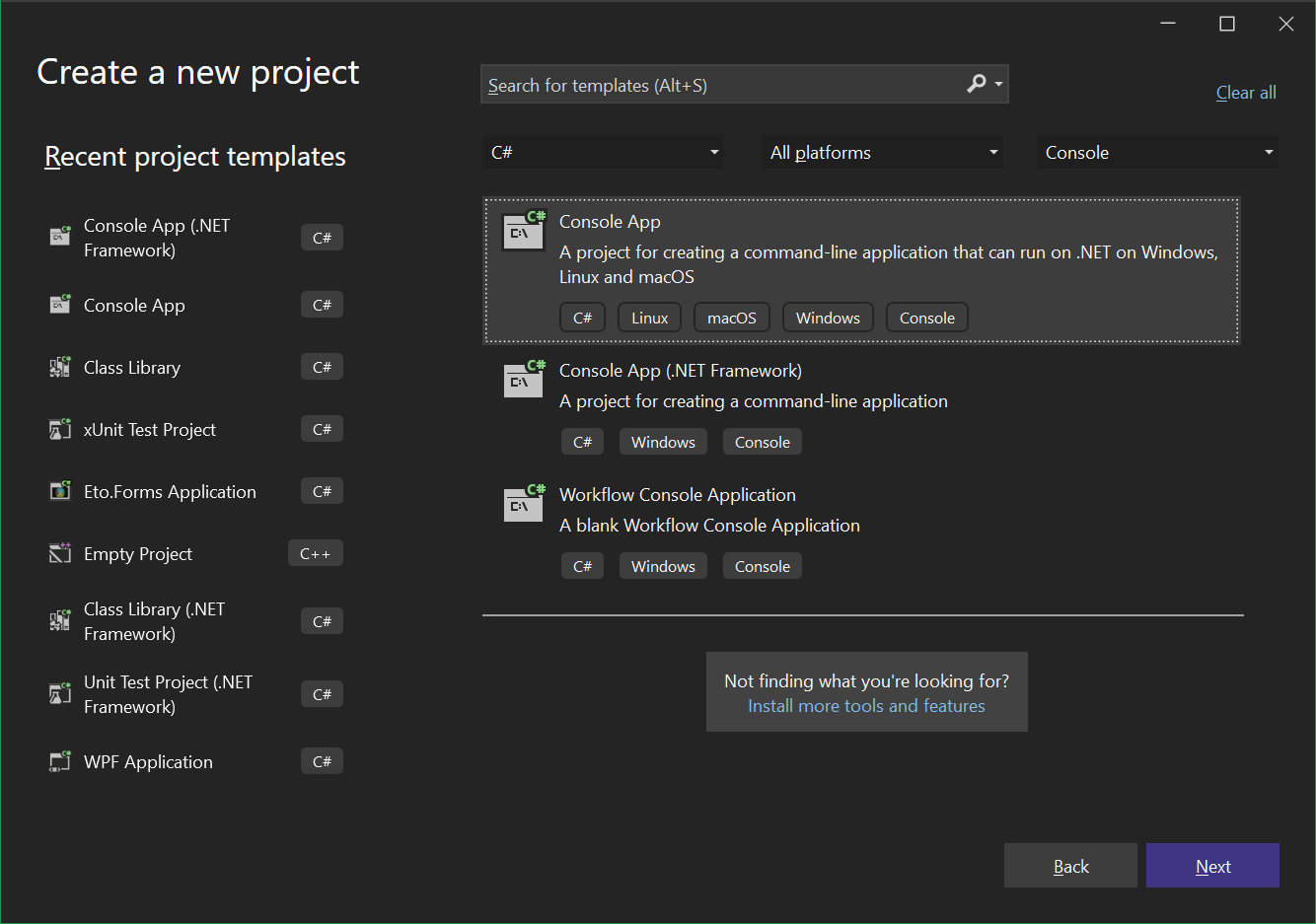
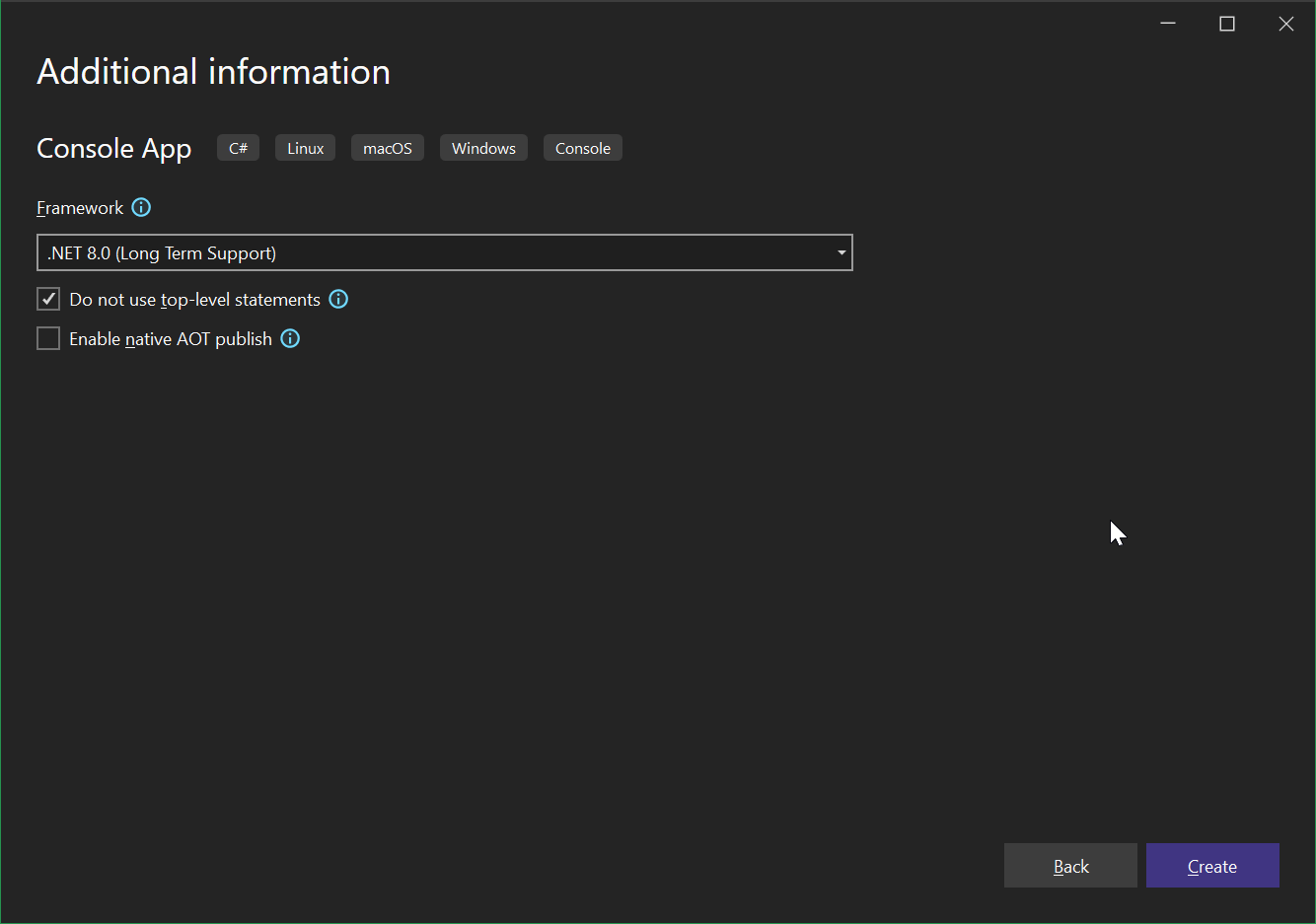
Create a C# Console project with .Net 8 while making sure Do not use top level statements is toggled off. (If you use command line, you can also just do dotnet new console in the script folder)
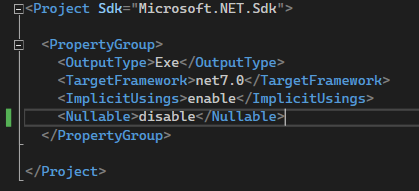
It's optional to specify <Nullable>disable</Nullable> in .csproj file if you don't want to handle null values, as shown below:
To reference Pure libraries in this environment, you just need to setup Nuget source to point to the installation folder of Pure, which contains a folder of Nugets.
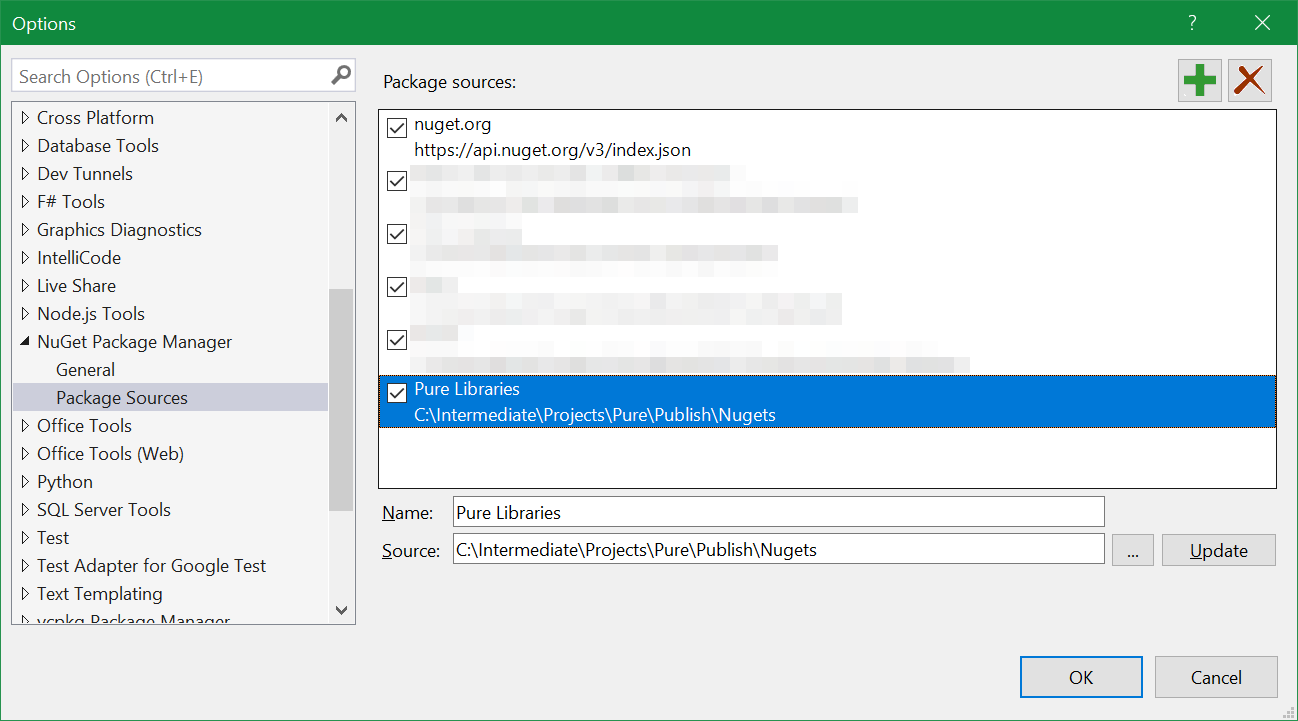
Afterwards, installing packages is just like with any other C# project.
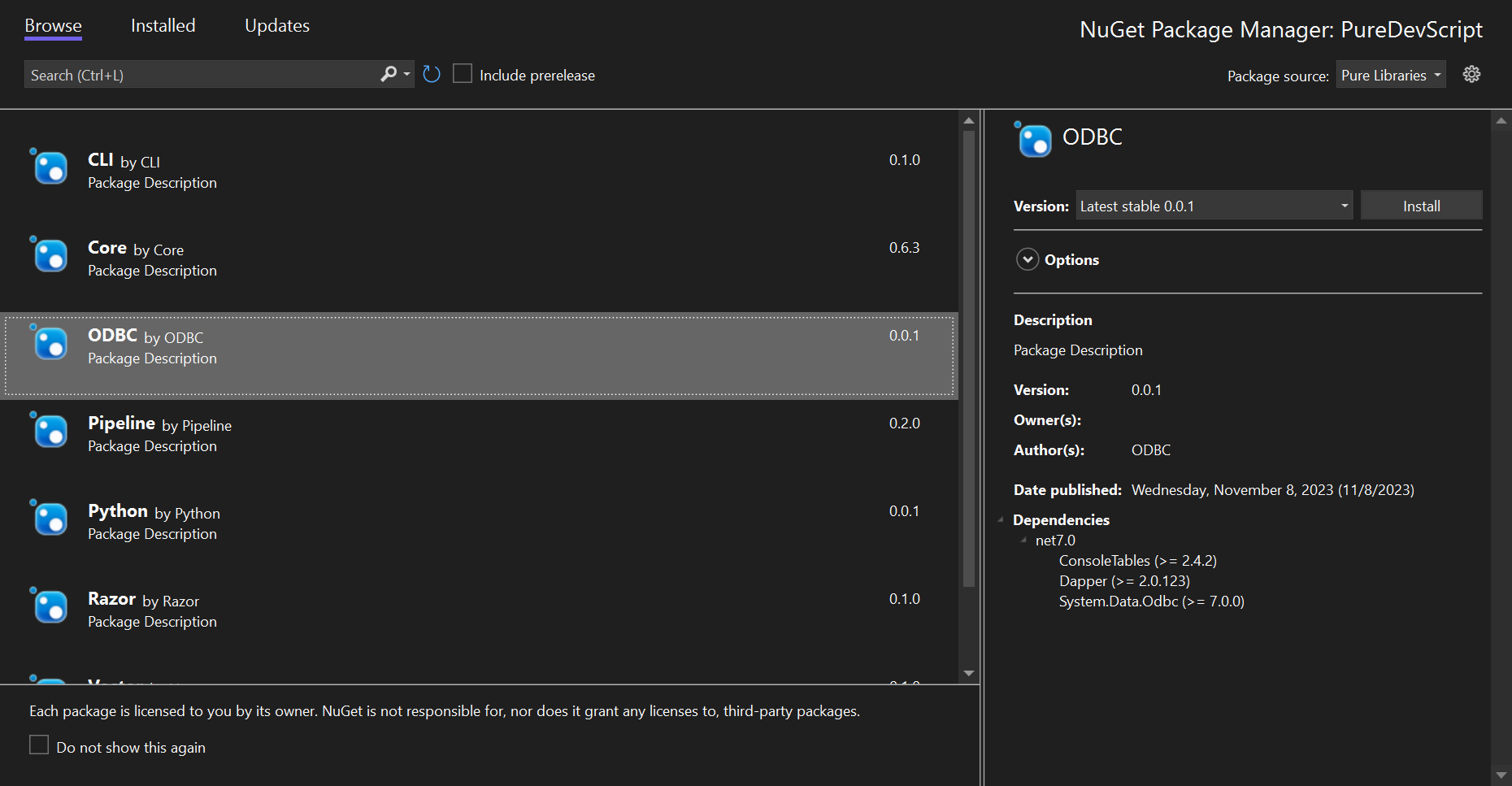
After this setup, you are able to write and debug Pure scripts directly in Visual Studio:
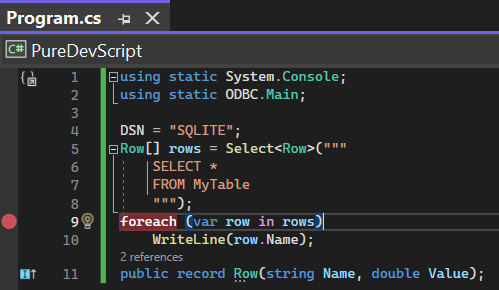
Notice there are a few notable differences:
- You will not be able to use
Import, which automatically finds the library and sets the staticusing. - C# top level statements require type definitions (e.g. records) at the bottom of all other functions and statements, while in Pure you can do it anywhere.
- You need to explicitly state
using static System.Console;in order to expose those names to the file scope, while in Pure this is done automatically.
Here is the complete script:
// Notice `Import(PackageName)` macro is only available in Pure
Import(ODBC)
using static System.Console;
using static ODBC.Main;

DSN = "SQLITE";
Row[] rows = Select<Row>("""
    SELECT *
    FROM MyTable
    """);
foreach (var row in rows)
    WriteLine(row.Name);
public record Row(string Name, double Value);
When converting C# projects to Pure scripts, note the following differences:
// Import(ODBC)

using static System.Console;
using static ODBC.Main;

// Include(MyScript.cs)
string[] Arguments = new string[] { "--help" };
Where,
Import()andInclude()doesn't work, but one can use Nuget and project files to achieve the same effect.usingstatements must be at the top of the script in both C# and Pure.- One needs to define an auxiliary
string[] Argumentswhich is supplemented by Pure otherwise.
A video instruction is available for converting Pure scripts into C# projects.