
Getting Started
Usage
Below is a basic Pure script and its execution:
using static System.Console;

var sum = File.ReadLines("Data.csv")
    .Skip(1)
    .Select(l => l.Split(','))
    .Sum(parts => double.Parse(parts[1]));
WriteLine(sum);
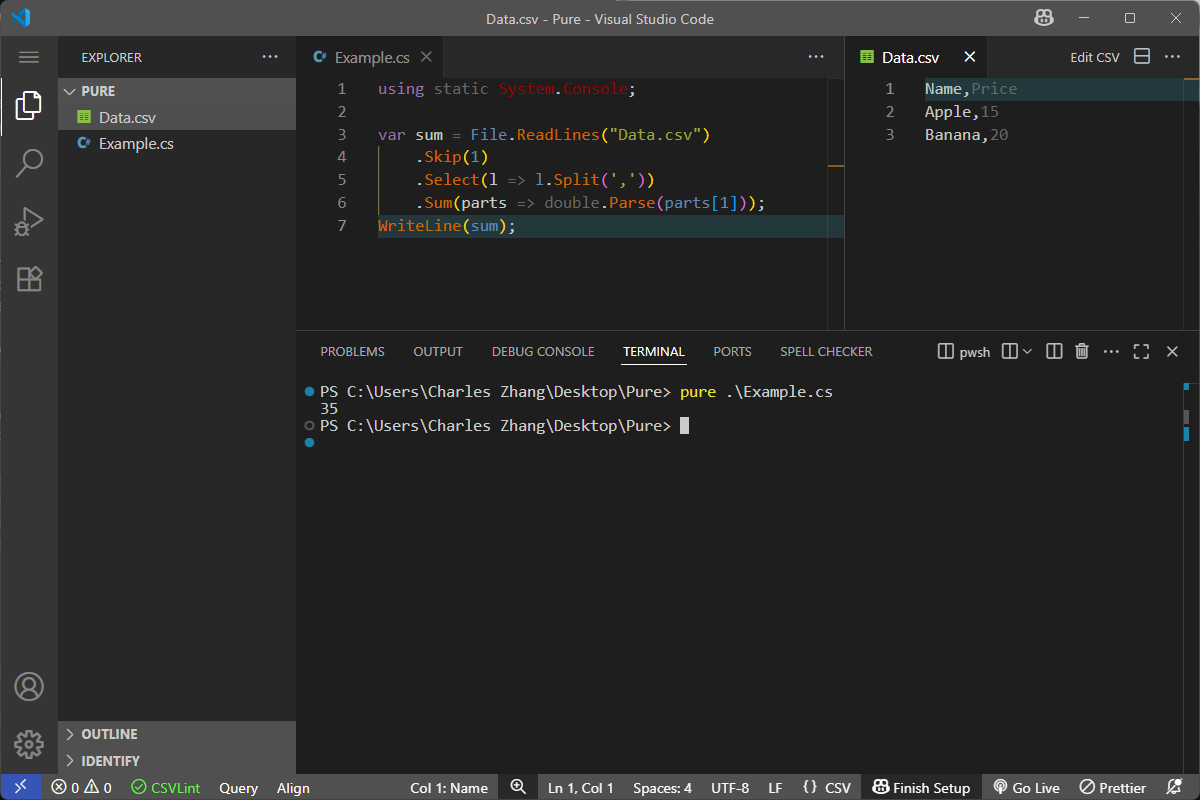
REPL
The REPL mode simplifies certain syntax to make it easier when evaluating things quickly on the command line:
- Supports
Help()andHelp(keyword)commands - Supports meta commands (e.g.
:packages) - Provides
Print(maps to Console.WriteLine()) - Exposes
Console,Mathat global level
Basic Syntax
Certain macros/syntax are provided to implement language level scripting constructs:
| Macro/Syntax | Function | Remark | Examples |
|---|---|---|---|
Import() |
Import modules from PATH, and automatically download packages from NuGet | Must be on its own line | Import(MODULE)Import(MODULE, true)Import(MODULE as Assembly.dll)Import(MODULE as Assembly.dll, true) |
Include() |
Transclude scripts from file path | Must be on its own line; At the moment it's only safe to include from the top-level, one must assume we cannot have another include within included files, otherwise the behavior might be undeterministic, see issue |
|
Help(name) |
Get help about namespaces, types, and specific variables |
Expresison evaluation
For single line assignment and variable creation, no need to append ; at end of line - this is only applicable at REPL; For script files, it must be properly formatted.
Installation & Source Build (Only if you have access to source code)
This section applies to earlier version and modern version of Pure.
The source code can be built on Windows/Linux with .Net 8 SDK.
- To use on Windows, just download prebuilt executables from Release.
- To build on Linux, either try
PublishAll.ps1(requirepwsh), or just dodotnet publish Frontends/Pure/Pure.csproj --use-current-runtime --output Publish.